

AI-Assisted Remote Production: Your 2026 DAW Playbook
Last Edited: Aug 11, 2026
AI-assisted remote production is production-ready for DAW users right now, and SoundBridge gives you the zero-latency tracking, integrated talkback, and AI tooling to run studio-accurate sessions from anywhere. Three things make this true today:
- Real-time monitoring is the non-negotiable foundation. Any perceptible latency on your local monitoring chain creates hesitation in a performer and degrades the final take.
- Remote collaboration stays perceptually synchronous at low round-trip latency, which is achievable on a standard broadband connection with the right driver and buffer settings.
- AI tools (stem separation, noise removal, auto-editing) run best when batched at the edge or in the cloud, keeping your monitoring path lean and your perceived latency low.
Your immediate next step: schedule a 10-minute low-latency test session in SoundBridge before your first real remote tracking date. Confirm your round-trip time, lock your clocking, and you’re ready.
What Does “AI-Assisted Remote Production” Mean for DAW-Based Music People?
The phrase gets used loosely across the web, so here’s the scope this guide covers. AI-assisted remote production, in the DAW context, means using AI tools inside or alongside your workstation to assist music recording, editing, mixing, and collaboration across physical locations. Think AI-assisted mixing suggestions, stem separation, automated noise removal, and intelligent editing, all woven into a remote tracking or mixing session.
This guide covers: AI-assisted mixing and mastering, stem separation, automated editing, real-time monitoring, and remote tracking workflows. It does not cover broadcast robotics, camera automation, or live-event production systems. Every recommendation here is built around studio-accurate, DAW-integrated workflows, with SoundBridge as the recommended platform.
What Are the Core Technical Components of a Remote AI Production Workflow?
Getting the architecture right before you touch a single AI tool saves hours of troubleshooting later. Here’s what actually matters:
- AI processing placement. On-device inference handles light tasks like noise removal and filler detection with no perceptible delay. Edge AI via regional PoPs handles near-real-time tasks, such as rough mix suggestions. Reserve central cloud for heavy batch jobs like full stem separation or AI mastering.
Clocking errors and buffer misconfiguration compound each other. A “fast” network cannot fix drift caused by two interfaces running at slightly different clock rates.
Pro Tip: Run your AI noise removal and filler detection on-device during tracking. Push stem separation and AI mastering to a cloud or edge job after the session ends. This keeps your monitoring path clean and your round-trip time predictable.
How Do You Set Up an AI-Assisted Remote Session Step by Step?
Follow this sequence, and you’ll avoid the most common session failures.
- Tracking pass. Record locally on both ends, always. Remote monitoring is for direction; local recording is your safety net. Use 24-bit WAV stems aligned to bar one as your delivery format.
If monitoring stutters mid-session: raise buffer to 256 samples first, then check for clock source conflicts. If audio drops: switch to a wired Ethernet connection and restart your audio transport. If an AI process stalls: cancel and re-queue as an offline job rather than blocking the session.
What Do Remote Tracking, Remote Mixing, and Hybrid Sessions Actually Look Like?
Remote tracking session. Performer at home, engineer monitoring remotely via a lossless audio stream. The engineer directs via talkback and video. Both sides record locally. After the session, the performer exports 24-bit WAV stems aligned to bar one, with a session sheet, and uploads to a shared folder. Estimated duration: 2–3 hours including setup and review.
Remote mixing session. The producer sends stems and a session sheet to the mixing engineer. The engineer runs an AI rough mix pass for balance, then performs a detailed human mix. Revisions happen asynchronously via stem swaps. Version control tools track saves but don’t solve cross-DAW compatibility, so stems remain the correct handoff format regardless of which DAW each person uses. Estimated duration: 4–6 hours for a full mix with one revision round.
Hybrid session. Local tracking with a remote director joining via talkback and video. AI tools run light denoising live; heavier processing queues for after the session. This works well when the performer and local engineer share a room, but the creative director is remote. It becomes inefficient when the remote director has high latency and can’t provide real-time feedback without introducing delay artifacts.
For all three scenarios, check out remote music collaboration tips to sharpen your coordination before the session starts.
Pre-Session Checklist: Confirm These Before You Hit Record
- Sample rate and bit depth agreed and set on both ends (48 kHz / 24-bit for video; 44.1 kHz / 24-bit for music-only)
- Project BPM and key documented in the session sheet
- Interface driver set to ASIO (Windows) or CoreAudio (Mac); buffer at 64–128 samples
- Clocking source confirmed and locked (no conflicting clock sources)
- Talkback and video tested and live
- AI task schedule decided: which tasks run live, which run offline
- Local recording armed on both ends
- File naming convention agreed (date-prefix + version number + changelog line)
If something breaks mid-session, record locally and exchange stems. That’s your fallback, and it works every time.
Key Takeaways
AI-assisted remote production is fully practical for DAW users today when you prioritize monitoring, lock your clocking, and batch heavy AI tasks to run offline.
| Point | Details |
|---|---|
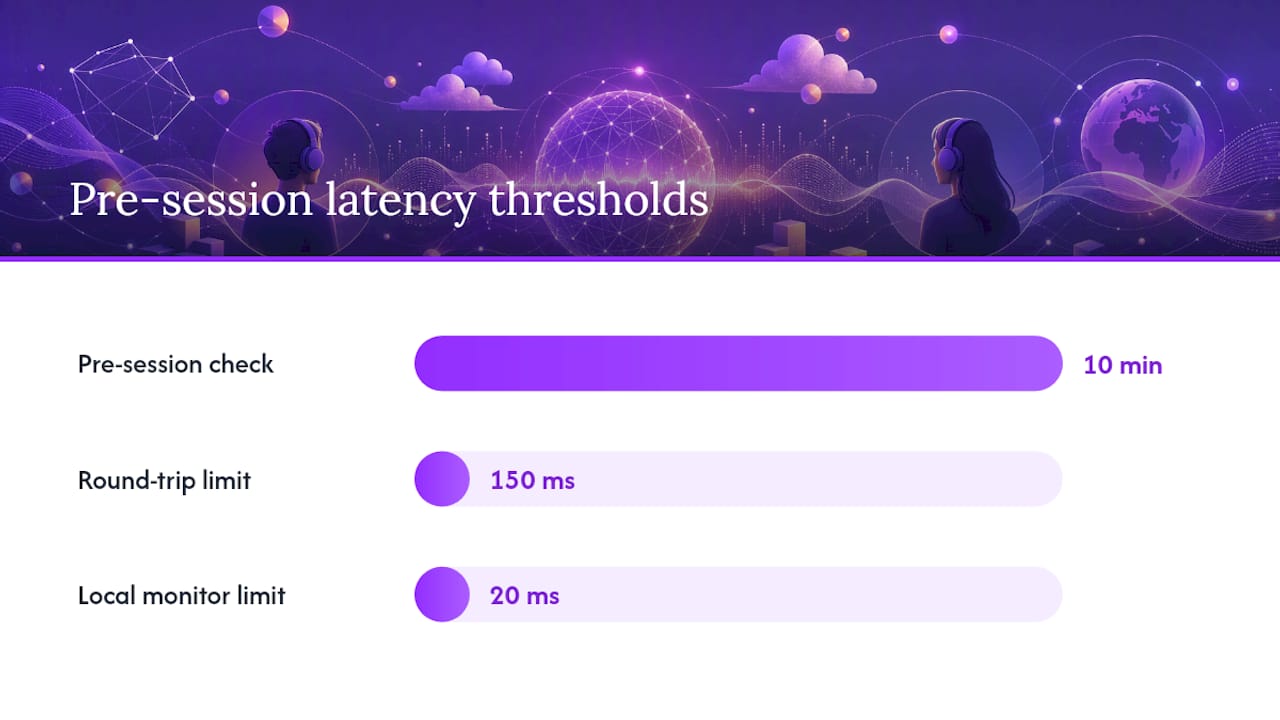
| Monitoring comes first | Keep local hardware monitoring under 20 ms; remote round-trip under 150 ms for perceptual sync. |
| Lock your clocking | Mismatched clock sources cause drift that no network speed can fix; confirm before every session. |
| Batch heavy AI tasks | Run stem separation and AI mastering offline or to the edge; keep on-device tools for live noise removal. |
| Stems are the handoff standard. | Export 24-bit WAV aligned to bar one with a session sheet for every cross-DAW collaboration. |
| SoundBridge is the recommended platform. | Zero-latency tracking, integrated talkback/video, and 192 kHz support make it a production-ready choice for remote AI workflows. |
What Experienced Engineers Actually Do Differently in Remote Sessions
The pros who run remote sessions reliably share a few habits that don’t show up in most guides.
- They always record locally on both ends, even when the remote monitoring stream sounds perfect. The stream is for direction; the local file is the deliverable.
- They version everything with a date-prefix and a one-line changelog. A folder of files named “final_v7_REAL_THIS_ONE” is a session that’s about to lose a take.
- They confirm clocking before the first take, not after the first dropout.
- They treat AI tools like a junior assistant: useful for the mechanical pass, but every output gets a human listen before it moves forward.
The single most useful behavioral change you can make: schedule a 10-minute pre-session latency check with explicit pass/fail criteria. If your round-trip is under 150 ms and your local monitoring is under 20 ms, you’re green. If not, fix the bottleneck before the talent is on the call.
Managing distributed creative teams well is a skill in itself. Practical guidance on coordinating remote production teams applies directly to the coordination layer of any remote session, even when the work is audio-first.
SoundBridge Is Built for Exactly This Kind of Session
You’ve just mapped out the full workflow. SoundBridge is where it runs. Zero-latency remote tracking, integrated talkback and video, support for sample rates up to 192 kHz, and a modular interface that fits your process rather than forcing you into one. The AI tools you need for noise removal, editing automation, and mix prep connect directly to the DAW without a separate app or subscription layer.

The free tier gets you into a real session today. If you’re ready to go deeper on remote audio editing workflows or want to understand the full DAW feature set, SoundBridge’s 2026 DAW guide walks you through everything. Start your test session at soundbridge.io and confirm your latency numbers before your next remote date.
Further Reading and Authoritative References
| Resource | What it covers |
|---|---|
| The essentials of remote audio production in 2026 | Monitoring imperatives and real-time sync standards for professional remote sessions |
| Edge AI for audio workflows | Device-level inference, regional PoPs, and latency targets for AI-assisted audio |
| Multi-agent audio production workflow guide | Agent chaining, file locks, and webhook orchestration for parallel AI production tasks |
| Online music collaboration tools and workflows | Stem formats, session sheet standards, and cross-DAW collaboration playbooks |
| SoundBridge virtual collaboration | Zero-latency tracking, talkback/video, and remote workflow features inside SoundBridge. |
Recommended
MASTER MUSIC PRODUCTION
Expert-led courses designed to take you from fundamentals to finished tracks.

HOUSEFrom bouncy bass and solid kicks, this course teaches you the most modern House music production techniques needed to succeed and stand out.

TRAPQuit sounding like generic Trap and produce something World with hints of the Far East. Create ethnic soundscapes to put your Trap ahead of the curve.

AMBIENTProduce relaxing, sophisticated psy-influenced ambient. Psychedelic and relaxing to listen to, create meditative soundscapes to put your listeners in Zen.