

CoTURN Server for Music Production: Low-Latency Setup Guide
Last Edited: Aug 11, 2026

You can deploy a production-ready CoTURN server on an Ubuntu 22.04 VPS, complete with TLS encryption, short-lived credentials, and proper firewall rules, and have it feeding real-time audio through SoundBridge in under two hours of active work. The monthly cost varies depending on your VPS plan and how much audio you relay. Bandwidth is the main variable, not compute.
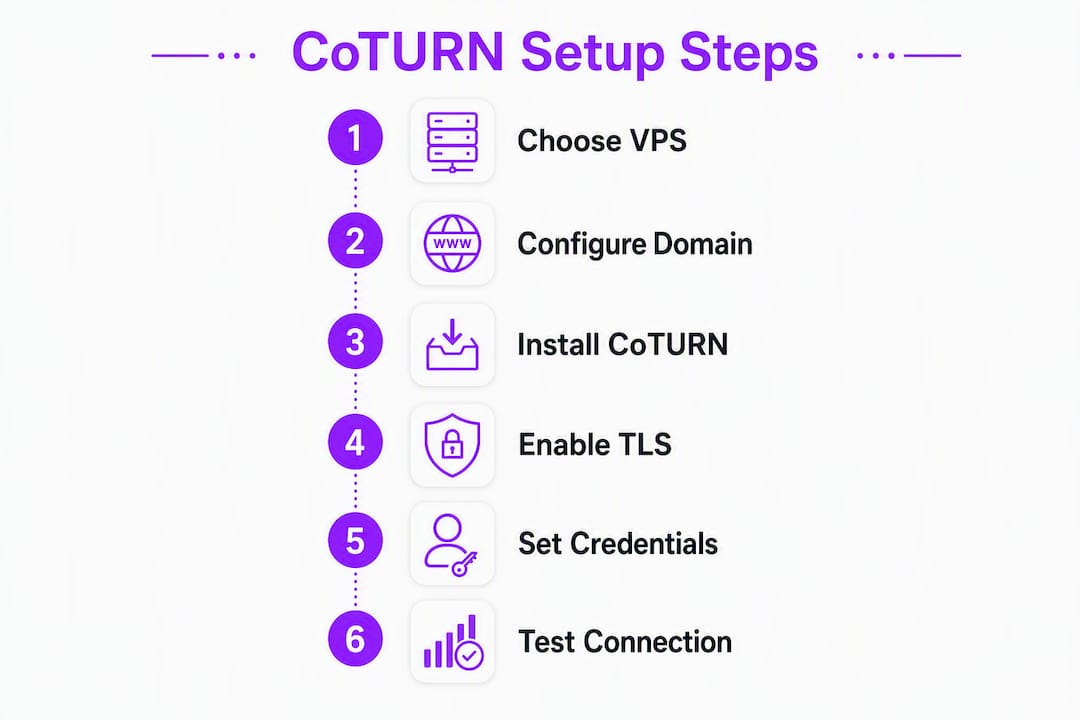
Here's what you need in place before your first session goes live:
- A VPS from AWS EC2, DigitalOcean, Linode, or Vultr, deployed in the region nearest your collaborators
- A domain name with an A record pointing to your server IP (required for Let's Encrypt TLS)
- Ubuntu 22.04 LTS as your OS
- The
coturnpackage installed viaapt - Let's Encrypt TLS via Certbot, linked to
turnserver.conf - Short-lived HMAC credentials (TURN REST API) or
lt-cred-mechfor authentication - UDP relay ports open (49152–65535 recommended range)
- Your TURN endpoint entered in SoundBridge's STUN/TURN settings
Most single-studio setups cost each month modestly. Heavy relay usage, where every audio packet routes through your server rather than peer-to-peer, drives up costs, but you can control it by choosing a VPS with generous transfer allowances.
What Is CoTURN and Why Does It Matter for Remote Audio?
CoTURN is an open-source implementation of the STUN and TURN protocols, the two core mechanisms that make WebRTC and real-time audio connections work across the internet. STUN helps peers discover their public IP addresses. TURN does something more powerful: it relays media packets through a server when a direct peer-to-peer path fails.
For music production, that distinction is everything. A dropped audio path mid-session doesn't just cause a glitch; it breaks the creative flow entirely. TURN relay ensures your collaborators stay connected even when they're behind restrictive NATs, corporate firewalls, or mobile networks that block direct UDP traffic. Placing your TURN server in the right network region keeps relay latency low and jitter tight, which is what separates a usable remote session from a frustrating one.
CoTURN supports TLS 1.3, TCP, UDP, and DTLS, along with configurable multi-threading and multiple relay addresses. Ubuntu 22.04 LTS is the recommended OS for this guide because coturn ships in the standard package repositories and most major providers offer ready-made Ubuntu 22.04 images.
Pro Tip: For music workflows, use short-lived HMAC credentials (the TURN REST API pattern) instead of static usernames. Static credentials embedded in a shared DAW config can leak to anyone who sees the file. Time-bound tokens expire on their own.
Why Run a Private TURN Server for Music Collaboration?
Public TURN servers exist, but they're shared infrastructure with no latency guarantees, no privacy controls, and usage caps that can throttle your session at the worst moment. Self-hosting gives you something different.
The core benefits:
- Latency control. You pick the region. Deploy near your collaborators and relay latency drops to the floor.
- Privacy. Your audio packets route through your server, not a third party's. For session musicians working on unreleased material, that matters.
- Cost predictability. Most VPS plans include a fixed monthly transfer allowance. Once you know your session patterns, you can size the plan and stop worrying about per-GB charges.
- No vendor lock-in. You own the config, the credentials, and the endpoint. Switching VPS providers takes an afternoon.
The trade-offs are real, though. You take on OS updates, certificate renewals, log monitoring, and bandwidth management. If your team runs ad hoc sessions with rotating collaborators across multiple continents, a single self-hosted server won't efficiently cover every region.
Relay bandwidth is the main cost lever. A stereo audio stream at typical DAW quality can consume a few Mbps over a network. Multiply that by session hours and participants to estimate your monthly transfer. Most entry-level VPS plans include substantial transfer allowances, which cover many hours of relayed audio per month.
SoundBridge's zero-latency remote tracking and studio-accurate synchronization benefit directly from a well-placed private TURN server. When the relay endpoint is close to your session participants, the platform's real-time collaboration features perform at their best.
How to Choose a VPS and Domain for Your TURN Server
Region is the single most important decision. A TURN server in US-East adds minimal latency for East Coast collaborators but can add 80–120ms for someone in Los Angeles. Pick the region where most of your session participants are located.
Providers Worth Evaluating
AWS EC2 gives you the most granular region selection globally and strong network performance, but pricing is more complex, and bandwidth costs add up fast if you exceed the free tier. DigitalOcean is the go-to for straightforward pricing: $6/month Droplets include 1 TB of transfer and a clean Ubuntu 22.04 image. Linode (Akamai) matches DigitalOcean on price and offers solid US region coverage. Vultr is cost-competitive and has a High-Frequency compute tier that helps with burst performance during peak session load.
Minimum Specs for Small-Group Music Sessions
For a small number of simultaneous relay streams, 1 vCPU and 1 GB RAM is sufficient. CoTURN is not compute-heavy; it's a relay, not a processor. Network I/O matters more. For larger groups or multiple concurrent sessions, more CPU and RAM provides headroom.
| Scenario | Monthly Cost (est.) | Transfer Included | Suggested Region |
|---|---|---|---|
| Small studio (2–4 users) | $6–$12 | 1–2 TB | Nearest to majority of collaborators |
| Mid-size team (4 users) | $12–$24 | 2–4 TB | Central US or split East/West |
| Heavy relay / large sessions | $24–$40 | 4+ TB | Multi-region or high-bandwidth plan |
Domain and DNS setup
You need a domain with an A record pointing to your VPS IP before Certbot can issue a certificate. Set the TTL to 300 seconds (5 minutes) when you first create the record so changes propagate quickly during setup. Once the cert is issued and everything is stable, you can raise the TTL to 3600.
How to Harden Your Server Before Installing CoTURN
Security first, always. A TURN server that's open to the internet needs to be locked down before coturn touches it.
- Generate an SSH keypair locally with
ssh-keygen -t ed25519and add the public key to your VPS during provisioning or via~/.ssh/authorized_keys. Disable password-based SSH login by settingPasswordAuthentication noin/etc/ssh/sshd_config, then restart the SSH service. - Create a non-root sudo user. Run
adduser turnuserandusermod -aG sudo turnuser. Log in as this user for all subsequent steps. - Update the OS. Run
sudo apt update && sudo apt upgrade -yand reboot if a kernel update was applied. - Install essential packages. Run
sudo apt install -y ufw certbotto get the firewall utility and Certbot in place before the CoTURN install. - Configure the firewall. Open the ports CoTURN needs: TCP 22 (SSH), TCP/UDP 3478 (STUN/TURN), TCP 5349 (TURN over TLS), and the UDP relay range 49152–65535. With
ufw:sudo ufw allow 22/tcp,sudo ufw allow 3478,sudo ufw allow 5349,sudo ufw allow 49152:65535/udp, thensudo ufw enable. Both TCP and UDP are required on the standard TURN ports for broad client compatibility. - Sync time. Install
chronywithsudo apt install -y chronyand confirm it's running. Short-lived HMAC credentials rely on accurate system time; clock drift invalidates tokens. - Enable automatic security updates. Install
unattended-upgradesand configure it to apply security patches automatically. This is the minimum viable maintenance posture for a server you don't check daily.
How to Install CoTURN and Configure It for Low-Latency Audio
Installation
sudo apt install -y coturn
After installation, enable the service by editing /etc/default/coturn and setting TURNSERVER_ENABLED=1. The turnadmin tool, included with the package, lets you manage users and test credentials from the command line.
For teams that prefer containers, CoTURN provides an official Docker image with example port mappings. Note that Docker's default NAT networking can interfere with TURN relay; --network=host is the standard workaround for production testing, though bare-metal or VM deployments are simpler for most music production use cases.
Sample turnserver.conf for Audio Relay
The minimal production configuration requires a listening port, a TLS listening port, and a relay UDP port range. Here's a starting point tuned for music sessions:
listening-port=3478
tls-listening-port=5349
listening-ip=0.0.0.0
relay-ip=YOUR_PRIVATE_IP
external-ip=YOUR_PUBLIC_IP
min-port=49152
max-port=65535
realm=your.domain.com
fingerprint
lt-cred-mech
# For short-lived credentials, replace lt-cred-mech with:
# use-auth-secret
# static-auth-secret=YOUR_LONG_RANDOM_SECRET
no-multicast-peers
no-loopback-peers
cert=/etc/letsencrypt/live/your.domain.com/fullchain.pem
pkey=/etc/letsencrypt/live/your.domain.com/privkey.pem
log-file=/var/log/coturn/turnserver.log
Replace YOUR_PRIVATE_IP and YOUR_PUBLIC_IP with your actual VPS addresses. The external-ip field is what CoTURN advertises to clients; getting this wrong is the most common cause of failed relay allocations.
| Parameter | Recommended Value | Why It Matters for Audio |
|---|---|---|
min-port / max-port |
49152–65535 | Covers the full ephemeral UDP range for concurrent relay streams |
realm |
your.domain.com | Must match your TLS cert domain |
no-multicast-peers |
enabled | Prevents relay abuse via multicast |
no-loopback-peers |
enabled | Blocks loopback address relay, a common misconfiguration |
fingerprint |
enabled | Required for WebRTC compatibility |
Pro Tip: Enable log-file from day one and set up log rotation with logrotate. CoTURN logs grow fast during active sessions. A full disk will silently crash the service.
How to Enable TLS with Let's Encrypt for Your TURN Server
Encrypted TURN connections (TURNS) are non-negotiable for production use. Clients that enforce secure WebRTC will refuse to connect to an unencrypted TURN endpoint.
- Stop any service using port 80 if you're using Certbot's standalone mode:
sudo systemctl stop nginx(or Apache, if installed). - Run Certbot in standalone mode:
Certbot writes certificates tosudo certbot certonly --standalone -d your.domain.com/etc/letsencrypt/live/your.domain.com/. Confirmfullchain.pemandprivkey.pemexist before proceeding. - Point CoTURN to the certs by setting the
certandpkeypaths inturnserver.confas shown in the config above. CoTURN needs read access to these files; runsudo chown -R turnserver:turnserver /etc/letsencrypt/live/your.domain.com/or add theturnserveruser to thessl-certgroup. - Start and verify CoTURN:
sudo systemctl enable coturn sudo systemctl start coturn sudo systemctl status coturn - Automate cert renewal. Certbot installs a systemd timer that runs
certbot renewtwice daily. Add a post-renewal hook to reload CoTURN when the cert updates. Create/etc/letsencrypt/renewal-hooks/post/reload-coturn.sh:
Make it executable:#!/bin/bash systemctl reload coturnsudo chmod +x /etc/letsencrypt/renewal-hooks/post/reload-coturn.sh. This approach, recommended in the CoTURN Docker documentation, keeps TLS valid without manual intervention.
Troubleshooting TLS: If clients can't connect on port 5349, check two things first: confirm the firewall allows TCP/UDP 5349, and verify the domain in your cert matches the realm in turnserver.conf. A mismatch here results in a generic TLS handshake error that appears to be a network problem.
Authentication Options and Adding Your TURN Endpoint to SoundBridge
Choosing Your Credential Mode
Two authentication modes are available in CoTURN. Long-term credentials (lt-cred-mech) use a static username and password stored in the config or a database. They're simple to set up but carry risk: anyone who sees the credential string can use your relay indefinitely.
Short-lived HMAC credentials (the TURN REST API pattern, enabled with use-auth-secret) are the better choice for music production workflows. Your backend generates a time-bound token using HMAC-SHA1 and a shared secret. The token expires after a configurable TTL, typically 24 hours for DAW sessions. Even if a credential leaks, it stops working on its own.
The HMAC pattern works like this: the username istimestamp:identifier, and the password is base64(HMAC-SHA1(shared_secret, username)). Most collaboration backends can generate these tokens on the server and pass them to the DAW client at session start.
Entering Your TURN Endpoint in SoundBridge
SoundBridge accepts STUN and TURN endpoints in its collaboration settings. Use these URL formats:
- STUN:
stun:your.domain.com:3478 - TURN (UDP):
turn:your.domain.com:3478?transport=udp - TURN (TLS):
turns:your.domain.com:5349
Enter your username and password (or the HMAC-generated token pair) in the corresponding credential fields. For the primary relay, always point to your private TURN server. You can add a public STUN server as a fallback for IP discovery, but the relay path should run through your own endpoint.
Pro Tip: Set a 24-hour TTL for HMAC tokens used in DAW sessions. Shorter TTLs (1 hour) are more secure but can expire mid-session if a collaboration runs long. Match the TTL to your typical session length, then add a buffer.
Explore essential DAW features for music production to get the most out of your SoundBridge setup once the TURN connection is live.
How to Test and Verify Your TURN Server End-to-End
Don't assume the server works because it started without errors. Run through this checklist before your first real session.
Testing checklist:
- Confirm DNS:
dig your.domain.comshould return your VPS public IP. - Verify the cert:
openssl s_client -connect your.domain.com:5349should show a valid certificate chain with no errors. - Test port reachability:
nc -zv your.domain.com 3478andnc -zv your.domain.com 5349from a remote machine. - Tail the CoTURN log during a test connection:
sudo tail -f /var/log/coturn/turnserver.log. A successful relay allocation shows anAllocate requestfollowed by an allocation success message. A failed allocation showsPermission deniedorAllocation mismatch. - In browser-based clients, open
chrome://webrtc-internalsand look for relay candidates prefixed withrelayin the ICE candidate list. Seeing a relay candidate confirms your TURN server is reachable and allocating correctly.
For music production, relay latency under 50ms round-trip is the practical target for real-time collaboration. Above 80ms, timing drift becomes audible during live tracking. Test with collaborators in your actual target regions, not just from the same city, to validate your region selection. Jitter matters as much as raw latency: a stable 40ms connection is far more usable than one that swings between 20ms and 90ms.
Pro Tip: Run a 15-minute test session before any important recording. Monitor the CoTURN log for repeated allocation failures or unusual allocation volume, which can indicate a misconfigured client or an unauthorized user accessing your endpoint.
Common Failures and How to Fix Them Fast
Most CoTURN deployment problems fall into a small set of categories.
- Blocked ports. Symptom: clients time out on TURN allocation. Diagnostic:
sudo ss -tulnp | grep turnserverto confirm CoTURN is listening, then test from a remote machine withnc. Fix: checkufw statusand confirm UDP 49152–65535 is open, not just TCP. - Wrong
external-ip. Symptom: relay allocations succeed in logs, but audio never flows. Diagnostic: check the allocated relay address in the log; if it shows a private IP, itexternal-ipis misconfigured. Fix: setexternal-ip=PUBLIC_IP/PRIVATE_IPinturnserver.conffor servers behind NAT. - Symmetric NAT. Some networks (corporate VPNs, certain ISPs) use symmetric NAT, which breaks peer-to-peer paths entirely. TURN relay is the fix, not a workaround. If a collaborator can't connect even with STUN, they're likely behind symmetric NAT and need the relay path.
- DNS misconfiguration. Symptom: TLS handshake fails with a certificate name mismatch. Diagnostic:
dig your.domain.comfrom the server itself. Fix: confirm the A record points to the correct IP and therealminturnserver.confmatches the cert domain exactly. - Expired or wrong TLS cert. Diagnostic:
openssl s_client -connect your.domain.com:5349 2>&1 | grep -E "verify|expire". Fix: runsudo certbot renew --force-renewaland confirm the post-renewal hook reloads CoTURN. - Permission errors on cert files. Symptom: CoTURN starts but immediately fails TLS connections. Diagnostic: check
/var/log/coturn/turnserver.logfor "permission denied" on cert paths. Fix: add theturnserveruser to the group that owns the Let's Encrypt directory, or copy certs to a location CoTURN can read. - Config mistakes in
turnserver.conf. Double-checkrelay-ip(must be the private interface IP, not the public IP),external-ip(must be the public IP), andmin-port/max-port(must match your firewall rules exactly).
For deeper troubleshooting on remote music collaboration, SoundBridge's resource library covers client-side configuration and session optimization in detail.
Ongoing Maintenance: Keeping Your TURN Server Secure and Running
A CoTURN server running in production needs a maintenance rhythm, not just a one-time setup.
Regular tasks to schedule:
- Weekly: Check
sudo apt list --upgradableand apply security updates. CoTURN itself should be updated promptly when new versions release. - Monthly: Review CoTURN logs for unusual allocation volume. A spike in allocations from unfamiliar IPs can indicate your credentials have leaked or your server is being probed.
- Quarterly: Audit your firewall rules and credential rotation schedule. Rotate the
static-auth-secretif you're using HMAC tokens.
A recorded denial-of-service vulnerability, CVE-2026-40613, demonstrates why keeping CoTURN patched matters. Unpatched TURN servers are a real target because they can be abused as open relays.
Hardening additions worth implementing:
- Install
fail2banand write a jail rule that blocks IPs generating repeated failed allocation attempts. - Set
max-allocate-timeoutinturnserver.confto limit how long an idle allocation holds a relay port. - Restrict
allowed-peer-ipranges if your collaborators connect from known IP blocks. - Set bandwidth alerts on your VPS. Most providers let you configure email or SMS alerts when monthly transfer hits 80% of your allowance. A misconfigured client or an abused credential can burn through your transfer budget in hours.
Pro Tip: Use a simple uptime monitor (UptimeRobot's free tier works fine) to ping your TURN server's health endpoint. You want to know about an outage before your collaborators do.
Key Takeaways
A production-ready CoTURN server for music collaboration requires five things done right: a region-proximate VPS, TLS via Let's Encrypt, short-lived HMAC credentials, correct firewall rules, and a verified relay allocation before your first real session.
| Point | Details |
|---|---|
| Region selection is the main latency lever | Deploy your VPS in the region nearest your collaborators; relay latency under 50ms is the practical target. |
| Short-lived credentials protect your relay. | Use HMAC tokens with a 24-hour TTL instead of static passwords to prevent credential leakage in shared workflows. |
| Bandwidth drives monthly cost. | Estimate 1–3 Mbps per relayed stereo stream; most setups stay under $40/month with a properly sized VPS plan. |
| Test before you record | Verify DNS, TLS, port reachability, and a live relay allocation in CoTURN logs before any real session. |
| SoundBridge benefits from a private TURN | SoundBridge's zero-latency remote tracking performs best when the TURN relay endpoint is close to all session participants. |
The Case for Self-Hosting (and When to Skip It)
Self-hosting a TURN server is genuinely worth it for the right team. If you run regular sessions with a consistent group of collaborators in a known geography, the math works in your favor: a $12/month VPS with 2 TB of transfer covers most studio workloads, you control the relay endpoint, and your audio never touches a third party's infrastructure. For producers working on unreleased material, that privacy argument alone often closes the decision.
Where it gets complicated is at the edges. Ad-hoc sessions with collaborators scattered across multiple continents expose the core limitation of a single-region server: you can't be low-latency everywhere at once. Managing multiple VPS instances across regions is doable, but it multiplies the ops work. If your team doesn't have someone willing to own that maintenance, the self-hosted route will eventually become a liability rather than an asset.
The honest reality is that self-hosting rewards discipline. Certificate renewals, log monitoring, credential rotation, and prompt patching aren't optional tasks you can defer. A TURN server that's been running unattended for six months is a security risk, not an asset. If your team has the ops capacity, self-hosting delivers real control and cost efficiency. If it doesn't, a managed alternative is the smarter call, even at higher recurring cost.
The trade-offs between self-hosted and managed TURN are well-documented: managed services reduce ops burden but increase recurring costs and hand your relay data to a third party. Neither choice is universally right. The right answer depends on your team's session patterns, technical capacity, and privacy requirements.
SoundBridge Handles the Infrastructure So You Can Focus on the Music
Self-hosting a CoTURN server gives you control, but it also gives you a to-do list: server provisioning, firewall rules, cert renewals, log monitoring, and credential rotation. For producers who'd rather spend that time on the actual session, SoundBridge's hosted collaboration is the alternative.

SoundBridge delivers zero-latency remote tracking and studio-accurate synchronization without requiring you to manage any relay infrastructure. The platform handles the networking layer, so your sessions start clean, and your collaborators connect reliably, whether they're across town or across the country. Integrated talkback, bi-directional plugin control, and support for up to 192kHz audio are built in, not bolted on.
If you're evaluating whether a full DAW platform fits your remote audio editing workflow, SoundBridge offers both free and paid tiers. Start with the free plan to test the collaboration features, then upgrade when the sessions demand it.
Useful Sources for Deeper Reading
These references cover installation, configuration, security, and protocol details for CoTURN deployments:
- coturn GitHub repository — the authoritative source for the project, including protocol support, release notes, and issue tracking. Start here for any behavior you can't explain from the config docs.
- CoTURN README.md — covers TLS support, multi-threading configuration, supported RFCs, and relay address options. Essential reading before tuning
turnserver.conffor production. - CoTURN Docker README — documents the official Docker image, port mappings, and the post-renewal hook pattern for Certbot integration. Useful even if you're not using Docker.
- CVE-2026-40613 advisory (SentinelOne) — documents the recorded denial-of-service vulnerability in CoTURN. Bookmark this and check it when planning your patching schedule.
- turnserver Wiki on GitHub — the full
turnserverapplication reference, including all command-line flags and config file options. The definitive lookup when a parameter behaves unexpectedly.
Recommended
MASTER MUSIC PRODUCTION
Expert-led courses designed to take you from fundamentals to finished tracks.

HOUSEFrom bouncy bass and solid kicks, this course teaches you the most modern House music production techniques needed to succeed and stand out.
TRAPQuit sounding like generic Trap and produce something World with hints of the Far East. Create ethnic soundscapes to put your Trap ahead of the curve.

AMBIENTProduce relaxing, sophisticated psy-influenced ambient. Psychedelic and relaxing to listen to, create meditative soundscapes to put your listeners in Zen.