

High-Fidelity Remote Monitoring for DAW Sessions
Last Edited: Aug 12, 2026
Studio-accurate remote monitoring means streaming your DAW mix to remote listeners at full resolution (up to 192 kHz) with low enough latency to give meaningful, real-time feedback — not medical telemetry, not IoT dashboards. For most stereo review sessions, the fastest path is a mix-bus sender plugin placed post-fader on your master bus, delivered over a peer-to-peer or wired LAN connection. Reserve RAVENNA/AES67 with PTP synchronization or a dedicated tracking service for sessions where a performer needs to play in time. SoundBridge is the recommended platform for zero-latency remote tracking and high-resolution collaborative sessions.
Key Takeaways
Studio-accurate remote monitoring requires matching your infrastructure to the session type: review-grade relay for feedback, PTP/RAVENNA for tracking, and strict session-coherence rules for all collaborative work.
| Point | Details |
|---|---|
| Match infrastructure to use case | Review sessions tolerate 80–150 ms relay latency; tracking requires under 40 ms one-way with PTP/RAVENNA. |
| Plugin placement is non-negotiable. | Place the sender plugin post-fader on the master bus, or it won’t reflect your actual mix. |
| Session coherence rules first | Shared clock and edit-locking prevent arrangement drift before any network tuning matters. |
| Consumer endpoints are translation tools. | Use wired phone headphones for frequency checks; never rely on AirPlay or AirPods for critical phase or timing decisions. |
| SoundBridge for tracking-grade sessions | SoundBridge supports zero-latency remote tracking and 192 kHz audio for sessions that demand studio-accurate sync. |
Which Monitoring Approach Do You Actually Need?
Not every remote session demands the same infrastructure. Picking the wrong category wastes time and money.
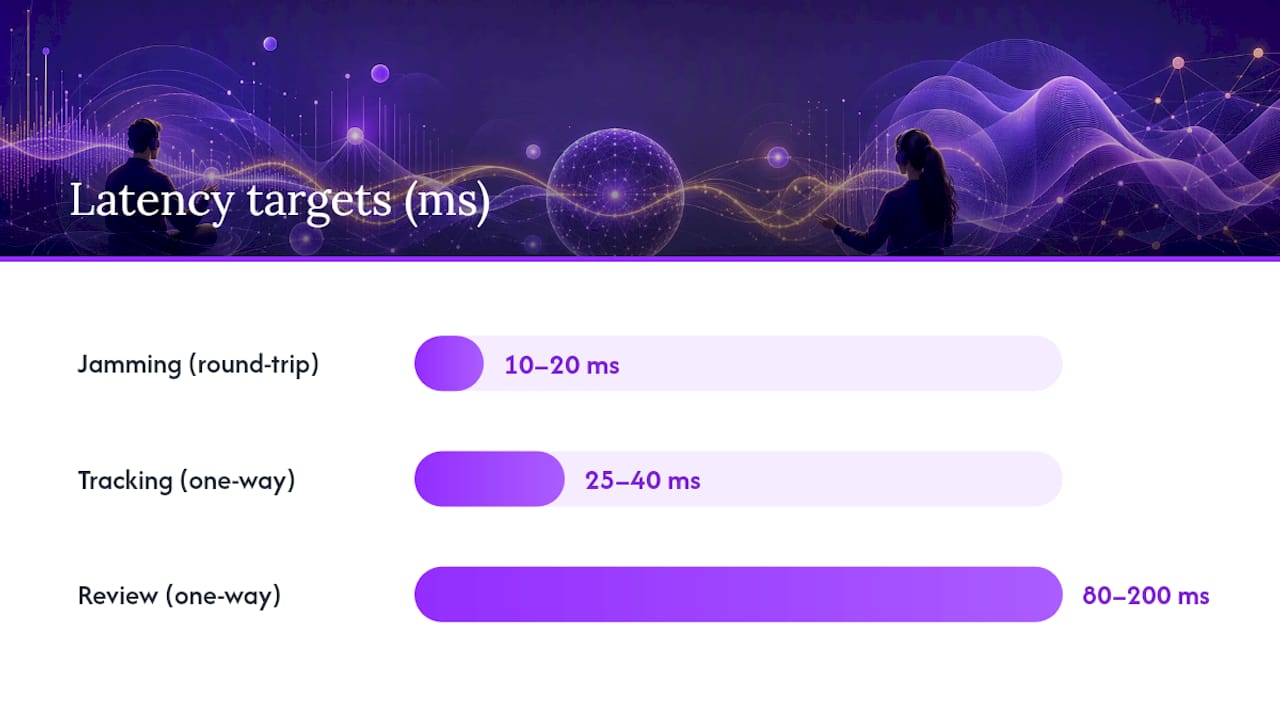
Review means a client, A&R rep, or co-producer listens to your mix and gives notes. Latency up to 150–200 ms one-way is perfectly acceptable because nobody is performing. Tracking means a musician records a performance while listening to the mix through their headphones. One-way latency must stay below 25–40 ms, or timing falls apart. Jamming is real-time group improvisation that demands sub-20 ms round-trip latency and a controlled LAN. Broadcast is one-to-many streaming for a live audience, where buffering is expected, and latency is irrelevant to the performer.
A peer-reviewed DAW collaboration framework published in the Journal of the Audio Engineering Society shows that streaming low-bandwidth control data rather than full-resolution audio lets many collaborators sync local DAW instances over public internet links — a practical insight for large review sessions where you want each listener to reference their own local files.
| Use Case | One-Way Latency Target | Best Infrastructure |
|---|---|---|
| Review (mix check, client notes) | 80–200 ms acceptable | Plugin on master bus + peer-to-peer or relay |
| Tracking (recording in time) | Under 25–40 ms | PTP/RAVENNA/AES67, dedicated tracking service |
| Jamming (real-time play) | Under 10–20 ms round-trip | Wired LAN, JackTrip-style routing |
| Broadcast (live stream) | Buffering expected | Broadcast encoder, CDN delivery |
How to Set Up Studio-Accurate Remote Monitoring Step by Step
Follow this checklist in order. Skipping a step is where most sessions go wrong.
Install
- Download the sender plugin in AU, VST3, or AAX format that matches your DAW host.
- Confirm your DAW project sample rate (44.1, 48, 88.2, 96, or 192 kHz) and bit depth (24-bit minimum for review-grade work).
- Restart the DAW after installation so the plugin registers correctly in the host’s plugin manager.
Route
- Insert the plugin on your master bus, post-fader and post-master limiter, so listeners hear exactly what you hear.
- If you route stems or buses separately, create a dedicated mix-down bus and insert there instead of on individual tracks.
- Match buffer size across all devices. Merging’s multi-machine guidance recommends starting with 48 samples for AES67 or 64 samples for RAVENNA when combining ASIO and CoreAudio hosts.
- On macOS, if you need to aggregate a hardware interface with a virtual audio device, use Audio MIDI Setup to create an Aggregate Device and set a single clock source.
Share
- Generate a peer-to-peer link or session invite from the plugin’s interface.
- Send the link via message or QR code. Listeners open it in a browser or mobile app — no account required for review-grade sessions.
- For multiple listeners on the same link, confirm that the relay region is geographically close to most listeners to minimize added latency.
Pro Tip: Before you send the link to your client, test it on a wired phone or laptop. If it sounds clean there, Bluetooth and AirPods coloration is the listener’s variable, not your signal chain.
Compatibility note: Logic Pro and GarageBand on macOS use AAC hardware acceleration for Bluetooth output, which can add variable encoding delay. For critical mix decisions, always confirm your reference path before concluding a Bluetooth monitor.
How to Keep a Collaborative Session Coherent
Session drift is the silent killer of remote DAW work. Two engineers editing the same arrangement simultaneously without a governance model will produce conflicting timelines within minutes.
The JAES scalable DAW collaboration research is direct: shared-clock synchronous operation, combined with control-data streaming and edit-locking, is a core requirement for maintaining session coherence at scale. That means you need to decide, before the session starts, who holds the master timeline.
A practical governance model looks like this:
- Timeline owner (usually the engineer): holds the playhead, controls transport, and is the only person who moves clips without requesting permission.
- Co-producer or collaborator: can suggest edits verbally or via TalkBack, then request a “control handoff” before making any changes to the arrangement.
- Edit-locking: any region being worked on is locked in the DAW (most major hosts support region locking natively) and released explicitly when done.
- Reconciliation rule: if two edits conflict, the timeline owner’s version is canonical. The collaborator re-applies their change on top.
Pro Tip: Set a shared grid quantization value at the start of every session. Even if you are working in a loose, organic style, a common grid prevents clip boundaries from landing on irrational positions that confuse the other engineer’s view.
For remote audio editing workflows that involve file exchange alongside live monitoring, version-naming conventions (e.g., TrackName_v03_ENG) prevent the wrong file from being loaded mid-session.
What Network Settings Actually Move the Latency Needle
Wired Gigabit Ethernet is the single biggest upgrade you can make. A wired path removes the variable jitter that Wi-Fi introduces; jitter forces receiver buffers to grow, adding latency.
Typical one-way latency by path type:
| Path | Typical One-Way Latency |
|---|---|
| Wired LAN (RAVENNA/PTP) | 1–5 ms |
| Wi-Fi peer-to-peer (same network) | 10–20 ms |
| AAC iOS peer-to-peer | 20–40 ms |
| Internet relay (browser-based) | 80–150 ms |
| AirPlay | buffered (multiple seconds) |
The remote-daw WebRTC demo breaks down where that 80–150 ms internet relay budget goes: audio driver buffer (10–100 ms), browser buffer (5–50 ms), network transit (20–200 ms), decoding (5–20 ms), and output buffer (5–30 ms). Every one of those is tunable.
Key network actions:
- Use a Gigabit switch, not a daisy-chained consumer router, for multi-machine studio setups.
- Enable quality of service on your router and tag audio UDP traffic as high-priority.
- Minimize routing hops between sender and receiver — every extra hop adds jitter.
- For RAVENNA/AES67, the RAVENNA network spec requires a single-subnet LAN, PTP-aware switches (transparent or boundary clock mode), and low UDP packet jitter. These constraints make tracking-grade sync impractical over uncontrolled WAN links.
Pro Tip: Set your jitter buffer to the lowest value that produces dropout-free audio on your specific network, then add 10 ms of headroom. Chasing the absolute minimum buffer often causes more dropouts than it saves in latency.
For engineers building a home studio network from scratch, a managed switch with VLAN support gives you the quality-of-service control that consumer routers lack.
How Phones, AirPods, and AirPlay Color What You Hear
Consumer endpoints are useful for translation checks, not critical decisions. Knowing what each one tells you — and what it hides — keeps your mix choices honest.
Bluetooth and AirPods add frequency coloration (typically a boosted high-mid presence curve and a rolled-off sub-bass) and introduce variable codec latency. AirPods are genuinely useful for checking whether your mix translates to casual listening, but they will mislead you on sub-bass weight and fine stereo balance. For accurate headphone monitoring during critical sessions, wired studio headphones remain the reference standard.
AirPlay buffers two or more seconds of audio before playback. That makes it completely unsuitable for any timing-sensitive check or talkback loop. Use it only when a client wants to hear a rough mix on a living room speaker, and timing is irrelevant.
A phone with wired headphones is the most useful consumer translation check. It gives you a realistic frequency response without Bluetooth coloration and with minimal added latency.
Multichannel note: stereo-only paths (most browser-based tools, AirPlay, Bluetooth) cannot faithfully carry surround or Atmos content. If your session is a Dolby Atmos mix, you need a multichannel-capable tool and a binaural render for remote listeners — a stereo fold-down will mask spatial decisions entirely.
What to test on consumer endpoints: low-end punch, vocal clarity, and stereo balance. What not to rely on: exact phase relationships, sub-bass extension, or fine timing between elements.
Three Workflows You Can Run Today
Solo Engineer Sharing a Mix With an Artist
- Insert the sender plugin post-fader on your master bus.
- Generate a peer-to-peer link and text it to the artist.
- The artist opens the link on their phone with wired earbuds.
- You make a mix tweak, hit play — the artist hears it within seconds.
- A typical note-and-tweak round runs about 10 minutes per revision.
Recommended settings: 48 kHz, 24-bit, and the lowest buffer size that stays dropout-free on your interface.
Engineer + Producer + A&R on the Same Link
- All three listeners open the same link simultaneously.
- Use a relay region close to most listeners.
- Designate one person (usually the engineer) as the talkback host; have the others mute their mics.
- A&R and producer drop timestamped notes in a shared doc rather than talking over each other.
- Confirm all listeners are on the same playback position before a critical pass.
For expert remote collaboration tips covering multi-listener talkback and note-taking workflows, SoundBridge’s practitioner guides go deeper into session management.
Voiceover Director Directing Talent Remotely
This workflow is review-grade, not tracking-grade. The director streams the session mix so talent can hear the music bed and existing VO, but talent records locally and sends files back. Latency of 80–150 ms is fine for direction and playback reference. Attempting to record talent’s performance in real time over an internet relay will produce timing drift — use a dedicated tracking service or an in-studio setup for that.
Pre-session checklist: confirm the plugin is running, share the link, confirm the listener count, test TalkBack, and agree on file naming for returned recordings.
Fast Troubleshooting When Something Goes Wrong
Work through these in order. Most failures resolve at step 1 or 2.
- No audio at all: Confirm the plugin is on the master bus post-fader and the DAW transport is actively playing. A paused transport sends silence.
- Sample-rate mismatch: Check that the DAW project sample rate, the audio interface sample rate, and the receiver’s expected rate all match. A mismatch produces pitch-shifted or distorted audio.
- Buffer/driver mismatch: Verify ASIO (Windows) or CoreAudio (macOS) buffer size is consistent. Mismatched buffer sizes between machines cause clicks and dropouts.
- Network issues: Switch to a wired connection if possible. Check relay status and listener count (high listener counts on a single relay node can degrade quality). Run a quick packet-loss test with
pingor a tool like PingPlotter. - Receiver problems: On mobile, check that the browser has microphone and audio permissions enabled—Disable auto-sleep or low-power mode. For AirPlay issues, force-quit the receiver app and reopen it.
- Dropout pattern (regular, rhythmic): almost always a buffer-size or driver issue.
- Dropout pattern (random, infrequent): almost always a network jitter or packet-loss issue.
- Codec mismatch (thin, aliased sound): confirm both ends are negotiating the same codec; restart the session if the codec was set before a sample-rate change.
The Case for Treating Session Coherence as Seriously as Signal Chain
Most engineers obsess over the signal chain and treat session governance as an afterthought. That’s backward. A pristine 192 kHz stream means nothing if two collaborators are editing conflicting versions of the arrangement simultaneously. The JAES research frames shared-clock operation and edit-locking not as nice-to-haves but as architectural requirements for scalable collaboration. Get those rules in place before you optimize your buffer size.
SoundBridge Gives You Studio-Accurate Remote Monitoring Built In
You’ve mapped the infrastructure, the latency expectations, and the session rules. SoundBridge puts it all in one place: zero-latency remote tracking, high-resolution audio processing up to 192 kHz, integrated talkback and video, and studio-accurate sync designed for real collaborative sessions, not just file exchange.

Whether you’re running a solo mix review or a full engineer-plus-producer-plus-A&R session, SoundBridge’s virtual collaboration features handle routing and link sharing so you can stay focused on the music. Available on Mac and Windows, with free and paid tiers to match where you are in your production journey. Head to SoundBridge to download and run your first high-fidelity remote session today.
Sources
- RAVENNA Real-time Audio Video Enhanced Next-generation Network Architecture
- remote-daw (WebRTC-based real-time DAW collaboration demo)
- How to use the Monitoring Mission with multiple VST hosts (amp simulation software) and a DAW for rehearsal and/or recording purposes. - Merging Public Document - Confluence
Recommended
MASTER MUSIC PRODUCTION
Expert-led courses designed to take you from fundamentals to finished tracks.

HOUSEFrom bouncy bass and solid kicks, this course teaches you the most modern House music production techniques needed to succeed and stand out.

TRAPQuit sounding like generic Trap and produce something World with hints of the Far East. Create ethnic soundscapes to put your Trap ahead of the curve.

AMBIENTProduce relaxing, sophisticated psy-influenced ambient. Psychedelic and relaxing to listen to, create meditative soundscapes to put your listeners in Zen.