

How to Mix Tracks Online: Techniques That Actually Work
Last Edited: May 29, 2026

Knowing how to mix tracks online used to mean settling for mediocre results. Either you paid a professional engineer hundreds of dollars, or you battled a steep learning curve in an expensive DAW with no one to guide you. That gap is closing fast. Browser-based mixing platforms and AI-powered tools have enabled musicians and content creators to produce clean, punchy, professional-sounding mixes without a traditional studio setup. This guide walks you through every stage, from stem prep to final export, so you spend less time guessing and more time creating music that lands.
Key Takeaways
| Point | Details |
|---|---|
| Prepare stems before uploading | Export uncompressed WAV files that peak at -3 dBFS, with all mastering plugins removed. |
| Label every stem clearly. | AI mixers apply instrument-specific processing only when stems are accurately labeled. |
| Use AI multi-track platforms. | Tools like Automix and Cryo Mix handle up to 32 stems for true multi-track mixing. |
| Mix first, then master. | Running your mix through a dedicated mixer before sending it to a mastering service produces cleaner results. |
| Combine online and offline workflows. | Pairing browser-based tools with a full DAW gives you the best of both speed and creative depth. |
How to Mix Tracks Online: Start With Stem Preparation
Every great online mix starts before you touch a single plugin or upload a single file. If your stems are messy going in, no AI or browser tool will fix them on the way out.
Export individual instrument tracks as separate files. That means your drums are on one file, bass on another, lead synth on its own, and so on. Do not bounce a rough mix and expect an online service to work miracles with it. Multi-track services support up to 32 stems, so you have room to be thorough.
Here is a clean export checklist before you upload anything:
- Remove all mastering and limiting plugins from your master channel and individual tracks. A limiter baked into a stem locks in the dynamic range and leaves the mixing engine with nothing to work with. Strip every mastering effect before you export.
- Set your peak levels to around -3dBFS. This gives the mix engineer or AI platform enough headroom for processing without clipping on import.
- Export in uncompressed WAV format, not MP3. Use 44.1kHz or higher at 24-bit depth for the cleanest signal.
- Name every file by instrument or role (e.g., “lead_vocal,” “kick,” “bass_synth”). Generic names like “track 01” create confusion and hurt AI processing accuracy.
- Start all stems at the same zero point so everything lines up when the platform imports them.
Pro Tip: Create a dedicated export folder for each session and run a quick listening check on each stem solo before uploading. Catching a reversed stereo bus or a forgotten reverb tail here saves you a full re-upload cycle later.
Good file hygiene might feel like admin work, but it is the single most underappreciated step in the entire workflow. Skipping it costs you hours on the back end.
Using the Best Online Track Mixing Tools Effectively
Once your stems are clean and labeled, you are actually ready to mix. The best online track mixing tools share a few core capabilities: multi-track import, volume automation, EQ, compression, and spatial effects. The differences come down to how much manual control you want versus how much you want the AI to handle.
Here is a practical step-by-step workflow for getting a solid mix from a browser-based platform:
- Upload your stems as a batch. Most platforms let you drag and drop a folder. Make sure all files share the same sample rate to avoid pitch or timing issues after import.
- Set your rough volume balance first. Before you touch any EQ or compression, get your levels feeling natural. Push the kick and bass to anchor the low end, then bring everything else in relative to that foundation.
- Apply instrument-specific EQ. Clear stem labels help AI apply correct EQ automatically, but always review the results. A lead vocal should have a high-pass filter rolling off anything below 80Hz. A snare needs presence in the 2kHz to 5kHz range.
- Use compression to control dynamics. Drums usually benefit from aggressive attack and release settings. Vocals need something more transparent to preserve the natural feel of the performance.
- Place elements in the stereo field. Pan supporting instruments away from the center. Keep kick, bass, and lead vocals mono. The width of pads and atmospheric layers creates depth without muddiness.
- Add spatial effects like reverb and delay. Use a short room reverb on drums for glue. A subtle plate on vocals adds air. Do not overdo it. Wash kills clarity.
- Use the automix or timeline editor to smooth transitions, adjust volume riding on vocals, and set up fade-ins or fade-outs for a polished final feel.
Pro Tip: When using virtual music mixing software with an automix feature, let it generate an initial pass first. Then compare it to your manual balance and cherry-pick the best of each approach. You will learn the platform’s logic faster by seeing where it made better decisions than you.
The revenue from AI music tools has surged 651% since 2023, and it shows in the quality and speed of what these platforms can now deliver. But the tool is only as smart as the input you give it.
Best Practices for Remixing Songs Online
Remixing is where online tools genuinely shine. You are not just balancing a mix. You are rebuilding a track from the ground up, using someone else’s sonic raw material as your starting point. AI stem separation isolates vocals, drums, bass, and melodic elements with impressive accuracy, giving you individual parts to work with, even from a released stereo track.
Here is how to get the most creative control from an online remix workflow:
- Separate stems from the source track first. Tools that include stem separation let you pull a clean vocal or a tight drum loop out of a full release. The quality depends heavily on the original mastering, so high-quality source files yield better-separated stems.
- Rearrange sections on a timeline editor. Drop verses, choruses, and bridges into a new order. Layer a new drum pattern underneath the original vocal. Cut a four-bar loop from a chord progression and build something entirely new around it.
- Apply effects deliberately. A low-pass filter sweeping in before a drop, a ping-pong delay on a vocal hook, or a reverb fade at the end of a phrase. These are the small moves that separate a remix from a simple re-edit.
- Match key and tempo before layering. Most platforms include key detection and BPM adjustment. Lock everything to the same grid before you start adding new elements, or your harmonic and rhythmic layers will fight each other.
- Import source tracks directly from streaming integrations. Some tools connect directly to your Spotify playlists, which means you can import tracks straight from playlists without hunting for download sources.
The most overlooked element in remixing is restraint. You have total access to every element of a song. That does not mean you should use all of them. Pick a focal point, build around it, and let the original track breathe.
Troubleshooting Your Mix and Verifying the Final Output
You have done the work. Now comes the part most beginners skip: checking whether the mix actually holds up outside of your browser window.
Common Mistakes to Catch Before Export
Clipping is the most damaging issue and the easiest to miss. Watch your master output meter throughout playback. If it hits 0dBFS, pull the master fader down. Never let it clip. Frequency clashes between bass and kick are another hidden problem. If both feel soft and indistinct in the low end, use a sidechain compression approach or carve out space with subtractive EQ on one element.
Use a reference track. Pick a commercially released song in the same genre, import it into the platform if supported, and A/B your mix against it. Pay attention to loudness, low-end presence, and how crisp the high-mid range sounds. If your mix sounds dull or thin by comparison, that is your diagnosis.
Mix Export Specifications to Get Right
| Setting | Recommended Value | Why It Matters |
|---|---|---|
| Sample rate | 44.1kHz or 48kHz | Matches standard distribution formats |
| Bit depth | 24-bit | Preserves dynamic range before mastering |
| Peak level | -3dBFS or lower | Leaves headroom for mastering processing |
| File format | WAV (uncompressed) | Avoids lossy compression artifacts |
| Mastering plugins | None applied | Keeps the signal clean for the mastering stage |
After export, listen to your mix on at least three different playback systems. Laptop speakers, earbuds, and a car stereo are the classic test trio. A mix that sounds good on all three translates.
Mixing vs Mastering Online Services: Knowing the Difference
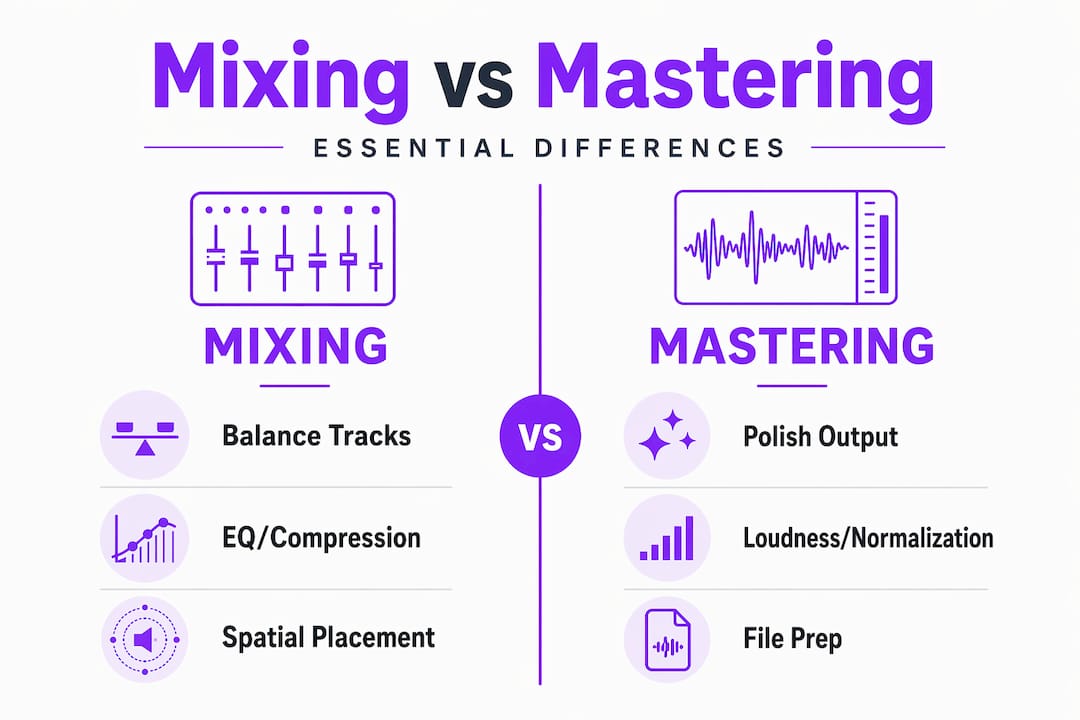
Mixing balances tracks using EQ, compression, and spatial placement. Mastering polishes the finished stereo mix for distribution across every playback device. These are two distinct processes, and confusing them leads to poor results from both.
Many musicians upload a rough bounce to a mastering service and wonder why it still sounds unbalanced. A mastering tool cannot fix a bad mix. It can only optimize what is already there.
| Service type | What it does | Best tools available |
|---|---|---|
| Multi-track mixing | Balances stems, applies EQ, and compression individually | Automix, Cryo Mix (up to 32 stems) |
| Mastering only | Enhances stereo loudness, tone, and distribution readiness | LANDR, eMastered, BandLab |
| Combined workflow | Mix in multi-track service, then master separately | Best of both approaches |
The recommended workflow is to mix multi-track first, then master. Use a platform like Automix or Cryo Mix to get your balance right at the stem level, then run the exported stereo mix through a mastering service. That two-step process gives you the cleanest and most professional final product. Many mastering services also support reference track matching) So you can dial in a specific sonic target.
For the stem export you send to mastering, apply zero limiting. Your online audio mixing tutorials and mix platform should hand off a clean, unprocessed stereo file ready to be shaped.
My Honest Take On Mixing Tracks Online
I have seen musicians spend three hours on a browser-based mix and end up with something that sounds worse than what they started with. The problem is rarely the platform. It is the workflow around the platform.
What I have learned is that the prep stage is where 70% of the result lives. When I skipped proper stem labeling early on, AI tools consistently misidentified my synth bass as a guitar and over-compressed it accordingly. Those early frustrations taught me to treat the stem separation step as seriously as the mixing step itself.
I have also found that combining online tools with offline DAW editing is not a compromise. It is actually the most professional approach available. Use the online platform for its speed and AI processing. Come back into your DAW for detailed automation, precise timing edits, and any creative decisions that need a finer touch. The two workflows are not competing. They are complementary.
One misconception I hear constantly is that online mixing is “just for beginners.” That undersells what these tools can do and who uses them. Producers with years of experience are folding AI-assisted online mixing into their pipelines because it saves time on routine tasks. The skill is knowing which decisions to delegate to the AI and which ones demand your own ears.
Be patient with yourself when you start. Your first mix will not be perfect. Your tenth one will surprise you.
— Wake
Take Your Mix Further With SoundBridge

You have the workflow now. The next step is building the production environment that makes every part of it run more smoothly. SoundBridge is a professional DAW built for musicians and producers who want zero-latency remote collaboration, high-fidelity audio processing up to 192kHz, and an intuitive interface that gets out of your way as you create. Whether you are exporting stems for an online mix or bringing a finished mix back into a DAW for final polish, SoundBridge gives you the tools to do it with precision. Explore SoundBridge’s guide to audio editing automation to see how AI-assisted workflows can sharpen your production process from start to finish. And if you are collaborating remotely on a mix, these remote collaboration tips will help you keep sessions tight and results professional. Start building your full production stack at SoundBridge.
FAQ
What file format should I use when uploading stems for online mixing?
Upload uncompressed WAV files at 44.1kHz or higher with a 24-bit depth. Remove all mastering plugins and keep peaks at or below -3 dBFS.
How many stems can AI online mixing platforms handle?
Platforms like Automix and Cryo Mix support up to 32 stems, which is enough for most full-band or electronic music productions.
What is the difference between mixing and mastering online?
Mixing balances individual tracks using EQ, compression, and panning. Mastering optimizes the finished stereo mix for playback across all devices and distribution platforms.
Can I remix songs online without owning the original stems?
Yes. Tools with AI stem separation can isolate vocals, drums, and bass from a stereo track, giving you creative remixing control even without original project files.
Do I need a DAW to mix tracks online?
No. Browser-based platforms handle the full mixing process without a DAW. However, combining online tools with a DAW like SoundBridge gives you more detailed control and better results for complex projects.
Recommended
MASTER MUSIC PRODUCTION
Expert-led courses designed to take you from fundamentals to finished tracks.

HOUSEFrom bouncy bass and solid kicks, this course teaches you the most modern House music production techniques needed to succeed and stand out.

TRAPQuit sounding like generic Trap and produce something World with hints of the Far East. Create ethnic soundscapes to put your Trap ahead of the curve.

AMBIENTProduce relaxing, sophisticated psy-influenced ambient. Psychedelic and relaxing to listen to, create meditative soundscapes to put your listeners in Zen.