

How to Produce Music: From Home Studio to Pro Tracks
Last Edited: May 13, 2026
You have the ideas. Maybe you’ve got a melody stuck in your head or a beat you’ve been tapping out for weeks. But the moment you sit down to actually produce it, something breaks down. The software feels overwhelming, the mix sounds muddy, or you never finish the track. Sound familiar? This guide cuts through the confusion and walks you through music production from scratch. Whether you’re setting up your first home studio or trying to sharpen your process for professional results, you’ll find clear, actionable steps here to help you stop dreaming and start delivering finished music.
Key Takeaways
| Point | Details |
|---|---|
| Essential setup | You only need a computer, headphones, and free DAW software to get started producing music. |
| Finish over perfect | It is better to complete rough music tracks than chase perfection as a beginner. |
| DAW workflow matters | The way a DAW fits your creative process is more important than minor differences in sound. |
| Collaborate efficiently | Share audio stems for low-latency teamwork and get expert feedback for better results. |
| Measure your progress | Target -6 to -3 dB peaks and -14 LUFS before mastering to hit industry benchmarks. |
What You Need to Start Producing Music
Once you understand the common barriers, it’s time to get your setup right so you can actually start making music. The good news is you don’t need a $50,000 studio to produce something great. Plenty of chart-topping records have started in a bedroom with surprisingly modest gear.
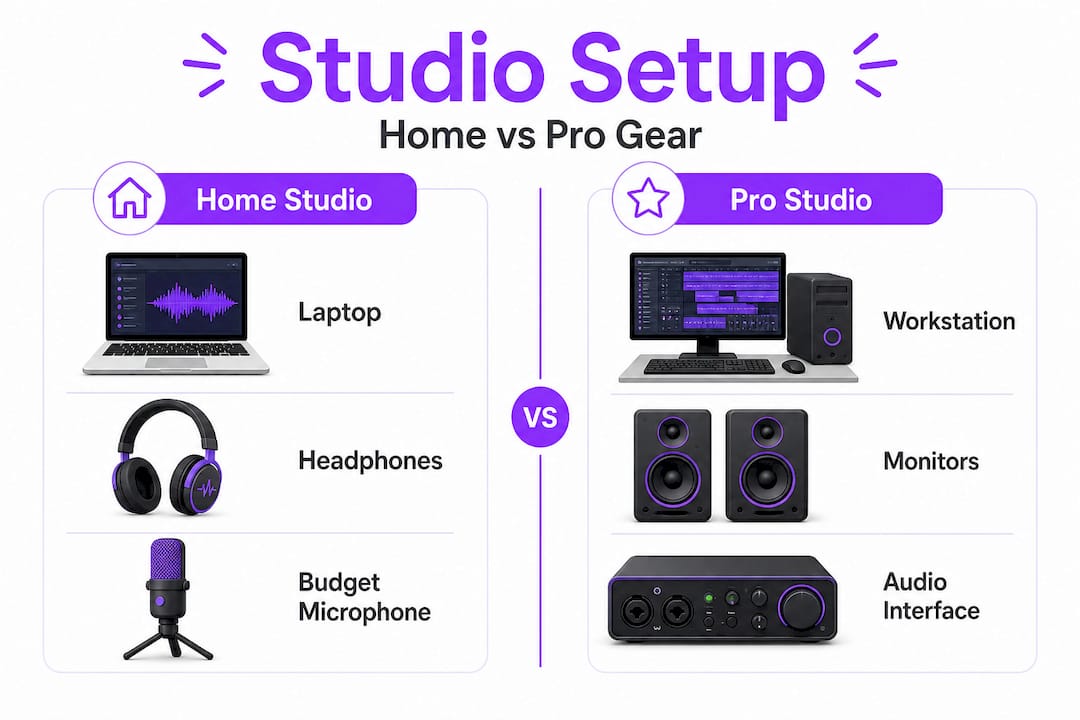
An essential home studio setup includes a computer, headphones or studio monitors, an audio interface for recording, and optionally a MIDI controller. Professional setups build on that foundation with quality microphones, treated acoustic rooms, and better monitors. The core difference is not the gear itself but the control it gives you over your sound.
Here’s what a basic home studio needs:
- Computer: Mac or Windows with at least 16GB RAM and a fast SSD
- Audio interface: Converts analog sound to digital; entry-level options from Focusrite and PreSonus work great
- Headphones or monitors: Closed-back headphones for tracking, open-back or studio monitors for mixing
- DAW software: Your main production environment (more on this in the next section)
- MIDI controller: Optional but helpful for playing melodies and drums naturally
- Cables and stands: XLR cables, a mic stand, and a pop filter if you record vocals
| Item | Home studio | Pro studio |
|---|---|---|
| Computer | Mid-range laptop or desktop | High-end workstation |
| Monitors | Budget studio monitors or headphones | High-fidelity near-fields and mains |
| Audio interface | 2-in/2-out USB interface | Multi-channel rack unit |
| Microphone | Dynamic or condenser entry-level | Large-diaphragm condensers |
| Room treatment | DIY foam panels | Professional acoustic treatment |
Mobile production is also a real option now. Apps like GarageBand for iOS and FL Studio Mobile let you sketch ideas wherever you are. AI-assisted tools for stem separation and chord generation are growing fast, though they still need manual cleanup before anything sounds polished.
Pro Tip: Start with the essentials and resist the urge to buy everything at once. A simple setup you actually understand will outperform an expensive rig you’re still figuring out.
Choosing the Right DAW and Tools
With your gear ready, it’s important to understand your main creative tool and how its design affects everything you do. Your DAW is not just software. It’s a creative philosophy. The way it organizes sounds, handles MIDI, and presents its mixer shapes the habits you build as a producer.
Music production starts with selecting a DAW: GarageBand is free for Mac; Cakewalk and FL Studio suit Windows beginners; Ableton Live shines for electronic and live performance; Logic Pro is a powerhouse for Mac users; and Pro Tools remains the industry standard for professional recording studios. Each one has a different feel, and that feel matters more than any spec sheet.
| DAW | Platform | Price | Best for |
|---|---|---|---|
| GarageBand | Mac/iOS | Free | Beginners, songwriters |
| FL Studio | Windows/Mac | $99+ | Beat-making, electronic |
| Ableton Live | Mac/Windows | $99+ | Electronic, live performance |
| Logic Pro | Mac | $199 one-time | All-around production |
| Pro Tools | Mac/Windows | Subscription | Professional recording |
| Cakewalk | Windows | Free | Beginners on Windows |
Here’s something that surprises a lot of new producers: DAW sound differences are mostly subtle and technical. Pan laws and summing engine variations create minor variations, but nothing that determines whether your track sounds professional. What truly shapes your output is how fluently you move inside your chosen DAW. Mobile production is viable with GarageBand and FL Studio Mobile for capturing ideas on the go, and AI tools for stems and chord generation are increasingly useful, though they still require hands-on editing.
Stay up to date with what’s happening in the gear and software world by following music production news, so you always know when new tools could genuinely improve your process.
Pro Tip: Spend at least 90 days inside one DAW before switching. The frustration you feel early on is the learning curve, not a sign you chose the wrong tool.
Step-By-Step: Producing Your First Track
Once you select your tools, it’s time actually to create. Here’s a hands-on walkthrough of what to do, step by step.
Most producers get stuck because they treat every session like it needs to produce a finished, radio-ready song. That pressure kills creativity. Instead, break the process into distinct phases:
- Set up your project. Name your session, set your tempo and key, and create a folder structure for audio files, samples, and exports. The organization now saves hours.
- Build your core groove. Start with drums and bass. A solid kick and snare pattern with a locked groove gives everything else a home. Don’t overthink it.
- Add your harmonic foundation. Chords or a melodic hook come next. Keep it simple. Three or four chords that feel right beat eight complicated ones that confuse the listener.
- Layer sounds and design your tone. This is where sound design and sample selection happen. Think about texture, not just notes. A pad underneath your melody adds depth. A filtered sound adds movement.
- Arrange your track. Build from intro to outro. Add drops, builds, and breakdowns intentionally. Arrangement is where amateur tracks often fall flat.
- Record or program your lead elements. Vocals, lead synths, or guitar parts land on top of your arrangement. Focus on feel, not technical perfection.
- Mix as you go. Keep levels balanced throughout. Aim for a mix target range of around -6 to -3 dB peaks before mastering, and roughly -14 LUFS integrated loudness as a working reference.
- Export a rough mix. Listen on different speakers, in your car, and on earbuds. This tells you more than any meter reading.
“Prioritize finishing rough tracks over perfection early. You learn by completing music, not by endlessly tweaking one song.” This mindset is what separates productive producers from those with 400 unfinished projects.
Recreating songs you love is one of the fastest learning methods available. It forces you to reverse-engineer decisions that real producers made, from their drum patterns to their reverb choices.
Basic competence in music production typically arrives in 3 to 6 months with consistent practice. That’s not mastery, but it’s enough to finish tracks that sound intentional and cohesive. The key is showing up and completing things.
You can push your creative range further by studying techniques such as crafting unique sound effects and learning to make your vocals stand out. Both skills add character to your productions fast.
Finishing, Evaluating, and Collaborating on Your Music
With your first track ready, the final hurdles are finishing, evaluating, and possibly sharing or collaborating with others. Many producers are great at starting tracks but terrible at ending them. Here’s how to close the loop.
Final steps before you call a track done:
- Check your levels in mono to catch phase issues
- Bounce your mix and listen with fresh ears the next morning
- Make sure your low end translates on smaller speakers
- Prepare your track for mastering by leaving headroom (target those -6 to -3 dB peaks)
- Export stems for any collaborators or mastering engineers
| Metric | Target value | Why it matters |
|---|---|---|
| Mix peak level | -6 to -3 dB | Leaves headroom for mastering |
| Integrated loudness | -14 LUFS | Standard for streaming platforms |
| Low-end mono check | No phase cancellation | Ensures bass translates everywhere |
| Stem export format | 24-bit WAV, 48kHz+ | Preserves quality for collaborators |
When it comes to collaboration, sharing stems rather than full project files is the smarter move. Stems typically run 3 to 4GB per track but enable fast, flexible iteration. Peer-to-peer sharing also reduces latency compared to uploading everything to cloud storage, which matters when you’re working in real time with a collaborator on the other side of the world.
For evaluating your mix quality, automated tools and meters are useful guides, but don’t tell the whole story. Human expert ratings remain essential for real quality assessment because automated proxies are inconsistent at catching the nuanced things that make music feel right or wrong. Get feedback from producers whose work you respect. Post rough mixes in forums or Discord servers. That honest outside perspective is worth more than any plugin analyzer.
Understanding mixing with equalization is one of the highest-value skills you can develop at this stage. A well-EQ’d mix translates cleanly, making mastering dramatically easier.
For a broader context on how the video production world handles finishing workflows, a YouTube music video production guide offers useful crossover insights, especially if you’re creating music for visual media.
Pro Tip: Version your mixes. Save “Mix_v1,” “Mix_v2,” and so on. Looking back at older versions teaches you exactly how your ears and skills are developing.
What Most Music Production Guides Get Wrong
Most guides spend an enormous amount of time debating which DAW sounds best or which plugin chain produces the most professional output. That framing misses the point almost entirely. The real skill in music production is not selecting optimal tools. It’s developing the discipline to finish music consistently and the confidence to move forward before everything is perfect.
DAW choice shapes workflow philosophy far more than sound quality. A producer who finishes 50 tracks in FL Studio in one year will outgrow a producer who spent that same year researching whether Logic Pro or Pro Tools has a better summing engine. The finished tracks teach you everything. The research teaches you very little that you can use.
Here’s what experienced producers actually focus on: capturing ideas fast before they evaporate, committing to sounds rather than leaving everything “just in case,” and building systems that make starting and finishing feel natural rather than intimidating. They spend less time troubleshooting than beginners expect. They know their tools well enough that the tools get out of the way.
The other thing most guides ignore is community. Sharing your work, getting feedback, and listening critically to what other producers create accelerates your growth faster than any solo practice session. You learn what “good” sounds like by surrounding yourself with people who are chasing it. Explore creative production workflows to see how working producers actually structure their sessions and think about their craft. The gap between knowing music theory and knowing how professionals actually work is where most beginners get lost, and closing that gap is where your real growth happens.
Get More From Your Music Production Journey
Ready to push your productions further? SoundBridge is built for exactly where you are right now, whether you’re finishing your first track or sharpening your professional workflow.

The SoundBridge DAW gives you zero-latency remote tracking, 192kHz audio processing, and a clean, intuitive interface that supports how you actually create. Beyond the DAW itself, SoundBridge’s in-depth guides help you level up fast. Explore parallel processing tips to add punch and depth to your mixes without cluttering your signal chain. If you work with live instruments, the guitar processing guide shows you how to dial in tones that sit perfectly in any mix. Your next great track is closer than you think.
Frequently Asked Questions
What DAW should a beginner choose to start producing music?
GarageBand is free for Mac and is a great starting point, while FL Studio and Cakewalk work well for beginners on Windows. Choose based on your platform and stick with it long enough to learn it.
How long does it take to become competent in music production?
With consistent practice, basic competence arrives in three to six months. That’s enough to finish tracks that sound intentional, though mastery is an ongoing process.
Can I produce music just on my phone or tablet?
Yes. Mobile production is viable with apps like GarageBand for iOS and FL Studio Mobile, making it easy to sketch full ideas wherever inspiration hits.
What mix levels should I aim for before mastering?
Target peaks of -6 to -3 dB and an integrated loudness of roughly -14 LUFS before sending your mix to a mastering engineer. This headroom gives the mastering stage room to work.
Does DAW choice affect the sound quality of my music?
Subtle differences in summing exist between DAWs due to pan laws and engine variations. Still, the workflow impact is far greater than any sonic difference you’d notice in a real-world mix.
Recommended
MASTER MUSIC PRODUCTION
Expert-led courses designed to take you from fundamentals to finished tracks.

HOUSEFrom bouncy bass and solid kicks, this course teaches you the most modern House music production techniques needed to succeed and stand out.

TRAPQuit sounding like generic Trap and produce something World with hints of the Far East. Create ethnic soundscapes to put your Trap ahead of the curve.

AMBIENTProduce relaxing, sophisticated psy-influenced ambient. Psychedelic and relaxing to listen to, create meditative soundscapes to put your listeners in Zen.