

Industry Standards for Studio-Grade Remote Sessions
Last Edited: Aug 12, 2026
The professional standard for studio-grade remote sessions targets a round-trip latency under 150 ms, with sub-50 ms preferred for tight real-time tracking, paired with a 44.1 kHz/24-bit baseline sample rate (48 kHz/24-bit when video is involved) and mandatory local redundant recording at every endpoint. Hit those three targets, and you have a session that holds up against anything tracked in a physical room.
The four pillars that define the standard:
- Network latency: Round-trip under 150 ms; sub-50 ms for live jamming and tight comping
- Sample rate/bit depth: 44.1 kHz/24-bit minimum for music; 48 kHz/24-bit for video; up to 192 kHz for high-end workflows
- Clocking: Sample-accurate sync at every endpoint, no drift
- Local redundant recording: Each performer records locally at full resolution; the stream is for direction and monitoring only
With the right setup, every one of these targets is achievable from a home studio. The rest of this guide shows you exactly how.
Key Takeaways
Studio-grade remote sessions require sub-150 ms round-trip latency, a minimum of 44.1 kHz/24-bit audio, sample-accurate clocking, and local redundant recording at every endpoint.
| Point | Details |
|---|---|
| Latency targets | Keep round-trip under 150 ms; aim for sub-50 ms for live jamming and tight rhythmic tracking. |
| Sample rate baseline | Use 44.1 kHz/24-bit for music, 48 kHz/24-bit for video, and up to 192 kHz for high-end workflows. |
| Local redundant recording | Record every performer locally at full resolution; treat the stream as a direction-and-monitoring channel only. |
| Pre-session tech audit | Test jitter, packet loss, and upload speed before every session; a wired Ethernet connection and 10 Mbps upload are the floor. |
| SoundBridge | Implements zero-latency remote tracking, sample-accurate sync, integrated talkback/video, and 192 kHz support in a single DAW. |
What Are the Industry Standards for Remote Sessions?
Studio-grade remote tracking lives or dies on three numeric targets: latency, sample rate, and clock stability. Here is what each one means in practice.
Latency Targets
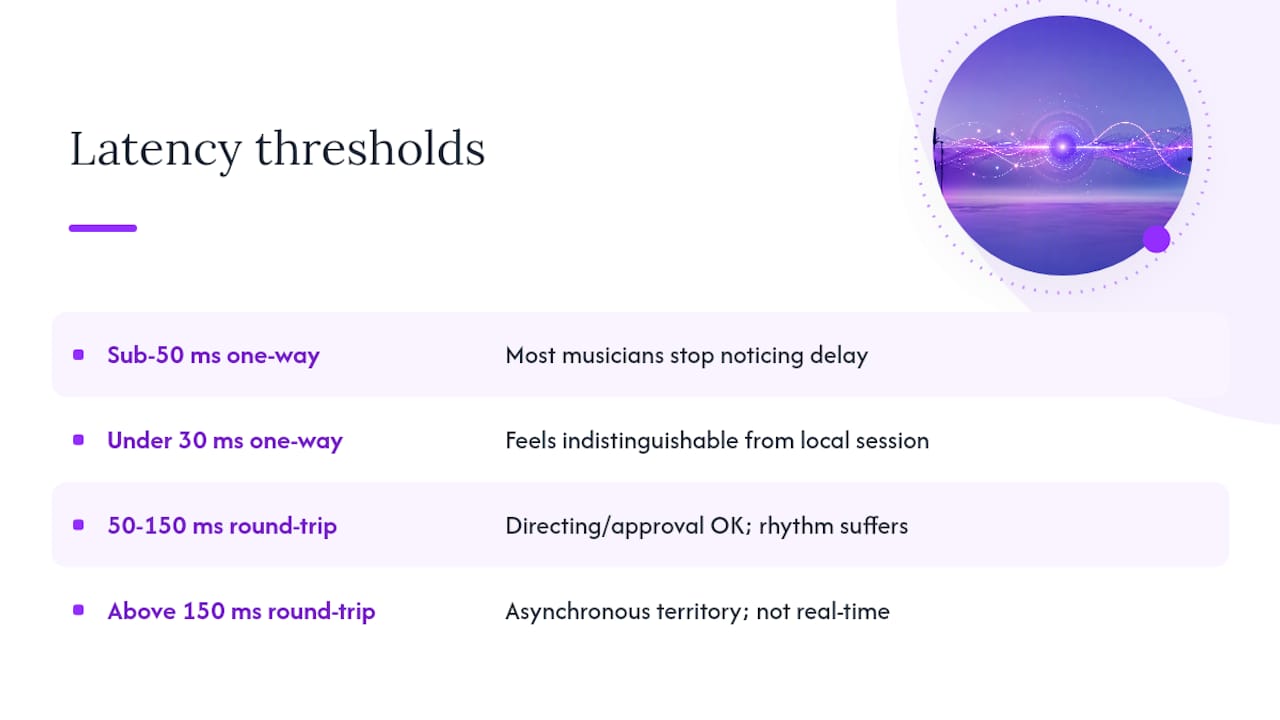
Sub-50 ms one-way (roughly 100 ms round-trip) is the threshold where most musicians stop noticing the delay during a live take. Under 30 ms one-way feels indistinguishable from a local session. Between 50–150 ms round-trip, you can still direct a session and approve takes, but tight rhythmic interplay suffers. Above 150 ms, you are in asynchronous territory, whether you planned for it or not.
Your total audible delay is the sum of: buffer size latency + interface driver latency + network RTT + remote buffer latency. At 128 samples on a 48 kHz session, the buffer alone adds roughly 2.7 ms each way. Add a 40 ms network RTT and a well-tuned interface, and you land comfortably under 50 ms one-way.
Sample Rate, Bit Depth, and Clocking
Set buffers to 64–128 samples for tracking when your CPU allows. That keeps local latency tight while leaving headroom for the network leg. For sample rate, 44.1 kHz/24-bit covers most music sessions; 48 kHz/24-bit is the right call when picture is involved. High-end scoring and immersive formats push to 96 kHz or 192 kHz, which SoundBridge supports natively.
Clocking is where sessions quietly fall apart. Every endpoint must lock to the same clock source, whether that is a hardware word clock signal, a DAW-based jam clock, or a sample-accurate software sync. Even a few parts-per-million of drift accumulates into audible flanging over a long take.
Pro Tip: Disable automatic gain control (AGC) and speech noise suppression on every music input. These features are built for voice calls and will destroy musical dynamics and timing. Turn them off at the OS level, the interface level, and inside any browser-based tool you use.
What Network Specs Does a Studio-Grade Remote Session Require?
Network quality is the variable most engineers underestimate. Bandwidth is rarely the bottleneck; jitter and packet loss are.
Minimum Specs
- Upload speed: 10 Mbps minimum per participant for stable real-time sessions; 25 Mbps recommended when streaming uncompressed multichannel audio
- Jitter: Under 5 ms for studio work; under 10 ms is workable
- Packet loss: Under 0.5% for clean audio; above 1% causes audible artifacts even with error correction
Physical vs. Wi-Fi
Wired Ethernet is non-negotiable for the tracking engineer and the performing musician. Wi-Fi introduces variable latency spikes that no buffer setting can fully compensate for. If a wired run is not possible, a powerline adapter is a better fallback than Wi-Fi.
Key insight: Public TURN relays commonly add 100–200 ms of latency on top of your baseline RTT. For studio-grade sessions, private TURN clusters are the only viable relay option — the performance gap between public and private relay is not marginal; it is the difference between a usable session and a frustrating one.
Practical Network Checklist
- Enable quality of service on your router and prioritize audio traffic
- Close all background apps that consume upload bandwidth (cloud sync, video streaming, OS updates)
- Avoid VPN tunnels during tracking; TCP-based VPNs add retransmission latency that compounds with network RTT
- Test your connection with a tool like PingPlotter or iPerf before every session to confirm jitter and packet loss are within tolerance
- If you see asymmetric routing (upload and download taking different paths), contact your ISP or switch to a different server region in your collaboration platform
Pro Tip: *Run a 60-second iPerf test to your session server before the call starts.
Which Transport Protocols Actually Meet the Standard?
Not every protocol family reaches studio-grade performance. Here is how the main approaches stack up.
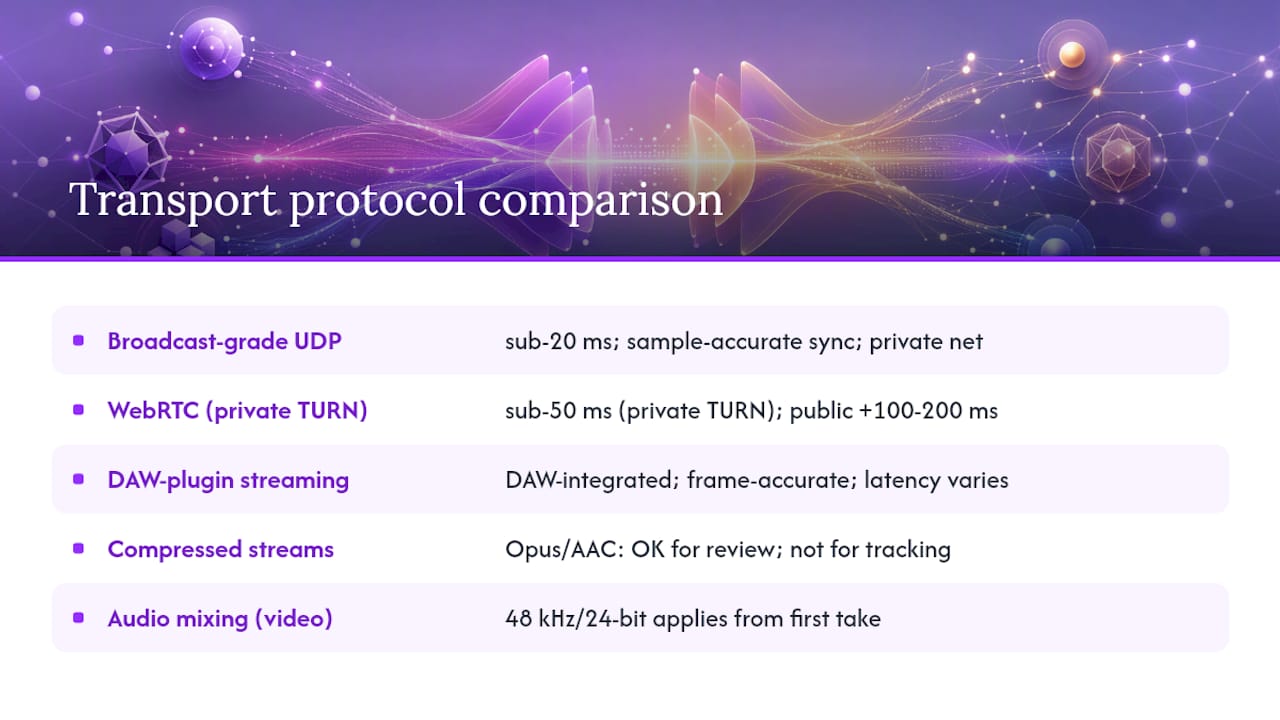
Broadcast-grade UDP streaming (used by dedicated audio-over-IP tools) reaches sub-20 ms latency with sample-accurate sync. It requires a stable, low-jitter network and typically runs over a private network or a dedicated relay. Best for: tracking sessions where latency is the top priority.
WebRTC with a private TURN can achieve sub-50 ms cross-region latency when configured with 10 ms-constrained Opus frames and careful audio-worklet clocking. The catch is that public TURN relays add 100–200 ms of delay, making them unsuitable for live tracking. Best for: browser-based creative sessions and client review when a private relay is in place.
Plugin-based DAW streaming integrates directly into your session timeline and supports high sample rates and frame-accurate recording. Latency depends on the network leg, but the advantages include tight DAW integration, bidirectional plugin control, and local redundant recording built into the workflow. SoundBridge’s virtual collaboration approach falls into this category.
Compressed streams (Opus, AAC) are acceptable for direction and client review, but not for the canonical tracking take. Use them as the monitoring feed while local recording captures the full-resolution source.
For sessions that combine remote audio with picture, the audio mixing for video workflow at 48 kHz/24-bit applies from the first take, not just at the mix stage.
How Should You Configure Your Hardware and DAW?
Audio Interface Requirements
Your interface needs stable ASIO (Windows) or Core Audio (Mac) drivers, direct monitoring capability, and confirmed support for your target sample rate. An interface that claims to support 192 kHz but uses a generic USB driver will introduce jitter that undermines every other setting you optimize. Check the interface’s role in sound quality and collaboration before committing to a unit for remote work.
Buffer and DAW Settings
Set your DAW clock source to your audio interface, not the system clock. Confirm that the sample rate matches across the interface, the DAW, and the collaboration platform before the session starts. Freeze CPU-heavy tracks during tracking to keep the buffer stable at 64–128 samples.
Pro Tip: Create a dedicated remote-session DAW template with all routing, talkback, and local-record tracks preconfigured. Loading a tested template at the start of the session eliminates the most common source of mid-session scrambling.
Monitoring and Talkback
Route talkback through a dedicated bus, not the main mix. Use direct monitoring on the interface for the performing musician so their local latency is zero, and send the mix-minus (everything except their own signal) as the monitoring feed. This keeps the feel tight even when network RTT is at the upper end of the acceptable range.
What Does a Studio-Grade Remote Session Workflow Look Like?
Pre-Session Checklist
- Confirm sample rate and bit depth match at every endpoint
- Run a network test (jitter, packet loss, upload speed)
- Verify local recording is armed and saving to a redundant drive
- Test talkback path and monitoring levels
- Load your session template and confirm clock source
Live Session Flow
Signal checks come first. Confirm every input is hitting the right level before you roll. Run a short soundcheck take and listen back locally before committing to a full take. During tracking, record locally at high resolution and treat the stream as the direction channel. After each take, the session engineer calls the comp decision over talkback, and the remote performer holds position until the engineer confirms the next take is rolling.
For file naming, use a convention like [ProjectName]_[TrackName]_[TakeNumber]_[Date] at every endpoint. Consistent naming prevents the “which file is the keeper?” confusion that wastes post-session hours.
Fallback Plans
If the connection degrades mid-session, switch immediately to local multitrack recording and continue the session asynchronously. The remote audio editing workflow covers how to sync and comp files after the fact. Most professional teams run a hybrid workflow by design: synchronous for creative direction, asynchronous for the highest-quality tracking passes.
How Do You Measure Latency and Fix Common Problems?
Latency Measurement
- Connect your interface output to its own input (loopback)
- Play a click track and record the loopback signal
- Measure the offset between the sent and received click in your DAW
- Add your network RTT (from a ping test to the session server) to get total round-trip latency
Prioritized Troubleshooting Flow
Start with the physical layer: confirm wired Ethernet, check cable integrity, and verify the interface is on a dedicated USB controller. If latency remains high, reduce the buffer size and update the drivers. If jitter or packet loss is the issue, check router quality of service settings and close background apps. If the problem persists, it is likely due to asymmetric routing or ISP congestion; switch server regions or schedule the session for off-peak hours.
Pro Tip: If you hit a wall mid-session, the fastest fix is almost always to switch to local recording and continue. You lose the real-time connection but keep the session moving. Sync files afterward.
How Does SoundBridge Implement the Standard?
SoundBridge maps directly to every target in this guide. Here is the configuration checklist:
- Set sample rate to 44.1 kHz or 48 kHz (up to 192 kHz for high-end projects) in SoundBridge’s audio preferences
- Confirm clock source is set to your audio interface
- Set buffer to 64–128 samples for tracking sessions
- Arm local recording on all tracks before the remote session starts
- Enable integrated talkback and video within the session interface
SoundBridge’s zero-latency remote tracking, sample-accurate synchronization, and local redundant recording are built to meet the numeric targets in this guide without requiring third-party workarounds. The platform supports sample rates up to 192 kHz, bi-directional plugin and hardware control, and integrated video and talkback in a single environment. For remote music collaboration tips that go deeper into session setup, SoundBridge’s own guides walk through each configuration step.
Standard met: Zero-latency remote tracking + sample-accurate sync + local redundant recording + integrated talkback/video + 192 kHz support. Every element of the professional standard, inside one DAW.
When Should You Insist on Live Tracking vs. Asynchronous Workflows?
Live tracking is worth the complexity when the performance depends on real-time interaction: a rhythm section locking together, a producer directing a vocalist’s phrasing in the moment, or a client who needs to hear and approve takes as they happen. The energy of a live session is genuinely different, and no amount of asynchronous polish fully replicates it.
Asynchronous workflows win on quality and reliability for overdubs, comping, and anything where the performer works alone. The file arrives at full resolution with no network artifacts, and the engineer has full control over the comp without time pressure.
Decision checklist:
- Live band tracking or tight rhythmic interplay → live session, sub-50 ms RTT required
- Solo overdubs, vocals, or melodic instruments → async preferred; local record + file delivery
- Client review and direction → live session acceptable at up to 150 ms RTT
- Film scoring to picture → live session with 48 kHz/24-bit minimum; async for revisions
The edge case worth knowing: even when async is the plan, a short live session at the start to align on feel and direction saves hours of revision. Hybrid workflows are the practical default for most professional distributed teams.
SoundBridge Is Built for Sessions That Meet This Standard
SoundBridge gives you zero-latency remote tracking, sample-accurate sync, integrated talkback and video, and local redundant recording in one place. You get support for sample rates up to 192 kHz, bi-directional plugin and hardware control, and a modular interface you can configure around your exact session workflow.

Load a session template, confirm your buffer and clock settings, and you are ready to track at a level that holds up against any physical studio. Start with the SoundBridge DAW platform to explore the full feature set, or go straight to the virtual collaboration guide to set up your first remote session.
Sources
- How to Collaborate on Music Remotely in 2025: Complete Guide | Feedtracks Blog
- How to Record Music Remotely: rLegacy Workflow Guide — rLegacy Media.Inc
Recommended
MASTER MUSIC PRODUCTION
Expert-led courses designed to take you from fundamentals to finished tracks.

HOUSEFrom bouncy bass and solid kicks, this course teaches you the most modern House music production techniques needed to succeed and stand out.

TRAPQuit sounding like generic Trap and produce something World with hints of the Far East. Create ethnic soundscapes to put your Trap ahead of the curve.

AMBIENTProduce relaxing, sophisticated psy-influenced ambient. Psychedelic and relaxing to listen to, create meditative soundscapes to put your listeners in Zen.