


Unlock SoundBridge Premium Features for Music Production
Last Edited: Dec 17, 2025
If you’re passionate about music production and looking for a digital audio workstation (DAW) that balances simplicity, power, and innovation, SoundBridge is worth your attention. While the free version is great for getting started, unlocking the premium tools takes your creativity and workflow to a completely new level. Whether you’re producing tracks, scoring video, or experimenting with sound design, the premium version of SoundBridge gives you everything you need to produce professional-quality music — without limitations.
In this article, we’ll walk you through all the premium features of SoundBridge, what they do, and why they’re essential for serious producers. Let’s dive in.
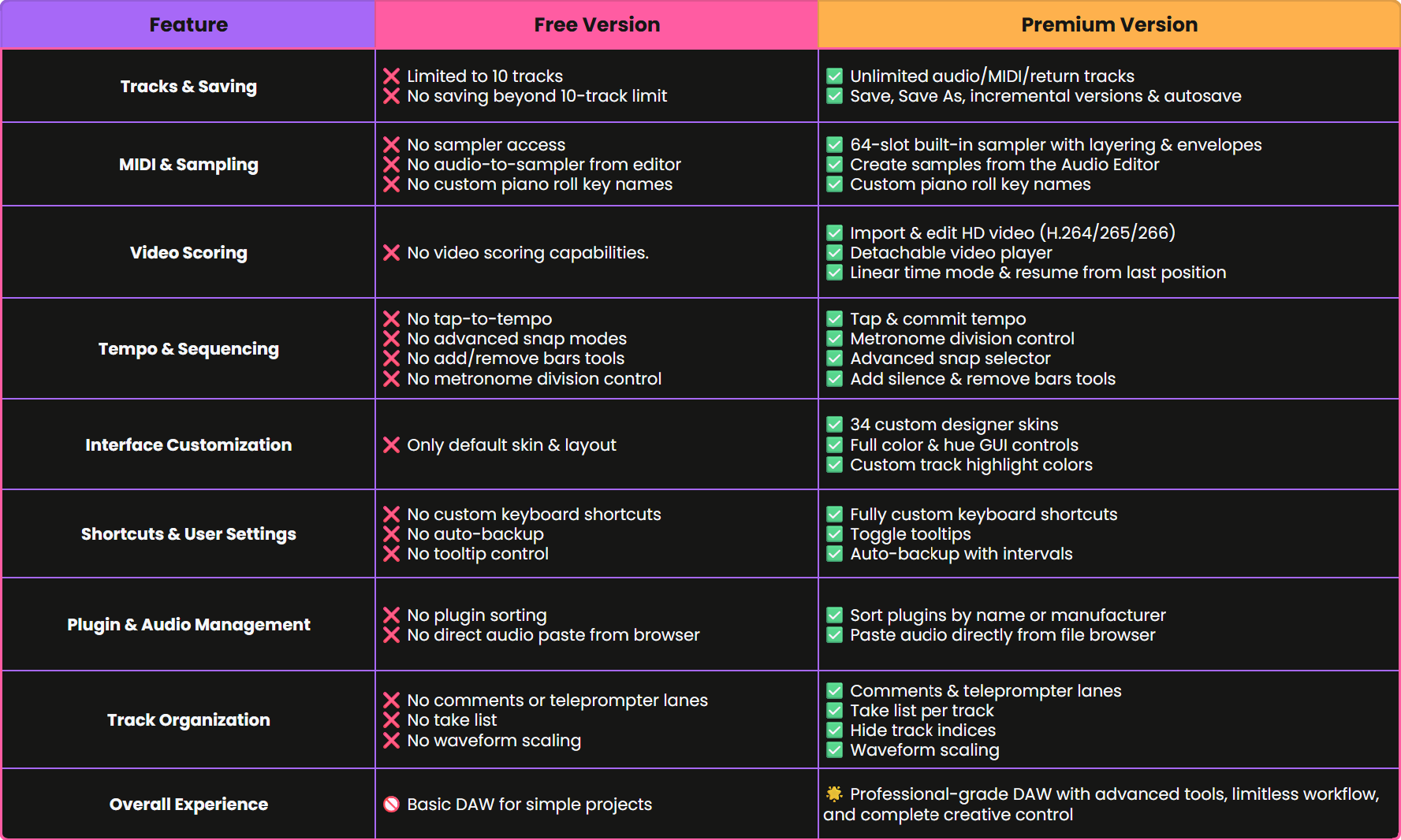
Unlimited Tracks & Project Saving in SoundBridge Premium
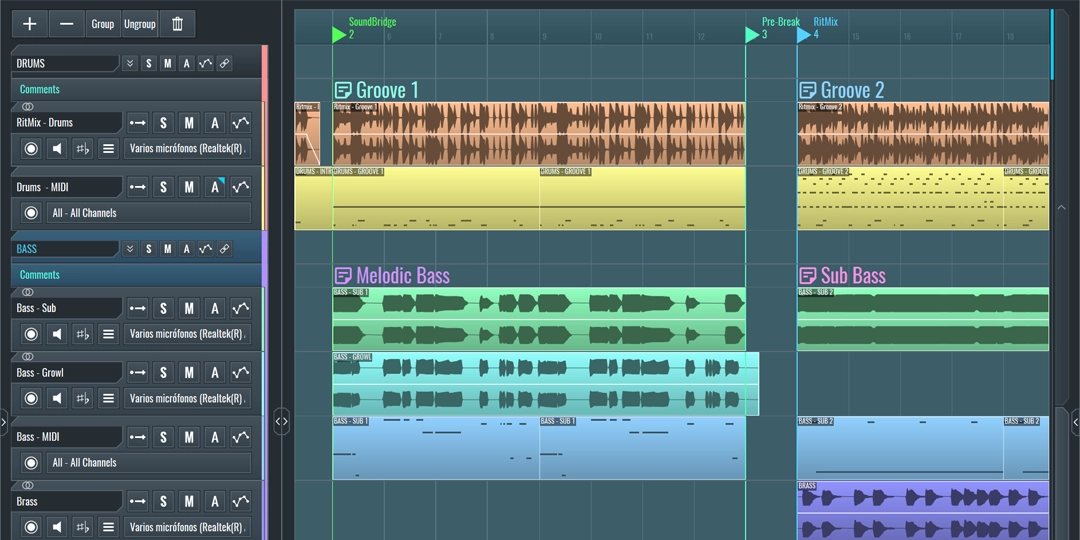
In the free version of SoundBridge, you’re limited to 10 audio or MIDI tracks, and saving is disabled beyond that. Upgrade to premium and you unlock:
-
Unlimited Audio/MIDI Tracks: Build full sessions without restrictions, ideal for complex arrangements, orchestral scores, or full-band productions.
-
Project Saving & Autosave: Save, “Save As,” create incremental versions, and autosave your project with confidence and peace of mind.
No more worrying about whether you’ve reached your track limit. Focus purely on your creativity.
Advanced MIDI Editing & Built-In Sampler Tools
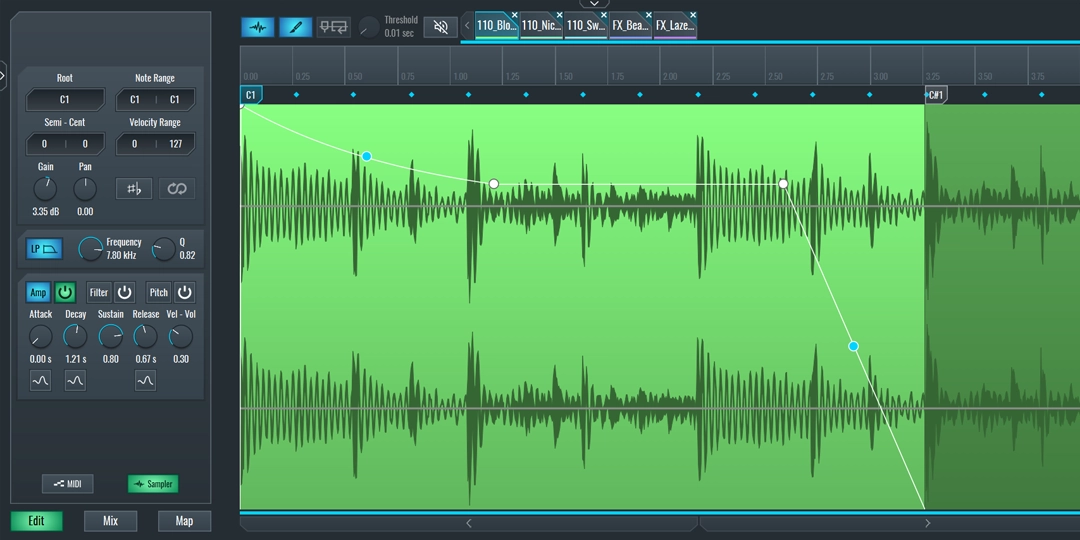
SoundBridge supercharges your MIDI and sampling capabilities with flexible, intuitive tools:
-
Built-in 64-Slot Sampler: Every MIDI track includes its own integrated sampler. Just drag-and-drop any audio to instantly create instruments, beats, or effects. Use features like round-robin triggering, envelope shaping, and sample layering, without needing third-party plugins.
-
Sampler Creation from Audio Editor: Turn any audio clip into a playable instrument in seconds. From the Audio Editor, you can now create a new MIDI track and load the selected audio into the sampler as either rendered or source audio — all with just one click.
-
Custom Piano Roll Key Names: Highlight specific notes, scales, or custom key zones for faster melodic composition and harmonic accuracy.
Video Scoring & Tempo Editing Tools in SoundBridge
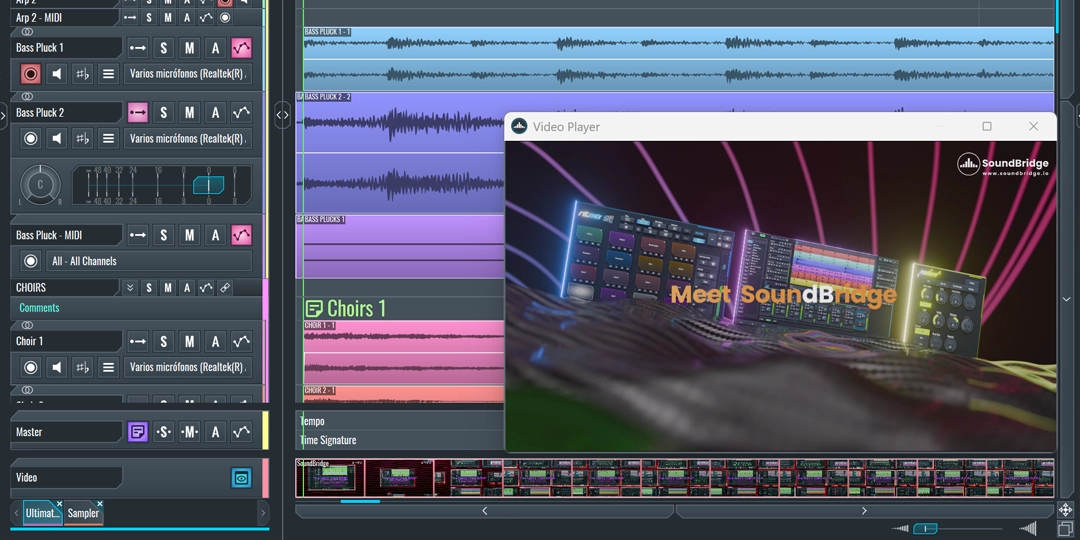
For producers working with film, animation, or performance sync, the premium version of SoundBridge offers advanced video scoring features:
-
Import & Edit HD Video (H.264/265/266): Drop in high-resolution video clips for scoring, sound design, or post-production. The detachable video player makes layout management flexible.
-
Resume Playback from Last Position: Return instantly to where you stopped — great for fine-tuning tight sync points.
-
Linear Time Mode: Bypass tempo/grid settings and align sound directly with video cues.
-
Overwrite Pasted Content on Master/Video Tracks: Clean, controlled editing when copying between projects — no hidden overlaps or artifacts.
Flexible Sequencing & Smart Tempo Control Features
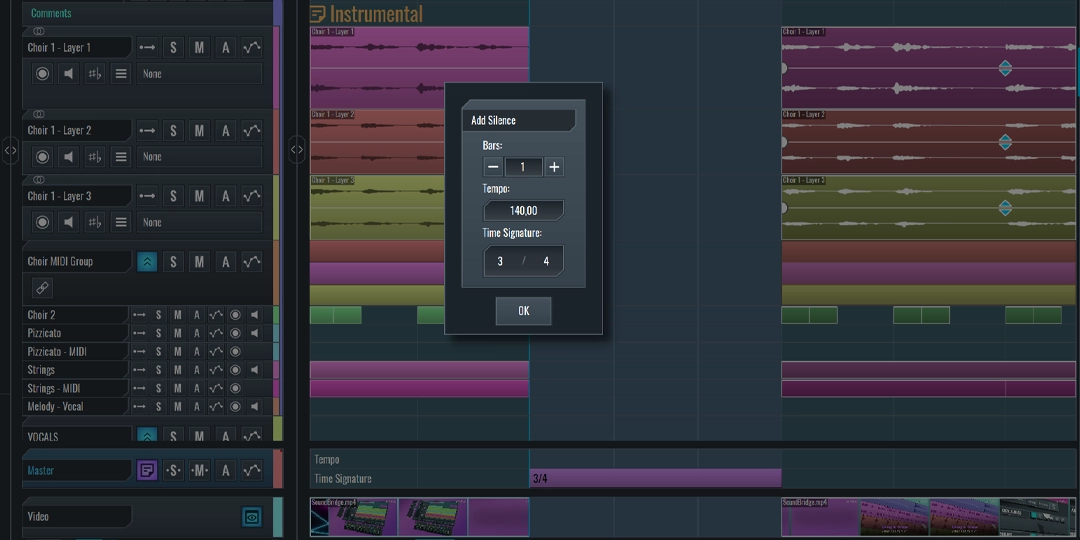
SoundBridge Premium adds powerful sequencing enhancements to help you control timing and structure more precisely:
-
Tap & Commit Tempo: Tap a tempo in real-time and lock it into your session — perfect for setting grooves organically.
-
Metronome Division Control: Take full control of your timing with the new Metronome Division feature. Adjust the beat resolution and playback rate to match your project’s needs. Available in the Time Signature settings, it’s ideal for complex rhythms or precision practicing.
-
Advanced Snap Selector: Choose between Auto, Auto-T (snaps adjust based on zoom level), 1 Frame, ½ Frame, or ¼ Frame. Ideal for both musical and visual sync.
-
Add Silence: Instantly insert empty timeline space for arrangement changes or extended intros.
-
Remove Bars: Need to clean up a section fast? The Remove Bars tool deletes all bars and content inside the loop marker range, then automatically closes the gap by shifting everything forward. A huge time-saver for arranging and editing.
Custom Skins & Interface Settings for Music Workflow
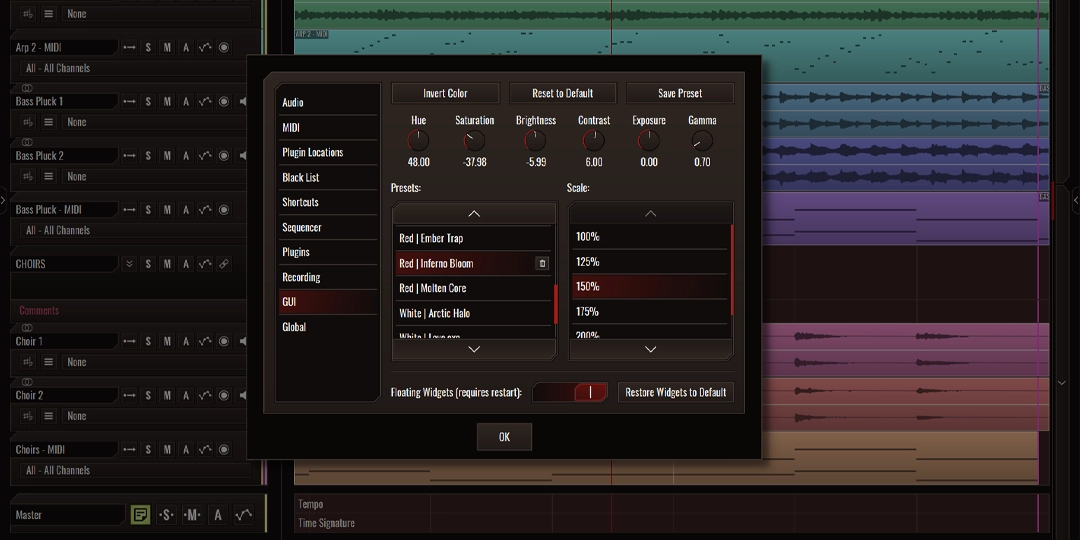
The DAW should feel like an extension of your creative mind. With SoundBridge Premium, you can fully personalize the visual and ergonomic experience:
-
Custom Skins & Color Controls: Adjust hue, brightness, and invert colors. Save and switch between custom layouts to match your creative vibe.
-
Designer Custom Skins: 34 professionally designed custom skins, crafted by experienced UI/UX designers to enhance your creative environment. Whether you're working late at night or aiming for a fresh visual vibe to spark inspiration, these skins let you customize your DAW's look and feel to match your mood and workflow.
-
Track Selection Highlight Color: Customize the way selected tracks look in your session. Choose between the default highlight or match the highlight to the track’s assigned color. This applies across the track, mixer channel, and insert rack — making it easier to spot exactly what you’re working on.
Keyboard Shortcuts & Advanced User Settings
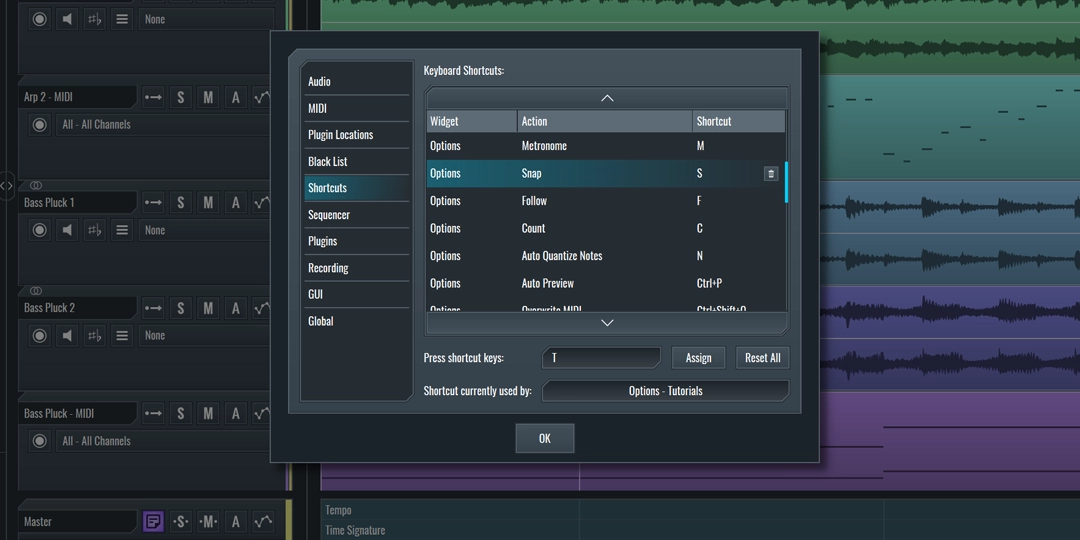
If you love efficiency, these premium preferences will help you work faster and smarter:
-
Full Keyboard Shortcut Mapping: Assign your most-used commands to any key, and unbind default ones to avoid clashes.
-
Toggle Tooltips: Show or hide helpful hints depending on your experience level.
-
Auto-Backup: Set regular backup intervals to ensure your work is never lost.
Organize Plugins & Manage Audio Files Efficiently
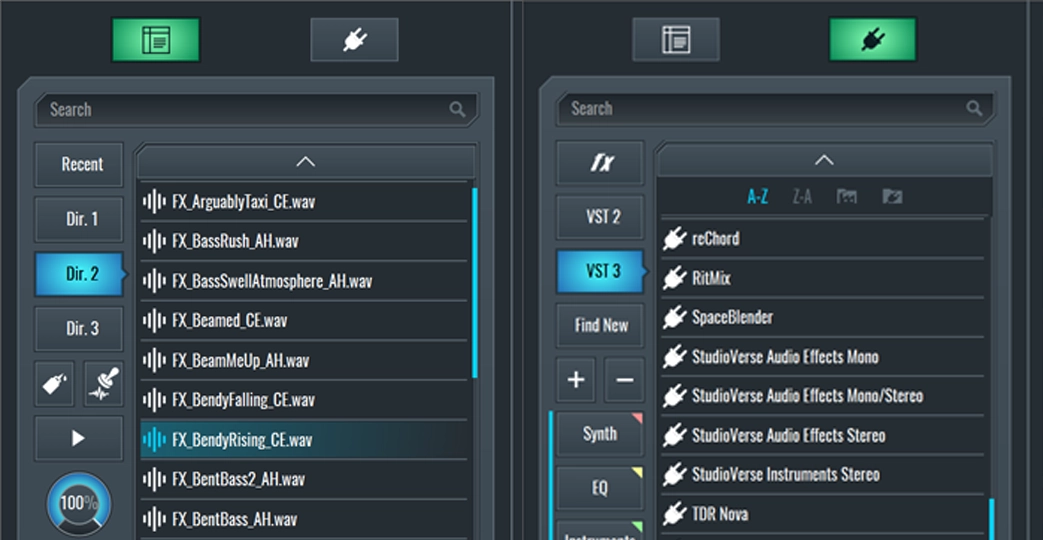
Working with plugins and samples is a breeze in the premium version:
-
Advanced Plugin Browser Filters: Sort by plugin name (A–Z or Z–A) or manufacturer to find what you need fast.
-
Paste Audio from File Browser: Directly place audio clips from your sample library into your timeline with drag-and-drop ease.
Organize Tracks with Notes, Comments & Teleprompter
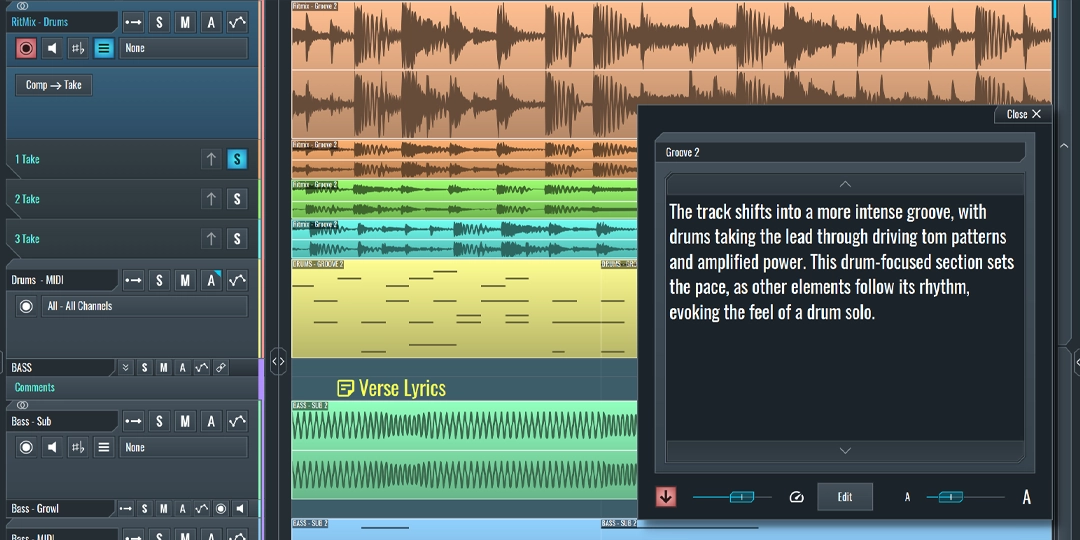
Stay organized, collaborate better, and keep your ideas clear:
-
Comment / Teleprompter Lanes: Add notes, lyrics, or cues to tracks. You can even automate scrolling during playback by naming markers inside square brackets. Ideal for rehearsals, vocal takes, or team collaboration.
-
Take List for Perfect Performances: Recording multiple takes just got easier. With SoundBridge Premium, every audio track includes a Take List — a powerful tool that stores each recorded take in the same track lane.
-
Hide Track Indices: Remove track numbers for a cleaner, distraction-free workspace.
-
Waveform Scaling: Adjust waveform visual size for better editing precision, especially helpful for quieter passages or detailed fades.
Why Choose SoundBridge Premium for Music Production?
By unlocking the premium features, you’re investing in:
-
A professional-grade DAW with no artificial limits.
-
Video and audio integration for film scoring and visual work.
-
Enhanced workflow with shortcuts, tooltips, backups, and layout options.
-
Powerful tools for composition, sampling, and sound design.
-
An interface that feels and functions the way you want it to.
Whether you're a music producer, audio engineer, film composer, or content creator, SoundBridge Premium gives you the tools you need — without bloated menus or confusing interfaces.
How to Upgrade to SoundBridge Premium?
Visit soundbridge.io to download SoundBridge and explore your creative potential. Start with the free version, then unlock premium whenever you’re ready to take things further.
If you liked this article on sound design, here are some more on the same subject:
DOMINA LA PRODUZIONE
Corsi guidati da esperti per portarti dalle basi alle tracce finite.

HOUSEDa bassi rimbalzanti e kick solidi, questo corso insegna le tecniche di produzione House più moderne per riuscire e distinguerti.

TRAPSmetti di suonare come Trap generica e produci qualcosa di World con tocchi del Far East. Crea soundscape etnici per portare la tua Trap avanti.

AMBIENTProduci ambient rilassante e sofisticata con influenza psy. Psichedelica e rilassante all'ascolto, crea soundscape meditativi per mettere i tuoi ascoltatori in Zen.