

Mac ARM64 and x86_64 Architecture Support Explained
Last Edited: Dec 26, 2023
SoundBridge now fully supports Apple Silicon with the release of version 2.2.1 BETA.
Heads-up: Only VSTs compiled for arm64 will work in the arm64 version, and 64-bit VSTs compiled for x86_64 will only work in the x86_64 version. 32-bit VSTs are not supported on Mac at all.
That said, M1/M2 users can go between the two architectures from a single installation of SoundBridge.
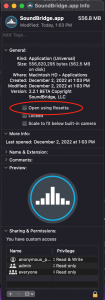
M1/M2 users can easily switch back to x86_64 by right-clicking the SoundBridge.app located in the Applications folder, selecting “Get Info,” and checking “Open using Rosetta” under the “General” tab. This will open SB in the old x86_64 architecture, so you can easily access the plugins you need.
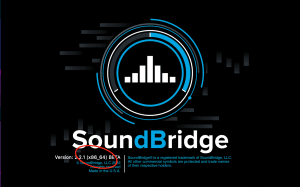
The splash screen will inform you of the architecture you’re running.
음악 프로덕션 마스터
기초부터 완성 트랙까지 이끄는 전문가 코스.

HOUSE바운시 베이스와 탄탄한 킥부터, 이 코스는 성공하고 돋보이기 위한 가장 현대적인 House 프로덕션 테크닉을 가르칩니다.

TRAP뻔한 Trap처럼 들리지 마세요—극동의 힌트를 담은 월드한 사운드를 만드세요. 에스닉 사운드스케이프로 Trap을 한발 앞서게 합니다.

AMBIENT편안하고 세련된 psy-영향 앰비언트를 제작하세요. 듣기에도 몽환적이고 편안한, 리스너를 Zen에 두는 명상적 사운드스케이프를 만드세요.