

Real-Time Collaborative DAW: Your 2026 Production Guide
Last Edited: Jun 16, 2026
A real-time collaborative DAW is a digital audio workstation that allows multiple musicians and producers to work on the same project simultaneously from different locations. Unlike traditional DAWs, where one person controls the session, these platforms let your bandmate in Berlin and your co-producer in Chicago edit the same arrangement at the same time. Tools like OpenStudio, MR-DAW, and Audiotool NEXUS have pushed this concept far beyond simple file sharing. The result is a new kind of creative workflow in which distance stops being a creative obstacle and becomes irrelevant.
How Does a Real-Time Collaborative Daw Work Technically?
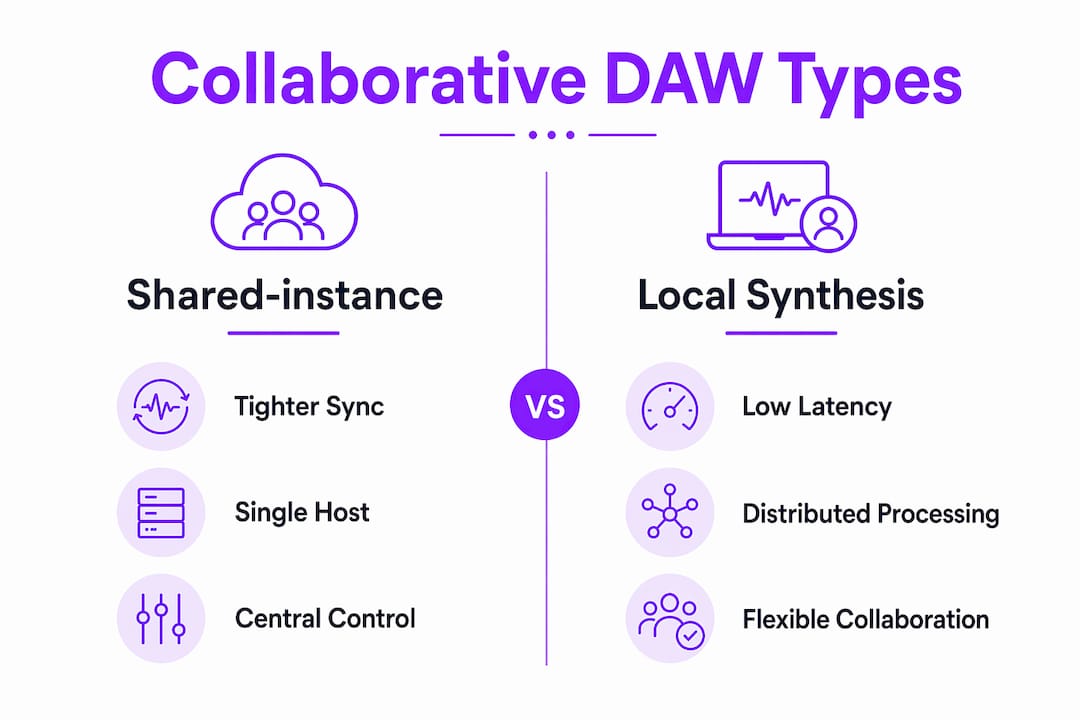
Two distinct architectural models define how multi-user DAW sessions operate. The first is the shared-instance model, in which multiple users control a single running DAW session simultaneously. The second is the synchronized local engine model, where each user runs their own audio engine and the systems exchange state data to stay aligned. MR-DAW uses the shared-instance approach with Ableton Live 12 and OSC for network communication, letting geographically dispersed musicians control a single session in real time. Each model has tradeoffs in latency, audio quality, and conflict handling.
The core technologies powering browser-based collaborative production are the Web Audio API, WebRTC, and WebSockets. WebRTC handles peer-to-peer audio and data streams, while WebSockets maintain persistent connections for low-latency event messaging. Platforms like the online-sequencer project use WebRTC and WebSockets together in a star-topology network to support real-time MIDI editing and synchronized playback across multiple users in a browser. This combination keeps the architecture scalable without requiring each user to install native software.
The smartest latency reduction technique is to avoid streaming audio altogether. Instead, the host transmits only control and timing events, and each client synthesizes audio locally from those signals. The Cornelljam band-app demonstrates this precisely, achieving sub-50ms round-trip LAN latency by broadcasting control signals rather than audio data. That number matters because anything above 50ms starts to feel unresponsive during live jamming.
Session coherence requires two additional mechanisms: a shared clock and a conflict resolution system. Without a shared clock, two users editing the same bar will drift apart within seconds. Without conflict resolution, simultaneous edits to the same track create chaos. Common approaches include edit locking, where only one user can modify a track at a time, and quantization, which snaps all incoming events to a grid. Hence, timing stays musical even under network jitter.
Pro Tip: If you are setting up a collaborative session over the internet rather than a LAN, test your round-trip latency before the session starts. Anything above 80ms will noticeably affect your ability to play in time with other musicians.
Here is the standard setup sequence for a productive multi-user session:
- Confirm all participants are on a stable, wired connection where possible.
- Designate one user as the session host to control the master clock and tempo.
- Assign track ownership before the session starts to minimize edit conflicts.
- Enable quantization on incoming events to compensate for minor network jitter.
- Test audio synthesis locally on each machine before going live.
What Are the Leading Platforms for Collaborative Music Production?
The field of multi-user DAW software has grown fast, and each platform takes a meaningfully different approach. Here is how the major options compare:
| Platform | Architecture | Latency | Collaboration mode | Standout feature |
|---|---|---|---|---|
| OpenStudio | Browser or native bridge | Sub-30ms | Real-time rooms | Cloud saves, offline WAV/MP3 export |
| MR-DAW | Mixed reality, shared instance | Low, OSC-based | Geographically dispersed | Ableton Live 12 integration |
| Audiotool NEXUS | Browser, open SDK | Not published | Multi-tool sessions | AI intercommunication, no licensing fees |
| Cornelljam band-app | Browser, local synthesis | Sub-50ms LAN | Live jamming | Control-signal-only transmission |
| Sound Selection Studio | Browser | Under 80ms voice | Role-based editing | Edit locking, pad sync for 4 producers |
OpenStudio is the most accessible entry point for most musicians. It runs in a browser, supports creating and joining rooms, offers a listener mode for observers, and saves projects to the cloud for persistent access. Its offline rendering capability via OfflineAudioContext lets you jam live and export a polished WAV or MP3 without switching tools. That hybrid workflow is genuinely useful for producers who want to capture spontaneous ideas and then refine them.
Audiotool NEXUS takes a different angle entirely. Rather than competing on latency numbers, it competes on extensibility. The platform offers an open SDK for developers to add tools to collaborative workflows, with built-in AI intercommunication and no licensing fees. For producers who want to build custom instruments or effects that live inside a shared session, NEXUS is currently the only platform offering that level of openness.
Sound Selection Studio targets professional co-production sessions with up to four producers per session. Its role-based edit locking and pad synchronization keep sessions organized even when multiple people are editing simultaneously. Voice chat latency stays under 80ms, and the platform runs on Chrome, Firefox, and Edge, with Safari support expected soon.
What Challenges Do Producers Face in Real-Time Music Collaboration?
Network latency is the most disruptive challenge in live collaborative audio editing. Even a 100ms delay between a keypress and the resulting sound is enough to break a musician’s timing instincts. The most effective mitigation is local audio synthesis, in which the client immediately plays back sound in response to the control event it sent, without waiting for server confirmation. This creates the perception of zero latency, even when the network round-trip is 40 to 60ms.
Synchronization across multiple users is the second major challenge. When two producers are editing different sections of the same arrangement, their local playback positions can drift if the session clock is not enforced strictly. Shared-instance systems like MR-DAW handle this by running one authoritative session that all clients connect to, so there is only one playback position by definition. Peer-to-peer systems must work harder to keep clocks aligned, typically using NTP-style synchronization or a designated host machine as the timing authority.
Conflict resolution is less discussed but equally important. When two users try to edit the same region at the same time, the session needs a rule for which edit wins. Edit locking, as used in Sound Selection Studio, prevents the conflict from occurring. Quantization-based systems like Cornelljam resolve it after the fact by snapping both edits to the nearest grid position. Neither approach is perfect, but locking is generally safer for structured production sessions while quantization works better for live performance contexts.
Balancing audio quality against collaboration performance is the final tension. Higher sample rates and bit depths demand more processing and bandwidth. Most browser-based platforms cap at 44.1kHz or 48kHz for collaborative sessions, reserving higher fidelity for offline exports. SoundBridge addresses this differently by supporting 192kHz sample rates in its remote-tracking workflow, maintaining studio-accurate fidelity even during remote sessions.
Pro Tip: Assign one producer as the session host with the fastest and most stable internet connection. The host machine controls the master clock, so its network quality directly determines how tight the session feels for everyone else.
Practical Tips for Getting the Most From Shared Music Editing Sessions
Good hardware and network setup make the difference between a session that flows and one that frustrates. A wired Ethernet connection is always preferable to Wi-Fi for collaborative audio work. A quality audio interface reduces monitoring latency on your end, even when the collaboration layer introduces its own delays. Headphones are strongly preferred over speakers during live sessions to prevent feedback loops when voice chat is active.
Session management habits matter as much as technical setup. Before any multi-user session, agree on a tempo, key, and basic arrangement structure. Spontaneous creativity thrives within constraints, not in their absence. Use the track ownership or locking features your platform provides, and communicate changes verbally or via in-app chat before making them. Platforms like Sound Selection Studio include integrated voice chat precisely because text chat alone is too slow for live production decisions.
Here are the most effective practices for productive collaborative sessions:
- Use loops and pre-rendered stems for your core rhythm section to reduce the number of live synthesis events the session must handle.
- Keep the number of active collaborators to the minimum needed. Four producers editing simultaneously is manageable; eight is usually chaos.
- Save session snapshots at regular intervals, especially before major arrangement changes.
- Leverage built-in effects and virtual instruments rather than heavy third-party plugins, which can introduce additional latency or compatibility issues.
- After the live session, use offline rendering features, such as those in OpenStudio, to produce a clean export for mixing and mastering.
For producers who want to go deeper into remote collaboration workflows, the principles of session structure and communication apply across all platforms, regardless of the specific tool you choose. The technology enables the session. Your preparation determines its quality.
Key Takeaways
Real-time collaborative DAWs work best when local audio synthesis, a shared clock, and clear session roles are combined to keep latency below 50ms and conflicts to a minimum.
| Point | Details |
|---|---|
| Architecture determines latency | Shared-instance systems offer tighter sync; local synthesis models reduce perceived delay. |
| Platform choice shapes workflow. | OpenStudio suits hybrid jam-to-export sessions; Audiotool NEXUS suits developer-driven extensibility. |
| Conflict resolution is non-negotiable. | Use edit locking for structured sessions and quantization for live performance contexts. |
| Hardware setup amplifies software gains. | A wired connection and a dedicated audio interface significantly reduce your local latency contribution. |
| Preparation beats improvisation | Agreeing on tempo, key, and track ownership before a session prevents the most common collaboration failures. |
Why Real-Time Collaboration Is Reshaping How Music Gets Made
I have spent years watching producers try to replicate the energy of a live room through file-sharing workflows, and the results are almost always the same: great individual parts that never quite lock together. The problem is not talent. It is the absence of real-time feedback between collaborators. When you can hear what your co-producer just played the moment they play it, you respond differently. You adapt, you react, you build on each other’s ideas in ways that asynchronous back-and-forth cannot replicate.
What excites me most about where this technology is heading is not the latency numbers, impressive as they are. It is the extensibility story that Audiotool NEXUS is telling. An open SDK with no licensing fees means that the tools inside a collaborative session can be built by the community of people who actually use them. That is how you get instruments and effects that solve real creative problems instead of imagined ones.
Mixed reality approaches like MR-DAW point toward something even more interesting: spatial collaboration where your sense of being in a shared creative space is not just metaphorical. Controlling a shared Ableton Live session through foot pedals while your collaborators do the same from different cities is a genuinely different creative experience than screen-sharing a DAW window. The interaction model changes what you make.
My honest expectation is that within two years, the latency gap between browser-based and native DAW collaboration will be negligible for most production contexts. The remaining differentiators will be the depth of feature sets and the quality of the conflict-resolution systems. Producers who learn these tools now, understand their constraints, and build workflows around their strengths will have a real creative and professional advantage.
— Wake
Take Your Collaborative Production Further With SoundBridge
SoundBridge is built for exactly the kind of high-fidelity remote production this article describes. Its zero-latency remote tracking, studio-accurate synchronization, and support for 192kHz sample rates put it in a different category from browser-only tools when audio quality cannot be compromised.

If you are ready to move beyond basic file sharing and into genuine real-time music collaboration, SoundBridge gives you the platform to do it without sacrificing sound quality. Start with the 2026 DAW guide to understand how modern DAWs fit into your production workflow, then explore how SoundBridge’s virtual collaboration features can replace your current remote setup. The free tier lets you test the core workflow before committing.
FAQ
What is a real-time collaborative DAW?
A real-time collaborative DAW is a digital audio workstation that allows multiple users to edit and produce music in the same session simultaneously from different locations. Platforms like OpenStudio, MR-DAW, and Sound Selection Studio each implement this through different technical architectures.
How low does latency need to be for live music collaboration?
Latency below 50ms is the practical threshold for live collaborative jamming, as demonstrated by the Cornelljam band-app approach, which transmits control signals rather than audio streams. Voice chat latency under 80ms, as achieved by Sound Selection Studio, is acceptable for communication during sessions.
Can you export high-quality audio from a browser-based collaborative DAW?
Yes. OpenStudio supports offline rendering of WAV and MP3 via OfflineAudioContext, allowing producers to export finished audio after a live collaborative session without switching to a separate tool.
Shared-instance systems run one authoritative DAW session that all users connect to, as MR-DAW does with Ableton Live 12. Local synthesis systems transmit only control events and synthesize audio on each user’s machine, thereby significantly reducing perceived latency.
How many producers can collaborate in real time on one session?
Sound Selection Studio supports up to four producers per session with role-based edit locking and pad synchronization. Most platforms recommend keeping the number of active editors to four or fewer to maintain session coherence and minimize conflict-resolution overhead.
Recommended
MASTER MUSIC PRODUCTION
Expert-led courses designed to take you from fundamentals to finished tracks.

HOUSEFrom bouncy bass and solid kicks, this course teaches you the most modern House music production techniques needed to succeed and stand out.

TRAPQuit sounding like generic Trap and produce something World with hints of the Far East. Create ethnic soundscapes to put your Trap ahead of the curve.

AMBIENTProduce relaxing, sophisticated psy-influenced ambient. Psychedelic and relaxing to listen to, create meditative soundscapes to put your listeners in Zen.