

Real-Time DAW Video Integration: Frame-Accurate Workflows
Last Edited: Aug 3, 2026
The fastest route to frame-accurate, low-latency video in your DAW is to offload video playback to a dedicated video engine or a plugin-plus-bridge architecture, then lock everything together with SMPTE timecode or MTC transport sync. When configured correctly, you get frame-accurate playback with minimal audio CPU impact. Soundbridge delivers this as an integrated, production-ready option with built-in video support and zero-latency remote collaboration.
TL;DR
- Soundbridge natively supports integrated video and talkback with timecode/transport sync, making it a strong all-in-one choice for scoring and remote ADR.
- Video Sync 6 is the go-to dedicated video engine for offloading decoding and supporting Blackmagic and AJA hardware outputs with MTC/MMC sync.
- SMPTE timecode and MTC are reliable protocols for long-form film sessions; MIDI clock works for short musical loops but quickly hits practical limits.
Three workflows to try: local scoring (plugin or native track + timecode), external-output rig (Video Sync 6 + DeckLink/AJA), and remote ADR (WebRTC or MoQ transport + talkback + local record fallback).
What Are the Main Approaches to Real-Time DAW Video Integration?
Four practical methods cover the full range of production scenarios, from a quick temp-score pass to a full remote ADR session. Each has a different CPU footprint, sync precision, and hardware requirement.
Native DAW Video Track
Most major DAWs let you drop a video file directly onto a dedicated video track. The DAW handles decoding internally, and the video follows transport exactly. Setup is fast, but the cost is real: video decoding competes directly with your plugin chain for CPU and memory. On a dense mix session, you will feel it.
Plugin-based video track (VST3 / CLAP / AU / AAX)
A video plugin lives on an audio or instrument track and renders the picture inside the DAW’s plugin window. DLL DAW VideoSync is the open-source example here, supporting MP4, MOV, and AVI with SMPTE timecode display across VST3, CLAP, AU, and AAX formats. The catch is sandboxing: plugin APIs typically block the plugin from sending transport commands back to the host, so two-way sync usually requires a companion bridge or controller extension.
External/Dedicated Video Engine
This is the professional standard for scoring and post. A separate application handles all video decoding and output while the DAW focuses entirely on audio. Video Sync 6 is the benchmark: it runs as a standalone engine, receives MTC or Avid Satellite Link from the DAW, and routes output to Blackmagic DeckLink or AJA hardware. Your audio CPU stays clean.
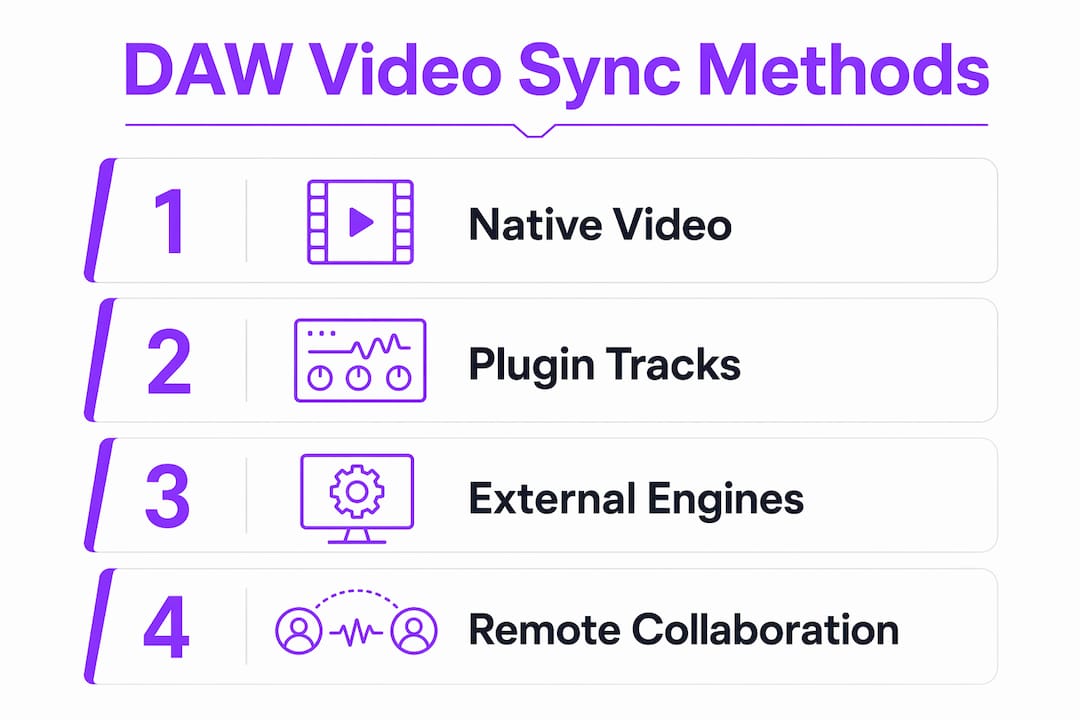
Remote Streaming and Collaboration
For remote ADR, directed sessions, or distributed scoring teams, the video travels over the network alongside audio using WebRTC or Media over QUIC (MoQ) transports. Services like LANDR Sessions and Source-Connect handle the talkback and transport sync layers. Latency is higher than local playback, but adaptive bitrate and packet-independent audio streams keep sync workable across variable connections.
| Approach | Sync accuracy | CPU impact | Transport control | Hardware output | Remote-ready | Cost shape |
|---|---|---|---|---|---|---|
| Native DAW video track | Frame-accurate (DAW-dependent) | High (shares audio CPU) | Full (host-native) | Limited | No | Included in DAW |
| Plugin-based (VST3/CLAP/AU/AAX) | Frame-accurate with bridge | Medium | Read-only without bridge | No | No | Free to paid |
| Dedicated video engine (Video Sync 6) | Frame-accurate | Low (offloaded) | Two-way via MTC/MMC | Yes (DeckLink, AJA) | No | Paid license |
| Remote streaming (WebRTC/MoQ) | Near-frame (network-dependent) | Low locally | Varies by service | No | Yes | Subscription |
Which Sync Protocol Should You Use for Your Session?
Getting frame accuracy right starts at the protocol level. The wrong choice here causes drift that no amount of buffer tweaking will fix.
SMPTE timecode and MTC
SMPTE longitudinal timecode (LTC) and MIDI Time Code (MTC) are the workhorses of film and long-form scoring. MTC encodes hours, minutes, seconds, and frames in a continuous stream that any SMPTE-aware device can lock to. For scoring sessions, ADR, and any project measured in minutes rather than bars, MTC is the right call. It handles long timelines without the range limitations that plague MIDI clock.
MIDI clock and Song Position Pointer
MIDI clock is bar- and beat-based, making it natural for music-first sessions. Song Position Pointer (SPP) lets a receiving device locate to a specific bar before playback starts. The problem: SPP is limited to approximately 1,024 bars, which sounds like a lot until you are working on a feature film or a long-form live set. For anything beyond typical song length, SPP breaks down, and MTC takes over.
DAW transport APIs and sandboxing
DAWs expose transport APIs to plugins, but sandboxed plugin environments often restrict what a plugin can send back to the host. The reliable pattern, documented in the DAWvid developer notes, is a plugin paired with a companion controller extension that communicates over localhost IPC. The extension runs with full transport API access, and relays commands the plugin cannot send directly.
Genlock and video reference
When you are routing video to an external monitor or projection system, genlock locks the video output device’s frame clock to a reference signal, guaranteeing that every frame lands at exactly the right moment regardless of network or processing jitter. Hardware such as Blackmagic DeckLink cards accepts a reference input for this purpose.
Protocol selection checklist:
- Film scoring / long-form ADR — Use MTC or SMPTE LTC. Never rely on SPP for sessions longer than roughly 1,024 bars.
- Short music sessions with visual sync — MIDI clock + SPP is workable; watch the bar-count ceiling.
- External hardware output (SDI/HDMI) — Add genlock via a reference signal to the output device.
- Plugin-based video — Add a companion bridge or controller extension for two-way transport control.
- Remote ADR / directed sessions — Use MTC over the DAW transport layer; pair with WebRTC or MoQ for the media stream.
Which Tools and Plugins Handle Video Sync in a DAW?
Here is a practical look at the software options, what each one actually does, and where each fits in a real workflow.
-
Soundbridge — Soundbridge’s native video support integrates picture directly into the DAW timeline with timecode and transport sync, plus built-in talkback for remote sessions. It is the integrated option for producers who want scoring, editing, and remote collaboration in a single environment, without patching together separate applications. Available on Mac and Windows with free and paid tiers.
-
Video Sync 6 — The dedicated video engine for professional post. Runs outside the DAW, receives MTC/MMC or Avid Satellite Link, and outputs to Blackmagic DeckLink or AJA hardware. Dual playback modes let you choose between quality and performance. This is the tool that keeps your audio CPU clean on heavy sessions.
-
DLL DAW VideoSync (DigiLogicLabs) — Open-source, plugin-based video player supporting VST3, CLAP, AU, and AAX. Handles MP4, MOV, and AVI with SMPTE timecode display. Multiple performance modes (from Ultra HD to Preview) let you trade quality for playback speed on slower machines. Free and broadly compatible.
-
DAWvid (jonwaterschoot) — A CLAP/VST3 developer project using FFmpeg decoding and OpenGL rendering. Its key contribution is the UDP IPC bridge to a companion controller extension, which solves the two-way transport problem that sandboxed plugins cannot address on their own. Worth studying if you are building or customizing a video plugin workflow.
-
LANDR Sessions — Cloud-based remote collaboration platform with session streaming and talkback. Not a dedicated video sync tool, but useful for distributed production teams who need a managed environment for real-time audio collaboration with video reference.
-
Source-Connect — The industry standard for remote ADR and directed voice sessions. Provides low-latency audio transport, talkback, and timecode relay between studios. Widely used in U.S. post-production facilities and voice-over studios.
| Tool | Sync accuracy | Transport control | Remote-ready | Hardware output | Cost |
|---|---|---|---|---|---|
| Soundbridge | Frame-accurate (native) | Two-way (native DAW) | Yes (built-in talkback) | Platform-dependent | Free / paid tiers |
| Video Sync 6 | Frame-accurate | Two-way (MTC/MMC) | No (local engine) | DeckLink, AJA | Paid license |
| DLL DAW VideoSync | Frame-accurate (plugin) | Read-only without bridge | No | No | Free/open-source |
| DAWvid | Frame-accurate (plugin+bridge) | Two-way (IPC bridge) | No | No | Open-source |
| LANDR Sessions | Near-frame (network) | Service-managed | Yes | No | Subscription |
| Source-Connect | Near-frame (network) | Two-way (talkback) | Yes | No | Paid license |
Plugin format compatibility: DLL DAW VideoSync and DAWvid both target VST3 and CLAP, with AU and AAX support in DLL DAW VideoSync for Logic Pro and Pro Tools users. Soundbridge supports its own native plugin ecosystem across Mac and Windows.
Why Does Dedicated Hardware Make Such a Difference for Video Output?
Routing video through a dedicated hardware card is not just about picture quality. It is about keeping your audio session stable while the picture runs at broadcast-grade precision.
-
Blackmagic Design DeckLink cards provide SDI and HDMI outputs with hardware-level genlock support. They accept a reference signal and lock the output frame clock to it, eliminating the drift that software rendering introduces over long sessions. DeckLink cards are the standard choice for post-production facilities running Pro Tools or Logic Pro with an external video monitor.
-
AJA Video Systems I/O devices offer similar SDI/HDMI output with genlock and support for 10-bit and HDR pipelines. AJA hardware tends to appear in broadcast and high-end post environments where color accuracy and signal integrity matter as much as sync.
-
NDI over network lets you route video to a remote display or a second machine over a standard Ethernet connection. It is lower-cost than dedicated SDI hardware and works well for internal studio setups where you need a picture on a second screen without running cable.
-
External playback machines (a dedicated Mac or PC running Video Sync 6 or a similar engine) take the entire video decode and output workload off your audio workstation. The audio machine sends MTC; the video machine locks to it and drives the display.
Pro Tip: When you understand video workflow topology before you buy hardware, you avoid purchasing a DeckLink card for a setup that actually needs an external playback machine. Map your signal path on paper first.
A typical hardware output topology looks like this: your DAW workstation generates MTC over a MIDI port or a virtual MIDI bus. The dedicated video machine (running Video Sync 6) receives MTC, decodes the video file, and sends the output signal to a DeckLink or AJA card. The card drives the external monitor or projection system via SDI or HDMI. Genlock locks the card’s frame clock to a house sync reference when available. Your audio workstation never touches a video frame.
How Do You Minimize Latency and Verify Frame-Accurate Sync?
Performance in a video-plus-audio session comes down to one principle: keep video decoding off the audio CPU. Offloading video to a separate process frees the CPU headroom your plugin chains need and removes the memory-bandwidth competition that causes subtle audio glitches during heavy decoding.
Configuration tips that actually move the needle:
- Enable hardware decode: use VideoToolbox on macOS, VAAPI on Linux, or QuickSync on Intel-based Windows machines. Software decode on a shared CPU is the single biggest performance drain in a plugin-based video setup.
- Disable unnecessary UI redraws in your DAW while video is playing. Every repaint cycle competes with audio processing.
- Route video output to an external device rather than a second window on the same GPU. This separates the render workload.
- Use MTC for any session longer than a few minutes. MIDI clock drift accumulates; MTC re-locks on every frame.
Testing methodology for sync verification:
- Record a clapper or flash frame at a known SMPTE address in your video file.
- Play back through your full signal chain (DAW transport → video engine → output device → monitor).
- Record the monitor output with a camera or a frame-grab tool and compare the visible frame to the SMPTE address displayed in your DAW at that moment.
- Log the frame offset. Anything beyond one frame (roughly 33 ms at 30 fps) indicates a configuration problem, not just network jitter.
- Run the test again after a 30-minute continuous session to catch drift that only appears over time.
Pro Tip: Set your audio buffer to 256 samples or higher during video playback sessions. Chasing ultra-low latency with a 32-sample buffer while decoding video is a recipe for dropouts. Lock your sample rate and bit depth before the session starts, not mid-session.
How Do You Run Remote ADR and Scoring Sessions With Picture?
Remote sessions with picture require a different stack than local playback. The video travels over the network, audio must stay prioritized, and sync has to survive packet loss and variable bandwidth.
WebRTC and Media over QUIC (MoQ) are the two transport protocols worth knowing. WebRTC is mature, widely supported, and handles adaptive bitrate automatically. MoQ, demonstrated in projects like iroh-live, treats each audio and video rendition as an independent QUIC stream, so a dropped video packet never blocks audio delivery. For remote sessions where audio sync is non-negotiable, MoQ’s packet independence is a meaningful advantage.
Recommended stacks by workflow:
- Remote ADR/directed sessions: Source-Connect for audio transport and talkback; MTC relayed over the DAW transport layer; local record fallback on both ends. The director hears the talent in near real time; the talent sees the picture locked to the DAW timeline.
- Collaborative production sessions: WebRTC-based service (LANDR Sessions or similar) for the media stream; DAW transport sync via a server relay; talkback routed through the same WebRTC channel.
- Low-latency live visuals: MoQ or iroh-live for the transport layer, with peer-to-peer as the default and a STUN/TURN relay as a fallback for NAT traversal.
Network checklist:
- Minimum 10 Mbps upload per participant for HD video + uncompressed audio.
- Jitter below 20 ms for reliable MTC relay. Higher jitter requires a larger jitter buffer, which adds latency.
- Configure STUN/TURN servers for NAT traversal if participants are behind strict firewalls.
- Always record locally on both ends. Network sync is your primary workflow; local recordings are your safety net.
- Expected latency budget for near-frame sync over a well-configured WebRTC connection is low enough to support smooth synchronization on a U.S. domestic connection.
| Stack component | Role | Protocol |
|---|---|---|
| Source-Connect / LANDR Sessions | Audio transport + talkback | Proprietary / WebRTC |
| DAW transport relay | MTC sync between studios | MTC over MIDI or virtual bus |
| iroh-live / WebRTC SDK | Video stream transport | QUIC/MoQ or WebRTC |
| STUN/TURN server | NAT traversal/relay | ICE/TURN |
| Local DAW recording | Safety net/sync verification | Native DAW |
For producers building out their remote collaboration workflow, the key insight is that the audio and video transports are separate concerns. Lock the audio sync with MTC first, then layer the video stream on top.
Three Practical Setups You Can Build Today
Setup A: Local scoring on a single machine
- Place your video file in the same folder as your project session. Rename it to match the session name to avoid broken links on reopens.
- Load DLL DAW VideoSync as a plugin on a dedicated instrument track, or use your DAW’s native video track if available.
- Set the SMPTE start time in the plugin to match your session start (e.g., 01:00:00:00 for a standard film reel start).
- Enable hardware decode in the plugin settings (VideoToolbox on Mac, QuickSync on Windows).
- Play back and confirm the SMPTE display in the plugin matches the DAW timeline counter at the same frame.
- Run the clapper-frame test described in the performance section to verify offset is within one frame.
Setup B: External-output and genlocked rig
- Connect your audio workstation to a second machine (the video playback machine) via Ethernet or a direct MIDI cable.
- Install Video Sync 6 on the playback machine. Configure it to receive MTC from the audio workstation’s MIDI output.
- Install a Blackmagic DeckLink or AJA card in the playback machine. Connect the card’s output to your external monitor or projector via SDI or HDMI.
- If a house sync reference is available, connect it to the DeckLink/AJA reference input for genlock.
- Set projection delay compensation in Video Sync 6 to account for any display processing latency (typically 1–3 frames for a professional monitor).
- Start playback from the DAW. Confirm the video machine locks to MTC within two seconds of transport start.
Setup C: Remote ADR session
- Both studios open the same video file locally. Do not stream video from one end to the other if bandwidth allows local playback.
- Configure Source-Connect (or equivalent) for audio transport and talkback between studios.
- Relay MTC from the directing studio’s DAW to the talent studio via the talkback service’s MIDI relay or a virtual MIDI-over-network tool.
- Both DAWs lock to the same MTC stream. Confirm timecode matches at both ends before the session starts.
- Enable local recording on both ends as a safety net.
- Run a sync check: call a specific SMPTE address over talkback, have both operators locate to it, and confirm the displayed frame matches on both screens.
Troubleshooting quick reference:
- Audio drift over long sessions: Switch from MIDI clock to MTC. Check that your audio interface clock source is set to internal, not external, unless you have a word clock reference.
- Dropped frames in the plugin: Enable a lower performance mode (Balanced or Performance in DLL DAW VideoSync). Transcode the source file to a proxy codec (ProRes Proxy or DNxHR LB) for smoother decode.
- Plugin not receiving transport: Add a companion controller extension (see DAWvid’s IPC bridge pattern). Sandboxed plugins cannot send transport commands without it.
- Transport commands not accepted by remote studio: Verify MTC is routing correctly. Check that both DAWs are set to the same frame rate (23.976, 24, 25, 29.97, or 30 fps).
Pro Tip: Transcode your delivery video to a proxy codec before the session. ProRes Proxy or DNxHR LB decode at a fraction of the CPU cost of H.264 or H.265, and you will not hear the difference in a sync session.
Which Approach Should You Actually Use?
The decision is simpler than the options make it look. Match your workflow to the right tool, and you will spend your time on the music, not the setup.
- Quick scoring pass or temp music: Native DAW video track or DLL DAW VideoSync plugin: fast setup, no extra hardware. Accept the CPU cost on lighter sessions.
- Full scoring or ADR with external monitor: VideoSync 6 on a dedicated playback machine with DeckLink or AJA output. This is the professional standard for a reason.
- Live performance with reactive visuals: VideoSync for Ableton or a WebGL-based engine (VJ-9000 style) with MIDI clock sync, and Syphon/Spout output routing.
- Remote ADR or directed sessions: Source-Connect for audio, MTC relay for sync, local record fallback on both ends.
- Integrated production with collaboration built in: Soundbridge. Native video support, timecode/transport sync, zero-latency remote recording, and built-in talkback in one environment. No patching required.
Try Soundbridge’s virtual collaboration workflow as your starting point if you want integrated video, talkback, and remote sync without having to assemble a multi-app stack from scratch.
Key Takeaways
Frame-accurate real-time DAW video integration requires either a dedicated video engine that offloads decode from the audio CPU, or a plugin-plus-bridge architecture locked to MTC or SMPTE timecode, with remote sessions using WebRTC or MoQ transport for packet-independent audio delivery.
| Point | Details |
|---|---|
| Offload video decoding | Move video decode to a dedicated engine (Video Sync 6) to free audio CPU for plugin chains. |
| Use MTC for long sessions. | SPP tops out near 1,024 bars; MTC handles full film timelines without drift. |
| Add a bridge for plugins. | Sandboxed plugins need a companion controller extension for two-way transport control. |
| Remote sessions need two transports. | Use MTC for sync and WebRTC or MoQ for the media stream; always record locally as a fallback. |
| Soundbridge as an integrated option | Soundbridge provides native video, talkback, and zero-latency remote collaboration in one DAW. |
The Setup Time You Are Not Budgeting For
There is a gap between how video sync is described in documentation and how it actually behaves in a real session, and it is worth naming directly.
Most guides treat frame accuracy as a binary: either you have it, or you do not. The reality is that frame accuracy is a budget you spend across your entire signal chain. A DeckLink card with genlock buys you precision at the output stage. MTC buys you precision at the transport stage. A proxy codec buys you precision at the decode stage. Skip any one of them and the others cannot compensate.
The setup time for a properly genlocked, MTC-synced external-output rig is real. Budget 45–90 minutes the first time you wire it up, not 10. The clapper-frame test is not optional; it is how you confirm the chain is actually working, not just appearing to work. On long sessions (two hours or more), run the test again mid-session. Drift that is invisible at the one-hour mark can be a full-frame off by the three-hour mark, and that is a problem you do not want to discover during a client review.
Remote sessions add another layer. Talkback etiquette matters more than most engineers admit. When the talent cannot see the director’s face, a clean, low-latency talkback channel with clear cue language is the difference between a productive session and a frustrating one. Build the talkback check into your pre-session checklist, not as an afterthought.
SoundBridge Brings Integrated Video and Collaboration to Your Sessions
If you have been assembling a multi-app stack to get video sync, talkback, and remote collaboration working together, Soundbridge is the cleaner path. It is built for exactly this: scoring to picture, remote ADR, and real-time collaboration without the patchwork.

Soundbridge delivers zero-latency remote recording, integrated video and talkback, timecode and transport sync, and cross-platform availability on Mac and Windows. Free and paid tiers let you start without a commitment and scale up as the sessions demand. For producers who want to understand the full scope of what a modern DAW can do, the DAW guide is a solid starting point. When you are ready to run your first integrated video session, try Soundbridge and see how much setup time you get back.
Useful Sources for Deeper Research
These are the primary references behind this guide. Use them to verify protocol specs, review plugin developer documentation, or explore hardware options in detail.
- Video Sync 6 (Non-Lethal Applications) — Product page and feature documentation for the dedicated video engine. Consult for MTC/MMC setup, Blackmagic/AJA output configuration, and details on dual playback mode.
- DLL DAW VideoSync (DigiLogicLabs, GitHub) — Open-source plugin source and feature list. Reference for VST3/CLAP/AU/AAX compatibility, codec support, and performance mode options.
- DAWvid (jonwaterschoot, GitHub) — Developer notes on the IPC bridge pattern, FFmpeg decode, and companion controller extension architecture—essential reading for anyone building or customizing a plugin-based video workflow.
- CentoSync MTC documentation (centomila.com) — Practitioner notes on MTC sync and SPP range limitations. Use this to understand why MTC is preferred for long-form sessions.
- Stream Video API (getstream.io) — WebRTC SDK documentation and adaptive bitrate guidance. Reference for remote collaboration transport architecture.
- iroh-live (n0-computer, GitHub) — MoQ/QUIC transport implementation. Consult for peer-to-peer stream architecture and relay fallback patterns.
| Deep topic | Best source to consult |
|---|---|
| MTC/MMC protocol setup and hardware output | Video Sync 6 documentation |
| Plugin development and IPC bridge patterns | DAWvid (GitHub) |
| SPP limits and MTC for long-form sessions | CentoSync MTC docs |
| WebRTC transport for remote sessions | Stream Video API docs |
| MoQ/QUIC peer-to-peer transport | iroh-live (GitHub) |
| Open-source plugin formats and codec support | DLL DAW VideoSync (GitHub) |
Recommended
MASTER MUSIC PRODUCTION
Expert-led courses designed to take you from fundamentals to finished tracks.
HOUSEFrom bouncy bass and solid kicks, this course teaches you the most modern House music production techniques needed to succeed and stand out.
TRAPQuit sounding like generic Trap and produce something World with hints of the Far East. Create ethnic soundscapes to put your Trap ahead of the curve.

AMBIENTProduce relaxing, sophisticated psy-influenced ambient. Psychedelic and relaxing to listen to, create meditative soundscapes to put your listeners in Zen.