

Real-Time Production Feedback for Music Producers
Last Edited: Aug 13, 2026
Reliable real-time production feedback in a DAW means your ears, eyes, and controllers all respond within a musical moment, typically under 10 ms for in-studio monitoring and under 40 ms one-way for remote sessions. The fastest path: enable direct monitoring on your audio interface, set your buffer to 64–128 samples at 48 kHz, and use ASIO (Windows) or Core Audio (Mac) drivers before you touch a single plugin.
What “working” looks like in practice:
- Audible monitoring with no perceptible smear between your performance and what you hear back
- Stable control feedback, meaning faders, knobs, and plugin parameters respond without lag
- A measurable round-trip latency you can verify with a loopback test
- Visual meters and waveform displays that update in sync with audio, not a beat behind
- Remote sessions where your collaborator’s click and talkback arrive predictably
Controlled experiments show many musicians can synchronize at one-way delays up to roughly 40 ms, though tempo tends to slow as delay increases and tolerance varies across performers.
Pro Tip: Set direct monitoring on your interface first. That single move cuts your audible latency to near zero before your DAW even enters the signal path.
Key Takeaways
Reliable real-time production feedback requires a wired network, ASIO or Core Audio drivers, a buffer of 64–128 samples, and direct monitoring enabled before any plugin enters the signal path.
| Point | Details |
|---|---|
| Direct monitoring first | Enable hardware-direct monitoring on your interface to reduce audible latency to near zero. |
| 40 ms one-way tolerance | Controlled experiments show that many musicians can synchronize at one-way delays up to about 40 ms, but test your own ensemble. |
| Jitter beats average latency | Bounding jitter with wired connections and private relays prevents dropouts more reliably than chasing low average ping. |
| Tempo-lock for high latency | When the delay exceeds your comfort threshold, adjust the tempo so the latency aligns with a musical beat unit. |
| SoundBridge for remote sessions | SoundBridge’s zero-latency remote tracking and integrated talkback address the core checklist in a single platform. |
What Does Your Real-Time Production Feedback Setup Need?
Getting audible and visual feedback working fast comes down to a short checklist you can run through in under 15 minutes.
Hardware (5 minutes):
- Plug into wired Ethernet. Drop Wi-Fi for any session where timing matters.
- Connect a low-latency audio interface with stable drivers (USB or Thunderbolt).
- Use closed-back headphones or near-field monitors with a flat response.
Driver and DAW settings (5 minutes):
- Select ASIO (Windows) or Core Audio (Mac) as your audio driver.
- Set buffer size to 64 or 128 samples. Higher buffers add latency; lower buffers stress your CPU.
- Set the sample rate to 48 kHz for remote sessions, or 96 kHz if your interface and session demand it.
- Disable system sounds, background apps, and any OS audio processing that shares the driver.
Network quick wins (5 minutes):
- Prefer a gigabit switch over a consumer router’s built-in ports for multi-node sessions.
- For remote tracking, use a private TURN or managed relay rather than a public server.
- Check your ping to the remote node before the session starts. Under 20 ms is excellent; 20–50 ms is workable with musical adjustments.
Pro Tip: On Windows, install your interface’s dedicated ASIO driver rather than ASIO4ALL. Manufacturer drivers consistently deliver lower and more stable latency than generic wrappers.
For a deeper look at how your interface choice shapes the entire signal path, the audio interface guide on SoundBridge clearly covers the trade-offs.
How Does Latency Actually Affect Your Playing?
Latency is not just a number on a spec sheet. It changes how you perform.
One-way vs. round-trip: One-way latency is the delay from your instrument to your collaborator’s ears. Round-trip is the full loop back to you, roughly double the one-way figure over a symmetric connection. For in-ear monitoring, round-trip is what you feel. For remote sync, one-way is what your collaborator hears.
Research with 11 musician pairs found that many performers can synchronize at one-way delays up to about 40 ms, but that tempo slows as delay increases and that variance across individuals is high. The classic studio target of 10 ms round-trip is a comfort threshold, not a hard perceptual wall.
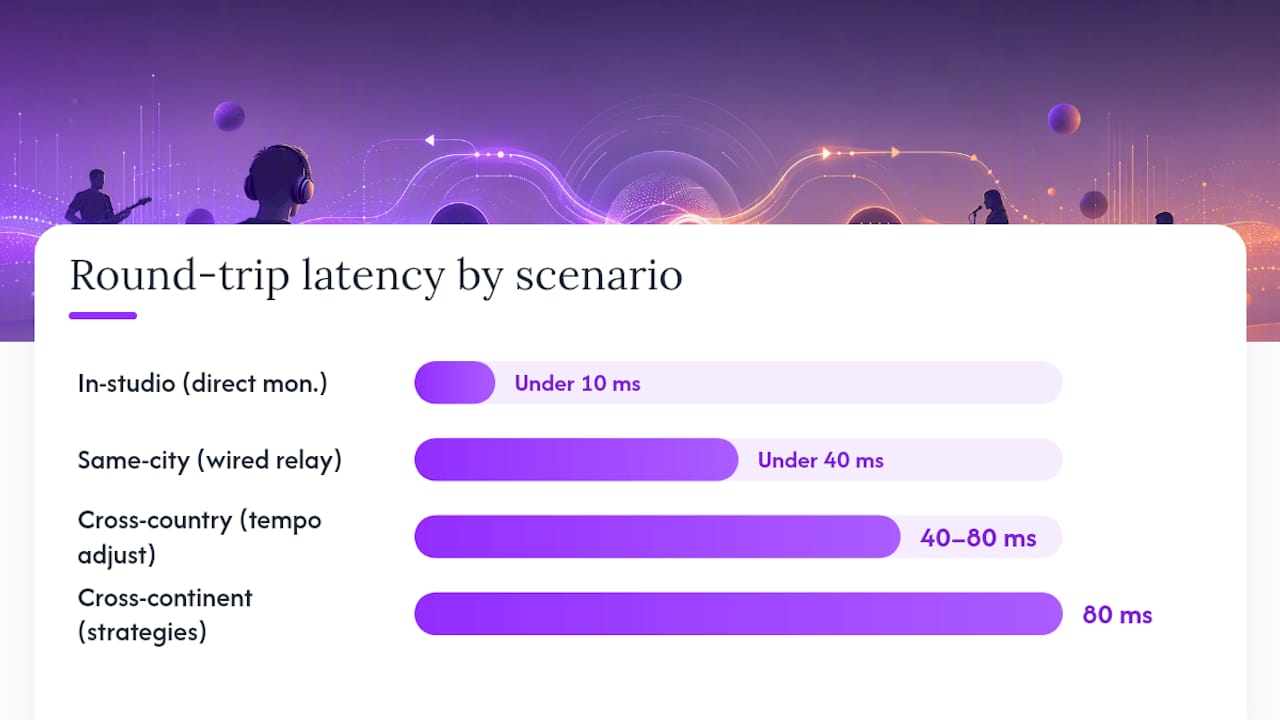
| Scenario | One-way target | Round-trip target | Notes |
|---|---|---|---|
| In-studio monitoring | Under 5 ms | Under 10 ms | Direct monitoring preferred |
| Same-city remote | Under 20 ms | Under 40 ms | Wired + private relay |
| Cross-country remote | 20–40 ms | 40–80 ms | Tempo adjustment likely needed |
| Cross-continent | 40–80 ms | 80 ms | Musical strategies required |
What matters beyond the raw number is predictability. A stable 35 ms feels better than a jittery 15 ms that swings by ±20 ms. When latency is consistent, your brain adapts. When it lurches, your groove falls apart.
How Do You Configure Your DAW and Network to Cut Delay?
Follow this sequence every time you set up a session:
- Set the sample rate first. Match it across every device in the chain. Mismatched rates force resampling and add unpredictable delay.
- Pick your buffer size. Start at 128 samples for tracking; drop to 64 if your CPU allows. Mixing sessions can run at 512 or 1024 without affecting your monitoring path.
- Route direct monitoring. Bypass the DAW’s software monitoring for any live input you’re tracking. Your interface handles this in hardware at near-zero latency.
- Manage plugin latency. High-latency plugins (linear-phase EQs, certain limiters) trigger PDC (Plugin Delay Compensation) in your DAW. Bypass them on live input channels during tracking.
- Validate end-to-end. Run a loopback test before the session starts (see the next section).
For network configuration, jitter is often more damaging than average latency. A packet that arrives 80 ms late breaks your jitter buffer and causes a dropout. Wired Ethernet, quality of service tagging for audio traffic, and private relay paths all reduce jitter variance.
Codec choice matters too. Opus introduces roughly 5 ms of encoding delay in typical configurations. Smaller frame sizes cut latency but raise CPU load and bitrate. For music, 10 ms Opus frames with constrained VBR are a reasonable starting point. Disable AGC and noise suppression entirely; they mangle musical dynamics.
Pro Tip: Lock your clock source. If you’re running multiple interfaces or a digital mixer, designate one device as the word clock master. Clocking mismatches produce clicks and phase drift that no buffer setting can fix.
Pro Tip: If possible, isolate your audio interface on its own USB controller. Sharing a USB hub with hard drives or webcams introduces interrupt conflicts that cause unpredictable latency spikes.
How Do You Measure and Verify Your Actual Latency?
DAW loopback test:
- Connect an output of your interface directly to an input with a short cable.
- Send a click or impulse from a DAW track to that output.
- Record the return signal on a new track.
- Zoom in and measure the sample offset between the sent and received transients.
- Divide by your sample rate to get round-trip latency in milliseconds.
Network checks:
- Run
pingto your remote collaborator’s IP or relay server. An average under 20 ms is solid. - Use
tracerouteTo spot high-latency hops in the path. - Check jitter with a tool like iPerf or your router’s quality of service statistics. Jitter above 5 ms begins to affect audio stability.
One-way estimation: Without time-synced clocks, divide your round-trip ping by two as a rough estimate. It assumes symmetric routing, which is usually close enough for session planning.
Tools worth knowing: Your DAW’s built-in latency meter, your interface’s control panel latency readout, and OS-level audio diagnostics (Audio MIDI Setup on Mac, ASIO control panel on Windows) all give you cross-reference points.
What Musical Strategies Help When Latency Is Unavoidable?
Engineering only gets you so far. When you’re connecting across time zones, musical design picks up the rest.
- Lock latency to tempo. The Online Orchestra project measured total system latency and adjusted tempo so the delay corresponded to a tactus beat, making the lag a predictable musical unit rather than an error.
- Lower the tempo. Slower tempos give each beat more time, making a 40 ms delay proportionally smaller relative to the beat grid.
- Choose call-and-response arrangements. Parts that don’t require tight simultaneous attack tolerate latency far better than unison lines.
- Favor sustained textures. Pads, drones, and legato lines mask timing offsets that would be obvious in a tight rhythmic lock.
- Use a shared click. Both players listening to the same metronome reference, even with delay, gives a common anchor that reduces drift.
Experienced NMP practitioners treat latency as an elastic condition, negotiating it through tempo, repertoire, and improvisation rather than fighting it as a fixed obstacle.
Pro Tip: Before a remote session, tell your collaborator the measured one-way latency and agree on a tempo. Shared expectations prevent the instinct to rush or drag in response to the delay.
What Workflow Patterns Keep Remote Sessions Productive?
Three templates cover most remote production scenarios:
- Zero-latency remote tracking. One musician tracks live while the engineer monitors and records remotely. Requires a private relay, talkback channel, and a shared click. The tracking musician uses direct monitoring; the engineer hears the processed feed.
- Hybrid live plus file exchange. Real-time session for arrangement decisions and takes, then stems are exchanged for offline editing. Reduces the latency pressure on mixing and processing.
- Asynchronous overdubs. One player records to a shared session file; the other overdubs later. No real-time sync required. Best for complex arrangements where timing precision matters more than spontaneity.
Role checklist for any live remote session:
- Designate one node as the server or relay host before the session starts.
- Assign talkback control to the engineer, not the performer.
- The engineer controls the click tempo and any tempo changes.
- Agree on a stem-naming convention before recording begins.
For cue mixes, give each performer a dedicated headphone mix with their own instrument louder than the rest. Bleeding from a shared mix causes performers to compensate for each other’s latency, compounding timing errors.
For more detailed remote session tactics, the remote collaboration guide on SoundBridge covers monitoring mixes and session rules in depth.
What Hardware and Software Features Should You Prioritize?
Spend your budget in this order:
- Audio interface with stable drivers and direct monitoring. This is the single highest-leverage purchase. Look for ASIO/Core Audio support, hardware direct monitoring, and at least 48 kHz/24-bit capability.
- Gigabit switch or router. A dedicated gigabit switch between your recording machine and your modem cuts network jitter compared to sharing a consumer router’s ports.
- Closed-back headphones. For tracking, isolation matters as much as frequency response.
- DAW with zero-latency monitoring and plugin delay compensation. These are non-negotiable for any serious tracking workflow.
SoundBridge addresses these priorities directly: zero-latency remote tracking, integrated talkback and video, per-channel routing, and bi-directional plugin control are built into the platform. Support for sample rates up to 192 kHz gives you headroom for high-fidelity sessions. The virtual collaboration overview shows how these features map to a real session setup.
Pro Tip: Buy the best audio interface you can afford before spending on plugins. A great interface with a modest plugin chain sounds better than a cheap interface with expensive processing.
How Do You Diagnose and Fix Common Real-Time Feedback Problems?
Work through symptoms in this order:
- Reproduce the issue consistently. A dropout that only happens once is hard to fix. Find the repeatable trigger first.
- Isolate audio vs. network. Disconnect from the remote node and test locally. If the problem disappears, it’s the network. If it persists, it’s audio or CPU.
- Check CPU and driver state. Open your DAW’s performance meter. Spikes above 80% cause dropouts. Widen your buffer size by one step and retest.
By symptom:
- Dropouts and glitches: Check for jitter and packet loss on the network path first. Then check for USB bandwidth conflicts on the audio interface.
- Clicks and pops: Usually a buffer underrun or a clocking mismatch. Verify your clock source and increase buffer size.
- Delayed control feedback: Plugin latency is the likely cause. Bypass high-PDC plugins on live channels during tracking.
- Tempo drift in remote sessions: Both nodes need a shared clock reference. Confirm your relay is delivering packets consistently.
Pro Tip: Bypass all CPU-heavy plugins on your master bus before a tracking session. You can re-enable them for mixing. A clean signal path during tracking prevents the CPU spikes that cause the worst dropouts.
Why Should You Trust These Thresholds and Procedures?
The 40 ms one-way tolerance figure comes from controlled experiments with 11 pairs of musicians performing under measured delay conditions. Results were statistically significant, but variance across performers was high. Some musicians maintained sync at higher delays; others struggled below 40 ms. Treat it as a starting guideline, not a guarantee.
“NMP practitioners often treat ‘real time’ as an elastic category rather than a fixed threshold, negotiating latency through tempo adjustment, repertoire choice, and improvisation.” This framing, drawn from interviews with 15 experienced practitioners, is consistent with what engineering guidance recommends: test your specific ensemble, in your specific network conditions, before committing to a session format.
The jitter-focused engineering guidance from RAVENNA and the tempo-locking approach from the Online Orchestra project both point to the same principle: predictability matters more than chasing the lowest possible average latency number. Run your own loopback and ping tests for every new session setup. The numbers in this article are benchmarks, not absolutes.
What Does a Realistic Remote Session Actually Feel Like?
A well-configured remote session with a 30 ms one-way delay feels slightly different from playing in the same room, but it’s absolutely musical. The key is briefing your collaborator before you hit record.
Ask every remote collaborator to run a wired connection, confirm their buffer settings, and do a quick loopback test before the session. Share the measured latency number with them so they know what to expect. When both players know the delay is stable at 28 ms, they stop fighting it and start playing with it.
The balance between musical goals and technical constraints is a real negotiation. A tight funk groove at 120 BPM with a 40 ms delay is genuinely hard. A slow jazz ballad at 60 BPM with the same delay is completely manageable. Choose your repertoire with the latency in mind, and the session feels like a creative choice rather than a technical compromise.
For artists who also want feedback on their music beyond the session itself, platforms that help you network with music curators can extend that feedback loop into the wider industry.
SoundBridge Makes Real-Time Production Feedback Practical
SoundBridge is built for producers and engineers who need zero-latency remote tracking without patching together a stack of separate tools. The platform’s integrated talkback and video mean you’re not juggling a video call alongside your DAW. Per-channel routing and bi-directional plugin control give you the same feedback precision you’d expect in a physical studio, across any distance.

Available on Mac and Windows with free and paid tiers, SoundBridge lets you test a two-node session before committing to a subscription. The DAW guide is a solid starting point for understanding how the platform’s architecture maps to the setup checklist in this article. Ready to hear the difference? Start your first session and run a loopback test inside SoundBridge today.
Sources
- Real time in different spacetime: a phenomenology of networked music performance
- Assessing the Effects of Delay to NMP via Audio Analysis
- Telematic performance and the challenge of latency
- RAVENNA Network Requirements V1.4
Recommended
MASTER MUSIC PRODUCTION
Expert-led courses designed to take you from fundamentals to finished tracks.

HOUSEFrom bouncy bass and solid kicks, this course teaches you the most modern House music production techniques needed to succeed and stand out.

TRAPQuit sounding like generic Trap and produce something World with hints of the Far East. Create ethnic soundscapes to put your Trap ahead of the curve.

AMBIENTProduce relaxing, sophisticated psy-influenced ambient. Psychedelic and relaxing to listen to, create meditative soundscapes to put your listeners in Zen.