

Remote Producer Workflow Tips for Mix-Ready Delivery
Last Edited: Aug 18, 2026
Adopt a remote-first ruleset before your next session: standardize file formats, assign one person to handle feedback, and cap revision rounds up front. That single shift eliminates most of the friction producers attribute to “remote work,” when the real problem is an undefined process.
Here’s the checklist worth pinning above your monitor:
- Stems export at 48 kHz.
- Feedback only counts if it’s time-coded. “The chorus feels off” gets ignored; “2:14, snare too loud” gets fixed.
- One project owner consolidates every note before it reaches you, no exceptions.
- Revision rounds per phase are capped to prevent endless edits, with additional changes billed separately.
- A single source-of-truth cloud folder holds every session file, so nobody’s working off a stale bounce.
A DAW built for this, like SoundBridge, handles the zero-latency tracking and integrated talkback that make the above rules enforceable instead of aspirational.
Key Takeaways
A remote-first workflow works when file formats are standardized, feedback is time-coded and owned by one person, and revision rounds are capped before the project starts.
| Point | Details |
|---|---|
| Standardize stem exports | Use 24-bit WAV at 44.1 kHz for music or 48 kHz for video, starting at bar 1, beat 1. |
| Assign one project owner | Route every stakeholder note through a single person to avoid conflicting revisions. |
| Cap revisions at two rounds | Set two free revision rounds per phase, then a paid change order after that. |
| Reserve real-time tracking for critical moments | Default to async stem exchange; use zero-latency tracking only for live or scored-to-picture sessions. |
| Build your stack around a remote-first DAW | SoundBridge combines zero-latency tracking, integrated talkback and video, and cloud ingest in one platform. |
Start your 48-hour plan today: set up your folder structure, export one test stem, and send the new rules to your current collaborators before your next session.
Essential Technical Setup for a Remote Producer Workflow
Your gear list matters less than people think. Your network settings matter more.
Start with a solid audio interface, a reference-accurate pair of headphones or monitors, and a decent mic if you’re tracking vocals or instruments remotely. Camera quality is an afterthought for most scoring and mixing work. Nobody’s rejecting a cue because your webcam is soft. They’re rejecting it because the low end doesn’t translate.
Network minimums matter just as much:
- Use wired Ethernet over Wi-Fi whenever a session involves live tracking or talkback.
- Upload speeds of at least 10 Mbps for smooth stem transfers; higher if you’re moving full sessions with video reference.
- SFTP or accelerated UDP transfer tools for large batches instead of email attachments or consumer file-sharing links.
- Proxy video workflows for scoring sessions when bandwidth is tight. Send a compressed reference file for sync work, then swap in the full-resolution picture at final delivery.
Lock in your DAW defaults before the first note gets recorded, not after. Set your sample rate (44.1 kHz for music, 48 kHz if picture is involved), bit depth, and tempo map when creating the project. Establish master bus rules early too, whether that’s a fixed headroom target or a specific limiter chain, so nobody’s guessing what “loud enough” means three revisions in.
Pro Tip: Before you send any stem package to a collaborator, import your own exported files into a blank session first. If something’s misaligned, mislabeled, or missing metadata, you’ll catch it before your composer or mix engineer does.
How Should Remote Teams Structure Feedback and Communication?
Undefined roles kill more remote projects than bad internet ever will. The most common reason remote collaborations break down is unspoken expectations at kickoff, not technical failure.
Fix that with a single project owner. One person consolidates all stakeholder notes into a single, coherent set of instructions. Skip this step, and you’ll get three conflicting opinions on the same mix from three people who never talked to each other, and you’ll spend a week reconciling notes instead of mixing.
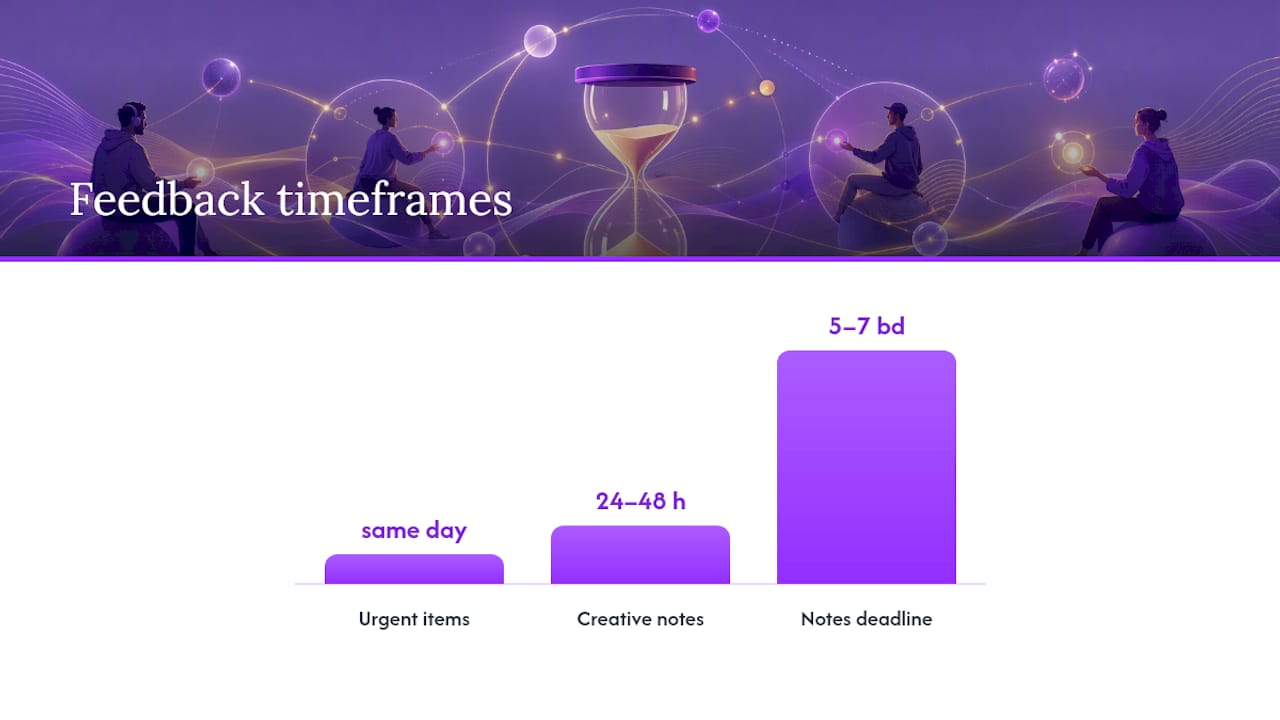
Set explicit response windows too. Urgent items (a session crash, a missing file) get a same-day reply. Creative notes get a 24-to-48-hour window. Put milestone reviews on the calendar in advance so nobody’s surprised by a deadline.
Your revision policy needs teeth. The standard that holds up across tracking, mixing, and mastering phases: two free revision rounds, then a paid change order for anything beyond that. This isn’t about nickel-and-diming clients. It’s about preventing the slow creep where “just one more small tweak” turns into a fourth full remix.
A workable contract clause covers:
- What counts as one “revision” (a full pass of notes, not a single comment).
- The deadline for submitting notes after a delivery is typically 5 to 7 business days.
- How stakeholder comments get routed (through the project owner only, never directly to the engineer).
A durable review loop depends on one reviewer owning feedback, time-coded comments in a single channel, and a hard cap on rounds with real deadlines. Skip any one of those three, and the loop stays open indefinitely.
Pro Tip: Require every note to include a timestamp and live in one tool, whether that’s a shared doc, a DAW comment track, or a dedicated review platform. “The bridge needs work” is not feedback. “1:47, guitar clashing with vocal” is.
What File Naming and Handoff Standards Prevent Confusion?
Sloppy file handling is the single easiest problem to fix and the one that costs the most time when ignored.
Every stem should export as a 24-bit WAV file starting at bar 1, beat 1. Use 44.1 kHz for music-only projects, and 48 kHz once video is involved. Starting every stem at the same downbeat means your collaborator’s session lines up the instant they drag the files in, no manual nudging required.
Filenames should carry their own metadata. A name like Project_Kick_140bpm_Fmin_V02.wav tells the next person everything they need before they even open the file, and a short README with BPM, key, and any tempo changes closes the gap that filenames can’t cover.
Decide upfront whether you’re sending stems or a full session. Stems work across any DAW and keep files small. Full sessions help when a mix engineer needs access to your automation, plugin chains, or edit history, but cross-DAW compatibility is limited unless everyone’s on the same platform—which is exactly why a cloud-capable DAW built for collaboration removes that friction.
Version control should live in one folder structure with clearly versioned subfolders, never scattered across email threads.
| Use Case | Sample Rate | File Format | Naming Elements |
|---|---|---|---|
| Music-only tracks | 44.1 kHz | 24-bit WAV | Track_Stem_BPM_Key_V## |
| Film/video scoring | 48 kHz | 24-bit WAV | Cue_Stem_TC-in_TC-out_V## |
| Reference mixes | Match project | MP3 or WAV | Track_RefMix_Date |
Include a reference mix and a short text note with every handoff: BPM, key, time signature, and what you actually want changed. This one habit alone prevents most of the “wait, what were you going for here” emails.
When Do You Actually Need Real-Time Remote Tracking?
Most exchanges should stay asynchronous. Synchronous sessions require more coordination and should be reserved for moments that genuinely require real-time interaction, such as live-tracking a band or scoring live to a locked picture cut.
When you do need real-time tracking, latency mitigation makes or breaks the session:
- Wired connections only. Wi-Fi introduces jitter that no amount of buffer tweaking fixes.
- Lower your buffer size for tracking, raise it for mixing.
- Use local direct monitoring so performers hear themselves with zero perceived delay, independent of the remote connection.
- Route audio on a partitioned path so talkback doesn’t compete with the program signal.
Cloud ingest and real-time capture patterns only pay off when a project genuinely needs parallel work during capture; otherwise, proxy workflows and standard async stems get the job done faster with less setup.
Integrated talkback and video matter enormously for scoring work, where a composer needs to watch the picture and hear the conductor’s cues in the same breath. A zero-latency remote tracking setup with built-in video removes the need for a separate video call running alongside your DAW session.
Run a technical check before any live session: ping, jitter, buffer settings, and a 30-second voice test with every participant.
Pro Tip: Treat remote tracking like a live broadcast, not a casual call. Run a full technical rehearsal with everyone connected 15 minutes before the actual session starts.
Building Templates That Speed Up Every Handoff
Templates are the difference between a five-minute setup and a 45-minute one. Workflow discipline, not the tools themselves, decides whether a remote project stays on schedule.
A solid template locks in:
- Track layout and consistent naming conventions across every session.
- Bus routing for drums, vocals, and instrument groups.
- Send and return setups for your standard reverb and delay chains.
- Master bus processing rules, so gain staging doesn’t drift project to project.
- A tempo map placeholder ready for the first downbeat.
Automation compounds the savings. Set up automatic version numbering so files are never overwritten, and connect cloud storage triggers to your project tracker so collaborators get notified the moment a new stem lands—no manual “hey, it’s uploaded” message required.
What Belongs on a Final Delivery and QC Checklist?
Standardize your capture and QC protocols before delivery, not during it. Confirm the sample rate and bit depth match the spec (24-bit WAV; dither down only at the final master if you’re delivering 16-bit for streaming). Set loudness targets against a reference track rather than chasing an arbitrary number.
Run this before anything ships:
- Import test: drop your final files into a blank session and confirm everything lines up.
- Phase coherence check across stems, particularly on drum and bass elements.
- Metadata and cue point verification.
- Frame-accurate sync confirmation for anything paired with a picture.
Archive with a canonical master folder, a backup copy in a separate location, and a retention policy that doesn’t rely on “I’ll get to it eventually.” Confidentiality matters here too: use password-protected links with expiration dates for client deliveries, and keep an audit trail of who downloaded what and when.
Which Tools Actually Support a Remote-First Workflow?
Producers need five categories covered: cloud storage and ingest, frame-accurate review tools, a sync-capable DAW, low-latency monitoring, and a project coordination system.
Scaling remote production without scaling the underlying infrastructure is where quality collapses. Adding more collaborators to a shaky setup doesn’t fix the setup.
A DAW built specifically for remote work removes several bottlenecks at once. Zero-latency remote tracking, integrated talkback and video, and high-fidelity processing up to 192 kHz address the exact friction points that turn a simple scoring session into an all-day ordeal. When talkback and video live inside your DAW instead of a separate Zoom window, you’re not toggling between two apps to communicate with a performer while watching a waveform.
Your recommended stack, category by category: centralized cloud storage for ingest, a review tool for time-coded notes, a DAW that supports remote-first collaboration at the center, and a lightweight project tracker to keep deadlines visible to everyone.
How to Adopt These Rules in the Next 48 Hours
Day 1:
- Set up your folder structure: one master project folder, versioned subfolders for stems, and a dedicated location for reference mixes.
- Export a test stem using your new naming convention and README format.
- Import that stem into a blank session to confirm it opens cleanly.
Day 2:
- Schedule a kickoff call with any active collaborators to define roles and confirm the revision cap.
- Add the two-round revision policy to your standard contract or scope document.
- Run a latency check if any upcoming session involves live tracking.
Quick self-test before you consider yourself ready:
- Import your own exported stems into a blank project.
- Confirm BPM, sample rate, and bit depth all match your stated defaults.
- Run a ping and jitter test if a real-time session is on the calendar this week.
Announce the change with one message to every active collaborator: “Starting now, all feedback needs a timestamp, all notes route through me, and we’re working off two revision rounds per phase before a change order applies. Stems will be 24-bit WAV, 48 kHz for anything scored to picture. Short, specific, and impossible to misinterpret.
Remote Isn’t a Compromise. It’s the Model.
Most producers still treat remote work as the fallback version of “real” production, something you tolerate until everyone can get back in the same room. That framing is backward. A well-built remote workflow isn’t a downgrade from in-person sessions. It’s a different production model with its own logic, and when you design for it deliberately rather than retrofitting studio habits onto a Zoom call, it often outperforms the in-person version in speed and clarity.
The decision that matters most isn’t “remote or not.” It’s choosing the simplest production model that actually achieves the creative goal. A string quartet tracking a live cue to picture probably needs synchronized real-time tracking. A vocal comp for a pop single almost never does. Producers who default to the most complex tool available—video calls for every note, real-time sessions for every overdub—are solving a coordination problem with a logistics tool, and it shows in how long their projects take.
The producers who move fastest are the ones who’ve stopped apologizing for working remotely and started building processes specifically for it: one owner for feedback, a hard cap on revisions, and file standards nobody has to think about twice.
How SoundBridge Simplifies Remote Production
Most of the friction covered above—mismatched sample rates, feedback scattered across three apps, latency that ruins a live take—comes down to using tools that weren’t built for distributed teams in the first place. SoundBridge was.

It gives producers zero-latency remote tracking, integrated talkback and video built directly into the session window, and centralized cloud ingest so your source files live in one place instead of six inboxes. That combination turns a lot of this article’s rules from policy into default behavior.
Where it speeds things up most:
- Scoring to picture, with video and talkback in the same window as your session.
- Remote tracking sessions where a delayed monitor mix would ruin the take.
- Bi-directional control of plugins, so a mix engineer across the country can adjust your track in real time.
If you’re rebuilding your workflow around the practices in this guide, start with a digital audio workstation built for remote collaboration and try the free tier before committing to a paid license. And if your home setup still needs an interface or monitoring upgrade to make any of this work reliably, MusicStreet’s studio setup guide covers the hardware side well.
Sources
- Musicproductionwiki
- Remote Video Production: How to Make Great Video Without Being in the Room | Viralix Blog
- Remote Music Production: The Complete Guide for Distributed Teams | Feedtracks Blog
- How To Scale Remote Video Production Without Sacrificing Quality
Recommended
MASTER MUSIC PRODUCTION
Expert-led courses designed to take you from fundamentals to finished tracks.

HOUSEFrom bouncy bass and solid kicks, this course teaches you the most modern House music production techniques needed to succeed and stand out.

TRAPQuit sounding like generic Trap and produce something World with hints of the Far East. Create ethnic soundscapes to put your Trap ahead of the curve.

AMBIENTProduce relaxing, sophisticated psy-influenced ambient. Psychedelic and relaxing to listen to, create meditative soundscapes to put your listeners in Zen.