

Synchronized DAW Playback: A Producer's 2026 Guide
Last Edited: Jul 20, 2026
Synchronized DAW playback is the practice of aligning two or more digital audio workstations to play audio and MIDI in perfect timing, sharing a single master clock. Producers who run orchestral templates in one DAW while tracking live instruments in another depend entirely on this coordination. Without it, even a few milliseconds of drift turns a tight groove into a muddy mess. This guide covers the protocols, network setups, and step-by-step methods you need to lock multiple DAWs together, whether you are working locally or collaborating remotely with another engineer.
What Are the Key Technical Requirements for Synchronized DAW Playback?
Multi-DAW sync depends on three layers working together: a shared clock, a reliable transport protocol, and a network that maintains predictable latency. Miss any one of these and your sessions will drift.
Clock and Transport Protocols
Three protocols handle the majority of real-world setups:
- MIDI Timecode (MTC): Sends absolute position data over MIDI. Works well for film scoring and post-production where frame-accurate sync to video is required. Latency depends on the quality of your MIDI interface.
- Ableton Link: Synchronizes tempo and beat position over a local area network. Every device on the same Wi-Fi or Ethernet network automatically joins the Link session. No master/enslaved person assignment needed.
- NTP-based clocks: Network Time Protocol handshakes let distributed systems share a global reference clock. A server-authoritative clock combined with pre-buffered audio achieves synchronized playback within 10–50 milliseconds. That range sits well below the human perception threshold for rhythmic drift, which most engineers place around 20–30ms.
Network Configuration
Wired Ethernet outperforms Wi-Fi for multi-DAW sync every time. A gigabit LAN switch keeps jitter under 1ms in most studio environments. Wi-Fi introduces variable latency spikes that break tight sync, especially when other devices share the network. For internet-based collaboration, WebRTC data channels deliver sub-100ms synchronization accuracy for sessions with up to 500 participants. Beyond that scale, more advanced protocols, such as LL-HLS with WebSocket markers, become necessary.
Hardware and Software Prerequisites
You need a dedicated audio interface on each machine, a common sample rate across all DAWs (48kHz or 96kHz are standard), and word clock synchronization if you are running multiple interfaces. On the software side, every DAW in the chain must support your chosen protocol natively or through a bridge plugin.
How to Set Up Synchronized Playback Across Multiple DAWs
Follow these steps to build a working multi-DAW sync environment on a local network.
- Set a common sample rate. Open the audio settings on every machine and match the sample rate exactly. A mismatch here causes pitch drift that no sync protocol can fix.
- Connect all machines to the same wired network. Plug each computer into the same gigabit switch. Avoid routing through a router if possible, since extra hops add latency.
- Enable Ableton Link in each DAW. Most modern DAWs include a Link toggle in their preferences or transport bar. Turn it on across all machines. The session tempo will align automatically within one or two bars.
- Add Ableton Link Audio for sample-accurate streaming. Link Audio streams sample-accurate audio over the local network, removing the need for virtual loopback cables or complex routing. This feature, introduced with Ableton Live 12.4, is now the standard for LAN-based audio playback synchronization.
- Schedule playback with a lookahead buffer. Do not trigger playback with an immediate command. Instead, schedule the start time as a future instruction on the shared clock. A minimum 50ms lookahead buffer absorbs OS scheduling jitter and prevents the kind of drift that accumulates over long sessions.
- Align plugin presets across all DAWs. Load the same plugin versions and save presets in the plugin’s native format. Shared preset formats, such as manufacturer-specific .fxp files, avoid incompatibility errors that break sync mid-session.
- Test with a click track. Route a click from your primary DAW to your monitors and record it on a second machine. Zoom in on the recorded waveform and measure the offset. Adjust your buffer settings until the offset stays under 10ms.
Pro Tip: Set your primary DAW as the Link session tempo master and turn off tempo editing on all secondary machines. This prevents accidental tempo changes from cascading through your entire rig mid-take.
What Are Common Challenges When Synchronizing Playback Across DAWs?
Even a well-configured setup runs into problems. Knowing the causes speeds up your troubleshooting.
Clock Drift and Network Jitter
Clock drift happens when two machines count time at slightly different rates. Over a 10-minute session, even a 0.01% difference adds up to noticeable slip. Network jitter compounds this by delivering sync packets at irregular intervals. The fix is continuous drift correction: scheduling playback as future instructions on a calibrated shared clock, then recalculating the offset every few seconds and nudging playback position to compensate. Systems using this approach maintain ±10–50ms accuracy across sessions.
Plugin State Inconsistency
A plugin loaded in one DAW but missing in another breaks the session the moment that track plays. Unified plugin inventory and shared preset management are not optional extras. They are the foundation of a stable multi-DAW environment. Before any collaborative session, both engineers should confirm that plugin versions match and that export presets are in a format both DAWs can read.
Common Pitfalls and Their Fixes
- Immediate playback commands: Triggering play without a scheduled future start time causes each DAW to begin at slightly different moments. Always use scheduled start times referenced to the shared clock.
- Mixed sample rates: Even a single machine running at 44.1kHz while others run at 48kHz creates pitch and timing errors. Audit every machine before the session starts.
- Wi-Fi interference: A microwave oven or neighboring Wi-Fi network can spike latency by 20–40ms. Switch to Ethernet or use a dedicated 5GHz band with no other devices.
- Overloaded CPU: High CPU load causes audio dropouts that break sync. Freeze CPU-heavy tracks on secondary machines before the session.
Pro Tip: Run a sync stability test for at least 15 minutes before a critical session. Short tests miss the slow drift that only appears after extended playback. Record a reference tone on all machines simultaneously and compare the waveforms at the 10-minute mark.
For deeper context on audio post-production sync strategies, the principles of distributed clock management apply equally to multi-device film scoring setups.
What Are the Latest Advancements in Multi-DAW Sync Technology in 2026?
The biggest shift in 2026 is the move from tempo-only sync to full audio streaming over local networks.
Ableton Link Audio
Link Audio, introduced in 2026, is now the industry standard for local network beat, tempo, and audio synchronization combined. It streams sample-accurate audio alongside tempo data, eliminating the virtual loopback cables and third-party routing tools that producers relied on for years. The practical result is that you can run two DAWs on separate machines and hear them as a single coherent playback engine with no perceptible offset.
Performance-Led Tempo Mapping
Traditional sync locks every DAW to a fixed grid. Performance-led synchronization algorithms generate tempo maps from live performance data instead, letting the DAWs follow the musician’s natural timing. This matters most for live performance and film scoring, where a conductor or soloist sets the pace and the technology adapts rather than constrains.
Distributed Clock Architectures
The table below compares the three main synchronization approaches available to producers in 2026.
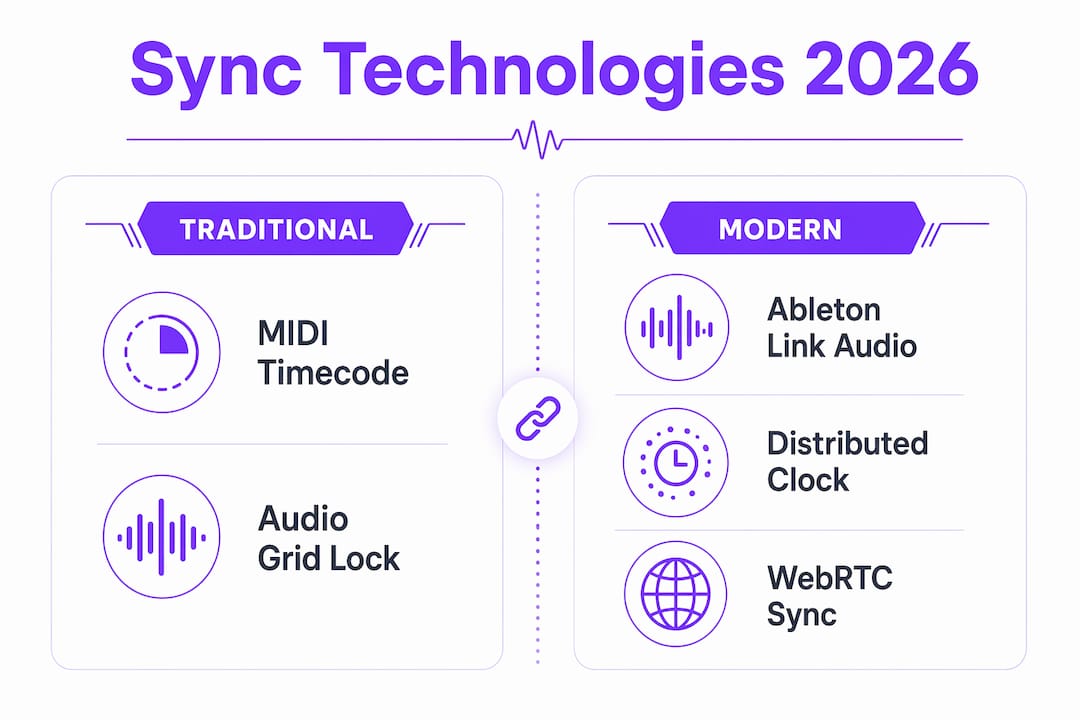
| Approach | Accuracy | Best use case |
|---|---|---|
| MIDI Timecode | Frame-accurate | Film scoring, video sync |
| Ableton Link + Link audio | Sample-accurate over LAN | Studio multi-DAW, live performance |
| NTP + pre-buffered audio | 10–50ms over internet | Remote collaboration, distributed sessions |
Each approach solves a different problem. MIDI Timecode wins for video work. Link Audio wins for studio multi-DAW setups. NTP-based systems win when your collaborator is in a different city.
Emerging Protocols
WebRTC and LL-HLS are moving from live streaming into studio workflows, bringing sub-100ms internet sync closer to LAN-quality performance. Producers working on cloud-based DAW setups will see these protocols become standard options within the next product cycle.
Key Takeaways
Synchronized DAW playback requires a shared clock, a stable network, and matched plugin states working together before any session begins.
| Point | Details |
|---|---|
| Use a shared clock protocol | Ableton Link Audio delivers sample-accurate sync over LAN with no extra routing hardware. |
| Schedule playback in advance | A minimum 50ms lookahead buffer prevents OS jitter from causing drift during long sessions. |
| Match plugin states across DAWs. | Shared preset formats, such as .fxp files, prevent incompatibility errors that break sync mid-session. |
| Prioritize wired Ethernet | A gigabit LAN switch keeps jitter under 1ms, far below the threshold where drift becomes audible. |
| Apply continuous drift correction. | Recalculating clock offset every few seconds maintains ±10–50ms accuracy across distributed sessions. |
Why I Stopped Chasing Perfect Sync and Started Building for It
Most producers I know treat sync as something to fix after the session falls apart. That approach costs you hours. The engineers who run the tightest multi-DAW rigs build the sync architecture before the first note plays.
The single biggest lesson from years of multi-DAW work is this: proprietary routing workarounds always break at the worst moment. The moment Link Audio became available as a native LAN streaming solution, I dropped every virtual cable setup I had built. The difference in reliability was immediate and obvious.
Plugin preset management is the part nobody talks about until it ruins a session. Two engineers using the same plugin but different preset save formats will hit a wall the first time one machine loads a session built by the other. Standardize on the plugin’s own format before you start, not after.
The future of real-time audio coordination points toward performance-led sync. Fixed-grid collaboration works for electronic music, but the moment you bring in a live drummer or a string section, the grid becomes a cage. Algorithms that generate tempo maps from the performance itself will entirely change how producers think about virtual collaboration workflows.
Watch the distributed clock space closely. The gap between LAN-quality sync and internet-quality sync is closing faster than most producers realize.
— Wake
SoundBridge and Multi-DAW Collaboration
Producers who want studio-accurate synchronization without building a custom routing rig will find SoundBridge worth a close look.

SoundBridge is built for real-time remote collaboration with studio-accurate sync, zero-latency remote tracking, and support for 192kHz sample rates. It runs on both Mac and Windows, with free and paid tiers that fit solo producers and full engineering teams alike. If you are new to the DAW side of sync architecture, the 2026 DAW guide on the SoundBridge site clearly covers the fundamentals. For producers already running multi-machine setups, SoundBridge’s remote workflow features are designed to handle the kind of session complexity that breaks simpler tools.
FAQ
What is synchronized DAW playback?
Synchronized DAW playback is the alignment of two or more DAWs to a shared clock so that audio and MIDI play in perfect timing across all machines. Protocols like Ableton Link and MIDI Timecode handle the clock sharing.
How do I sync two DAWs on the same network?
Enable Ableton Link in both DAWs and connect both machines to the same wired network. Link Audio extends this with sample-accurate audio streaming, removing the need for virtual loopback cables.
What causes DAWs to drift out of sync?
Drift comes from independent clocks counting time at slightly different rates, compounded by network jitter. Scheduling playback as future instructions on a shared clock with continuous drift correction keeps sessions within ±10–50ms accuracy.
What is the minimum latency achievable for multi-DAW sync?
A server-authoritative global clock with pre-buffered audio achieves 10–50ms latency across devices. On a local wired network with Link Audio, the offset drops to the sample level.
Do plugins need to match across all DAWs in a sync setup?
Yes. Mismatched plugin versions or incompatible preset formats cause playback errors that break sync. Use the plugin’s native preset format and confirm versions match on every machine before the session starts.
Recommended
MASTER MUSIC PRODUCTION
Expert-led courses designed to take you from fundamentals to finished tracks.
HOUSEFrom bouncy bass and solid kicks, this course teaches you the most modern House music production techniques needed to succeed and stand out.
TRAPQuit sounding like generic Trap and produce something World with hints of the Far East. Create ethnic soundscapes to put your Trap ahead of the curve.

AMBIENTProduce relaxing, sophisticated psy-influenced ambient. Psychedelic and relaxing to listen to, create meditative soundscapes to put your listeners in Zen.