

Unlock Dynamic Mixing: The Essential Role of Automation
Last Edited: May 21, 2026
Most producers spend hours dialing in the perfect EQ curve or compressor ratio, then wonder why their mix still sounds flat. The truth is, EQ and compression set the foundation, but automation transforms static mixes into living performances. Without it, even the most technically precise mix can feel lifeless. This guide breaks down automation from first principles to advanced strategies, giving you practical tools to shape mixes that move listeners, not just pass technical checks.
Key Takeaways
| Point | Details |
|---|---|
| Automation creates movement | Mix automation brings tracks to life by dynamically controlling parameters throughout a song. |
| Modes change workflow | Mastering DAW automation modes helps you efficiently capture both creative and technical intent. |
| Technique is critical | Strategic automation of vocals, effects, and dynamics results in polished, expressive mixes. |
| Avoid common pitfalls | Plan automation moves wisely, focusing on musical impact rather than technical excess. |
| Judge by listener impact | The true test of automation is if it elevates the mix’s emotional storytelling and listener engagement. |
What is Automation in Mixing?
To appreciate why automation matters, you first need to understand what it actually is and how it differs from ordinary mixing moves.
Most beginners think of mixing as setting levels and leaving them. You pull a fader to a good spot, set your pan, and move on. That approach works for a rough balance, but it misses the entire dimension of time. A real mix breathes, shifts, and reacts to the music as it unfolds.
Automation in music mixing is the process of programming or recording changes to parameters like volume, panning, EQ, effects sends, and plugin settings over time in a DAW to create dynamic, evolving mixes. That definition covers a lot of ground. In practice, it means your fader can ride up during a chorus, your reverb send can swell at the end of a phrase, and your EQ can open up a high shelf the moment the drop hits.
Here are the parameters most commonly automated in professional mixes:
- Volume (fader level): The most fundamental automation move. Riding levels keeps vocals intelligible and instruments balanced across every section.
- Panning: Shifting elements left or right over time creates stereo movement and section contrast.
- EQ parameters: Automating frequency boosts or cuts lets you sculpt tonal changes between verse and chorus without static compromises.
- Effects sends: Controlling how much signal feeds your reverb or delay bus adds depth and drama at key moments.
- Plugin controls: Any knob or switch in a plugin, from a filter cutoff to a saturation drive, can be automated for creative effect.
“A static mix is a photograph. An automated mix is a film. Both can be beautiful, but only one tells a story over time.”
The difference between static and automated mixes lies in the balance between technical correctness and emotional engagement. You can find plenty of music mixing tips that focus on EQ and compression, but automation is what makes those moves feel intentional rather than mechanical. Every automation move should serve the song’s structure and emotional arc, not just fix a technical problem.
Core Automation Modes and Workflows
Once you identify which parameters can be automated, the next step is to understand how to record those changes efficiently in your DAW.
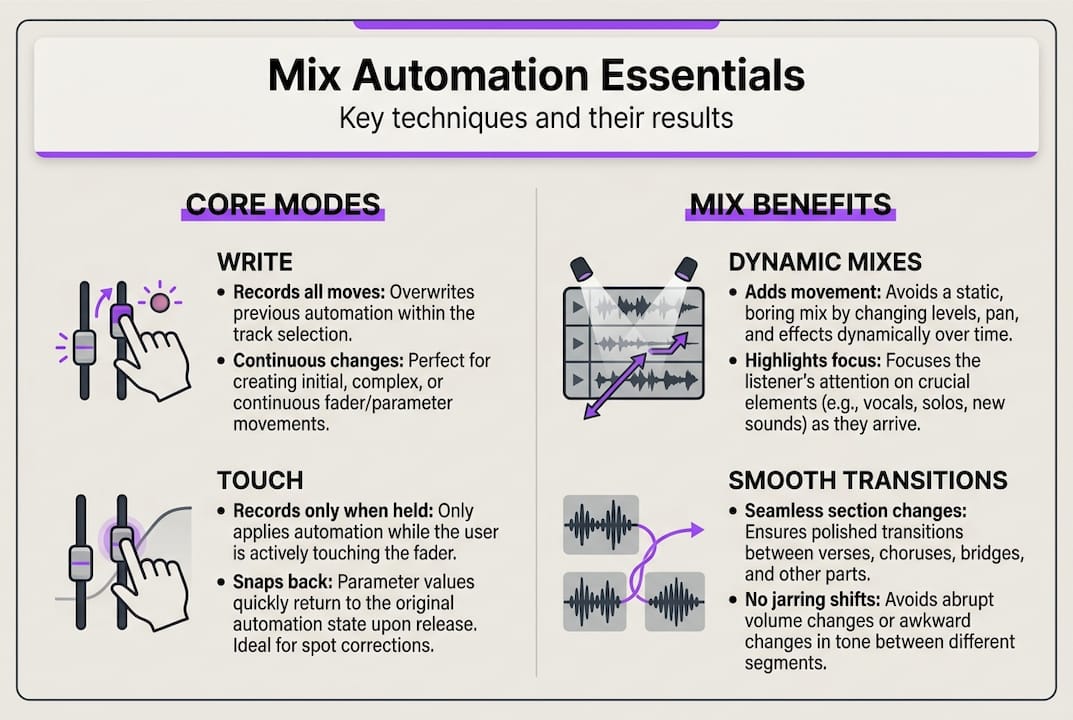
Every professional DAW offers multiple automation modes, and knowing which one to use in a given situation saves you from costly mistakes. Common automation modes across DAWs include Read, Write, Touch, and Latch, each of which behaves very differently.
| Mode | What it does | Best used for |
|---|---|---|
| Read | Plays back existing automation data | Reviewing and auditioning recorded moves |
| Write | Continuously overwrites all automation | Starting fresh on a track with no prior data |
| Touch | Records while you touch the control, then returns to the previous value | Refining specific moments without destroying surrounding data |
| Latch | Records and holds the last value when you release | Locking in a new level for a long section |
Here is a practical workflow for building automation in your sessions:
- Start in Read mode to hear your mix without accidentally overwriting anything.
- Switch to Write mode on a clean pass to lay down your first broad automation moves.
- Use Touch mode to refine specific moments, like a vocal phrase that needs a quick level nudge.
- Apply Latch mode when you want a new value to hold through an entire section without manually drawing it.
- Draw additional curves in your DAW’s automation lane for precise, repeatable moves that are hard to perform in real time.
Drawing automation curves manually gives you surgical control. Recording in real time feels more musical and often produces more natural fades and swells. The best engineers combine both approaches, recording broad strokes live and cleaning up details by hand.
Pro Tip: Before every session, check which automation mode each track is set to. Leaving a track in Write mode by accident is one of the fastest ways to erase hours of carefully crafted automation. Make it a habit to return all tracks to Read mode when you stop recording.
Automation in DAWs is a core skill that separates reactive mixers from intentional ones. Learn the modes cold, and you will never fear the automation system again.
Mix Enhancements: Real-World Automation Techniques
Now that you know how to record automation, let’s look at specific scenarios where producers unlock the true potential of their mixes with these tools.
The most impactful automation techniques are not exotic. They are disciplined applications of simple moves at exactly the right moment. Vocal riding, section contrast, filter sweeps, and send automation are the primary mechanics that separate polished mixes from rough ones.
Here is how each technique plays out in practice:
- Vocal riding: Instead of relying solely on a compressor to even out a vocal performance, use volume automation to manually level the loudest and quietest phrases. This gives you control that no compressor can replicate, because you are making musical decisions, not just dynamic ones.
- Section contrast via panning and EQ: Narrow the stereo width during the verse, then open it wide for the chorus. Automate a high-shelf boost on your mix bus to add air and excitement when the chorus hits. These moves make the listener feel the energy shift physically.
- Filter sweeps for builds: Automate a low-pass filter cutoff that rises gradually over a 4- or 8-bar build. When the filter fully opens at the drop, the release of tension is visceral.
- Reverb and delay throws: Automate your effects send to spike on the last syllable of a vocal phrase before a chorus. That brief wash of reverb creates a sense of space and anticipation.
One technique that many producers overlook is clip gain automation before your plugins. Adjusting the clip gain pre-compressor lets you control the dynamics feeding into the compressor naturally, so the compressor responds differently to each section. Combine that with post-plugin volume automation for complete, layered control over your signal.
| Technique | Where it works best | Result |
|---|---|---|
| Vocal riding | Lead vocals, rap verses | Consistent intelligibility |
| Panning automation | Guitars, synths, backing vocals | Stereo width contrast |
| Filter sweep | Synth pads, white noise risers | Tension and release |
| Reverb send spike | Vocal tails, snare hits | Depth and drama |
| Clip gain pre-compressor | Any heavily compressed source | Natural dynamic response |
Pro Tip: Use automation snapshots or instant mutes for abrupt changes, like cutting a reverb tail dead at the start of a new section or bypassing a filter at the drop. These sharp moves create contrast that gradual fades cannot.
You can explore vocal automation tips and techniques to create build-ups and put these ideas directly into your next session.
Advanced Strategies and Expert Pitfalls
Beyond common tactics, mastering automation means understanding subtle moves and what to avoid so your mix stands out for the right reasons.
One of the most powerful advanced techniques is automating gain before a compressor to push RMS levels without triggering peak limiting. Automating pre-compressor gain by 4-8 dB into a 4:1 ratio compressor yields only 1-2 dB of actual output increase, but the perceived loudness and density jumps are significant. This is how professional engineers make choruses hit harder without simply slamming the master fader.
AI-assisted automation tools are becoming more common in modern DAWs. They can analyze a vocal performance and suggest level rides, or detect transients and propose mute points. These tools are genuinely useful for speeding up rough passes. However, they should augment your judgment, not replace it. AI hears patterns; you hear meaning. Always refine machine-generated automation with your own ears and musical instincts.
Here are the most common automation pitfalls to avoid:
- Over-automating: Too many breakpoints create a nervous, jittery mix. Every move should be audible and intentional, not just technically present.
- Wrong mode selection: Accidentally leaving a track in Write mode silently erases existing automation. Always confirm your mode before hitting play.
- Ignoring mono compatibility: Panning automation that sounds wide in stereo can collapse oddly in mono. Check your mix in mono regularly, especially if you are automating stereo width.
- Automating without an emotional plan: Random automation moves add complexity without adding feeling. Map out your song’s emotional arc first, then automate to support it.
Dynamic control techniques like multiband processing pair naturally with automation, giving you even more precision over how energy moves through your mix. The key is always to ask: Does this automation move serve the song, or does it just show off a technique?
Statistic callout: Engineers who plan automation around emotional arcs report fewer revision cycles and stronger listener engagement scores in A/B testing scenarios. The data is perceptual, not numerical, but the pattern is consistent across professional workflows.
Measuring Success: How Automation Shapes Mix Impact
Having explored methods and pitfalls, it is critical to understand how you will know your automation makes a difference where it counts most: on the listener.
Here is the truth about measuring automation quality. There are no hard numbers. Mix quality relies on perceptual improvements, such as perceived loudness via RMS changes and listener engagement through contrast, not on meters or technical readouts. You cannot A/B test automation with a spectrum analyzer and declare a winner.
What you can do is train your ears to recognize these practical indicators:
- Energy lifts at key moments: Does the chorus feel louder and wider, even if the peak level is the same? That is automation working.
- Emotional flow: Does the mix guide the listener through the song without them consciously noticing the transitions? Invisible automation is the best automation.
- Attention retention: Play your mix for someone unfamiliar with the track. Do they stay engaged? Do they react physically to drops, builds, or breakdowns? Those reactions are your metrics.
- Section contrast: Is there a clear, felt difference between your verse and chorus? Between the breakdown and the drop? Automation creates that contrast.
“The goal of automation is not to be heard. It is to make the listener feel something without knowing why.”
Music production innovation continues to push the boundaries of what is possible in a DAW, but the measure of a great mix has not changed. It moves people. Automation is your primary tool for making that happen consistently, across every genre and every session.
Why Intentional Automation Separates Great Mixes From the Rest
After exploring the mechanics, let’s step back and look at what really makes automation an art, and how you can turn practical knowledge into creative impact.
Many engineers obsess over their plugin chains. They spend hours comparing compressors, chasing the perfect EQ curve, and debating analog emulation. That obsession is understandable because plugins are tangible and measurable. Automation feels more abstract. You cannot point to a specific plugin and say, “That’s what made the chorus hit.” But that invisibility is exactly what makes automation so powerful.
The engineers whose mixes you remember did not just process audio well; they also shaped the sound. They articulated moments. They made you feel the lift before you consciously heard it. They built tension through a filter sweep and released it at exactly the right bar. That is intentional automation, not a setting.
Here is the uncomfortable truth: most amateur mixes have too much automation, not too little. Producers discover the automation lane and start drawing curves on everything. Every snare hit gets a reverb throw. Every synth gets a panning sweep. The result is a mix that feels busy and exhausting rather than dynamic and exciting.
Professional engineers automate less, but with far more purpose. One emotional lift in the right place beats twenty arbitrary fades scattered across the timeline. The question to ask before every automation move is simple: What does this do for the listener right now? If the answer is unclear, the move probably does not belong there.
You will find real-world automation examples that illustrate this principle across genres. The through line is always the same: the best automation serves the song’s narrative, not the engineer’s desire to demonstrate technique. Master that mindset, and your mixes will feel alive in a way that no plugin can replicate.
Want to Master Automation in Your Mixes?
Ready to bring your mixes to life with smarter automation? It is time to see these strategies in action with tools built for producers like you.
SoundBridge gives you a professional environment designed to make automation feel natural, not intimidating. Whether you are riding vocals, sculpting section contrast, or building tension with filter sweeps, the workflow is intuitive and built for creative speed.

Explore professional automation tools inside SoundBridge, from dedicated automation lanes to real-time parameter recording that keeps up with your creative flow. Dive into the resource library for tutorials on vocal mix automation and advanced DAW-specific workflows. Whether you are on the free tier or a paid plan, SoundBridge puts the tools you need to automate with intention directly in your hands. Your next mix deserves to move people. Start there.
Frequently Asked Questions
How does automation improve a mix?
Automation allows precise, real-time parameter changes, giving mixes dynamic movement and emotional impact. Dynamic mixes through automation feel alive because every section is shaped with intention, not just set and forgotten.
What parameters should I automate first?
Start with volume and panning, then experiment with EQ, effects sends, and plugin parameters for more expressive control. Volume, panning, and EQ are the three pillars that give you the most immediate, audible impact with the least complexity.
What’s the difference between writing and drawing automation?
Writing automation records changes live in real time, while drawing lets you manually create and edit curves after the fact. Write mode overwrites existing data continuously, so use it carefully and always verify your mode before recording.
How do I know if my automation is working?
A mix with good automation keeps the listener engaged, highlights contrast between sections, and supports the track’s energy flow. Perceptual improvements like contrast and perceived loudness are your real benchmarks, not technical readouts.
Recommended
MASTER MUSIC PRODUCTION
Expert-led courses designed to take you from fundamentals to finished tracks.

HOUSEFrom bouncy bass and solid kicks, this course teaches you the most modern House music production techniques needed to succeed and stand out.

TRAPQuit sounding like generic Trap and produce something World with hints of the Far East. Create ethnic soundscapes to put your Trap ahead of the curve.

AMBIENTProduce relaxing, sophisticated psy-influenced ambient. Psychedelic and relaxing to listen to, create meditative soundscapes to put your listeners in Zen.