

Virtual Collaboration for Film Scoring: A Composer's Guide
Last Edited: Aug 12, 2026
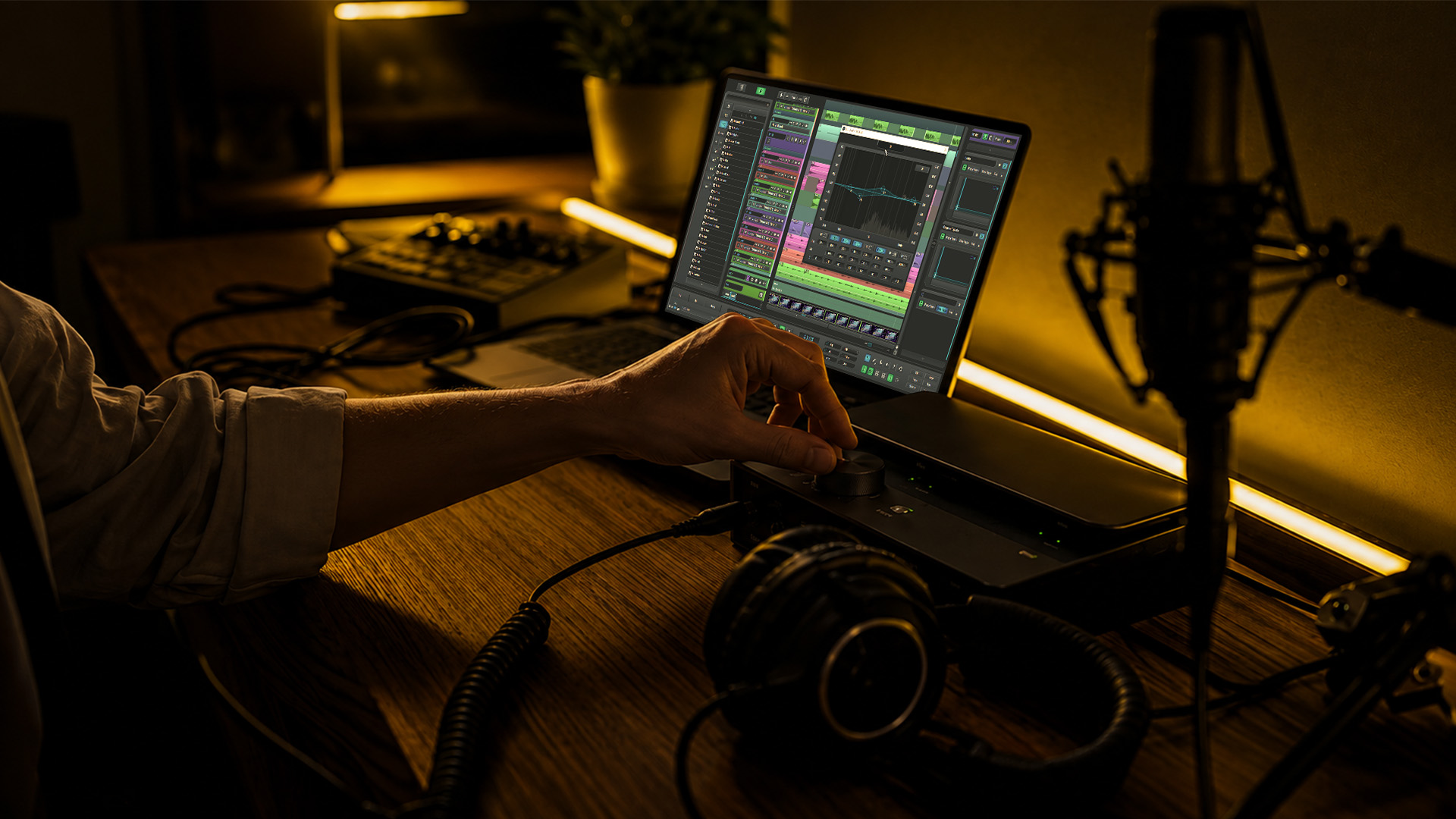
Run your remote scoring projects on a mixed workflow: scheduled synchronous spotting and review sessions paired with an asynchronous file-exchange cadence for revisions. Your core tech stack includes SoundBridge (DAW with integrated video and talkback), Audiomovers or Source-Connect (studio-quality audio streaming), Zoom (for admin and low-resolution check-ins), and a secure file sync solution via SFTP or access-controlled cloud storage. To start your first session, schedule a live spotting call with the director, enable DAW screen share with stereo audio output, and record the entire session for note extraction afterward. According to Stage32’s remote copost-session composer guide, the workflow today is almost entirely remote, and recording spotting sessions via DAW screen share is one of the highest-leverage habits you can build.
Virtual collaboration for film scoring is not simply a workaround for when travel is impractical. It is the standard operating model for professional composers today—almost all workflow is remote—and the composers who thrive in it treat it as a craft in its own right.
Key Takeaways
Effective virtual collaboration for film scoring requires explicit scope alignment in the first live session, studio-grade streaming for director monitoring, and a standardized file-delivery system that editors and mixers can rely on.
| Point | Details |
|---|---|
| Scope alignment first | Define deliverables and emotional targets verbally in the first spotting session, then confirm in writing to prevent revision cycles. |
| Mixed session model | Use synchronous sessions for spotting and sign-off; use asynchronous file exchange for iterative revisions and musician overdubs. |
| Studio-grade streaming | Use Audiomovers or Source-Connect for any session where director approval is the goal; Zoom is for admin only. |
| File naming discipline | Apply a consistent naming pattern (project code, cue ID, sample rate, bit depth, version) before the first delivery. |
| SoundBridge as your hub | SoundBridge integrates video, talkback, and zero-latency tracking into a single DAW, reducing failure points during live remote scoring days. |
What Breaks in Remote Scoring and What Research Says Actually Improves Outcomes
The friction in remote film scoring is rarely about audio quality. It is almost always about people and process.
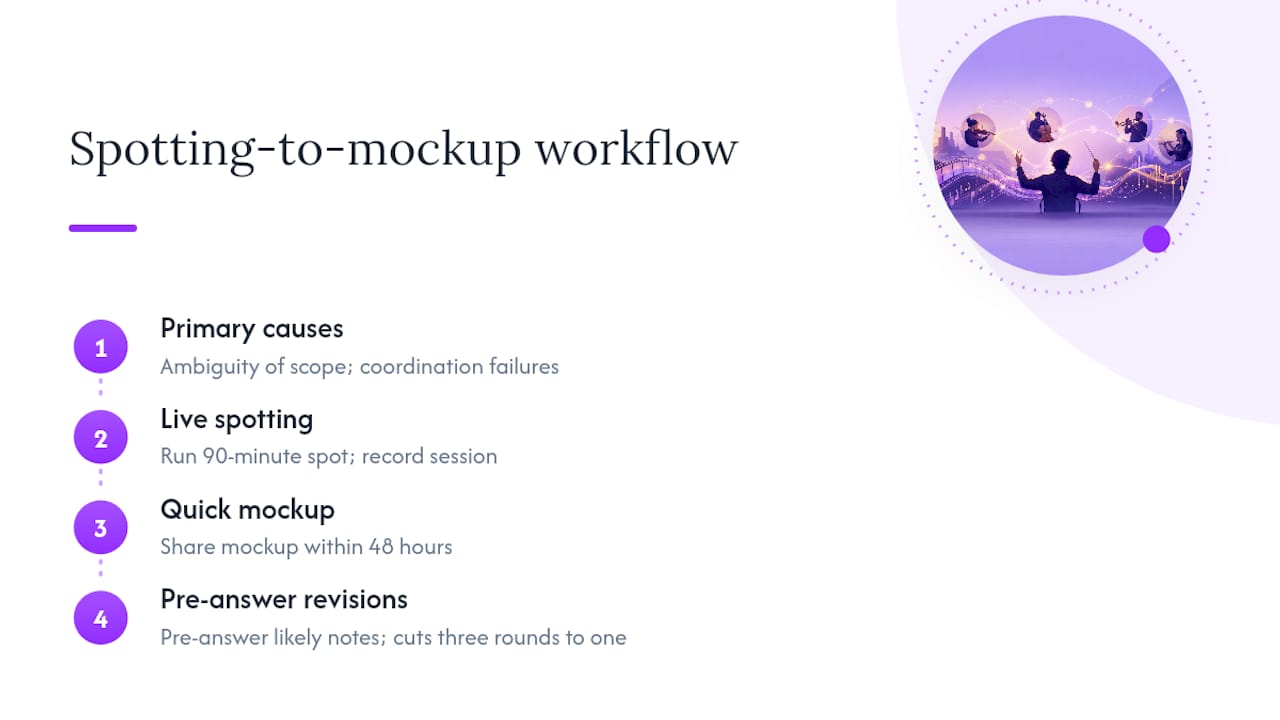
An ACM study on remote creative collaboration in film scoring found that ambiguity of scope and coordination failures between composers and filmmakers are the primary causes of project breakdown. Technical limitations ranked lower. The implication is direct: you can have a perfect streaming chain and still lose three revision cycles to a director who had a different emotional target in mind from the start.
What actually improves outcomes is a combination of explicit communication protocols and the right technical habits. A recorded live spotting session, for example, does two things at once: it forces the director to articulate intent in real time, and it gives you a timestamped reference to resolve disputes later. One common pattern among working composers is to run a 90-minute live spot, share a mockup within 48 hours, and use the recorded session to pre-answer the director’s likely revision notes before they are even sent. That single habit can cut a three-round revision cycle down to one.
The Stage32 guide for remote film and TV composers reinforces this: keeping the director-composer relationship active through proactive video meetings and DAW screenshare with stereo audio—along with recording spotting sessions and reviews—is essential for successful remote projects.
Which Session Type Should You Use for Each Stage of the Project?
The choice between synchronous and asynchronous work is not a preference. It is a decision with real production consequences.
Synchronous Sessions Work Best For:
- Initial spotting (aligning on emotional targets, cue placement, and temp track references)
- Live mockup playback where the director needs to react in real time
- Creative tradeoff discussions (tempo, instrumentation, tone)
- Remote orchestra oversight and conductor-to-director communication
- Final sign-off on locked cues before stems are delivered
Asynchronous Workflows Work Best For:
- Iterative mockup revisions between live sessions
- Alternate stem versions for editorial to cut against
- Musician overdubs and ADR-style remote recording passes
- Versioned deliveries for picture editors who review on their own schedule
- Note consolidation and spotting sheet updates
The practical decision rule: use synchronous sessions whenever alignment and sign-off are the goal. Use asynchronous file exchange whenever the work is detailed, iterative, or requires the other party to review at their own pace. Mixing the two deliberately, rather than defaulting to one or the other, is what keeps projects moving without burning everyone out on video calls.
What Tools Should You Use for a Remote Scoring Session?
Your tool choices determine whether a remote session feels like a real studio day or a frustrating workaround. Here is how the main categories fit together.
| Tool Category | Primary Use | Key Consideration |
|---|---|---|
| SoundBridge DAW | Integrated video playback, talkback, zero-latency tracking, screenshare | Native video support eliminates the need for a separate video player during spotting |
| Audiomovers Listento | Studio-quality stereo streaming to remote clients | Browser-based monitoring for directors; no software installation required on their end |
| Source-Connect | Broadcast-grade low-latency audio link for remote recording | Preferred for live musician sessions where round-trip latency must stay under 30ms |
| Zoom | Admin calls, low-resolution visual check-ins, session recording | Not suitable for critical listening; use only for communication, not audio monitoring |
| Freque | Synchronized video-plus-music review with annotation | Let's directors compare multiple cue options against the same scene and leave timestamped notes |
| SFTP / Encrypted Cloud | Secure file delivery of stems, sessions, and alternates | Access-controlled; never use public share links for pre-release material |
Audiomovers is the industry standard for streaming studio-quality audio to remote clients during live sessions, allowing directors to monitor from anywhere without attending in person. Source-Connect fills a different role: it is the preferred link for live musician sessions where broadcast-grade reliability and sub-30ms round-trip latency are non-negotiable.
SoundBridge sits at the center of this stack because it handles video playback, talkback routing, and DAW screensharing in a single environment. That means you are not switching between a video player, a separate talkback app, and your DAW during a live spotting call. SoundBridge’s virtual collaboration workflow is built specifically for this kind of integrated remote scoring session, and it supports audio processing up to 192kHz, which matters when you are delivering stems that will go through a professional mix chain.
Synchronized review platforms like Freque add a layer that a pure DAW screen share cannot: they let directors compare multiple music options against the same picture cut and annotate directly on the timeline. For projects with multiple stakeholders reviewing at different schedules, that is a significant time-saver.
Pro Tip: Route your talkback mic through a separate channel from your monitoring feed. If your talkback bleeds into the director’s monitoring stream via Audiomovers, they will hear themselves with a slight delay, which is disorienting and kills the session’s momentum.
Remote sessions and live streaming for scoring are now standard practice across professional studios. Composers and engineers use integrated streaming portals to deliver the same quality a client would expect from an in-room session.
Your Pre-Session Technical Checklist for Reliable Remote Days
Technical failures during live sessions are almost always preventable. Run through this list before every synchronous scoring day.
Network and Routing:
- Wired Ethernet connection only; disable Wi-Fi on the scoring machine during sessions
- Minimum 25 Mbps upstream for studio-quality audio streaming; 50 Mbps upstream recommended for simultaneous video and audio
- Enable Quality of Service on your router to prioritize audio traffic over other devices on the network
- Test your streaming path with a 1kHz tone and slate 30 minutes before the session starts
Studio Gear Minimums:
- Audio interface with stable clock source and support for your project’s sample rate (48kHz for most film work; 96kHz for premium deliveries)
- Low-latency monitors or closed-back headphones for reference during talkback
- Dedicated talkback microphone routed separately from your main monitoring chain
- Confirm your audio interface setup supports the bit depth and sample rate your DAW template requires
DAW and Session Prep:
- Load your DAW template with SMPTE timecode pre-configured and locked to picture
- Confirm the video file is the correct cut (check the version number with the editor before the session)
- Record a local backup of the session audio independently of your streaming chain
- Verify the director’s monitoring path: confirm they can hear your DAW output through Audiomovers or Source-Connect before the session begins.
Pro Tip: Send the director a one-page monitoring guide the day before the session. Include a screenshot of the Audiomovers browser player and a note to use headphones. Directors who show up to a spotting call on laptop speakers will not give you useful feedback on your low strings.
How to Manage Files, Stems, and Versions Without Losing Your Mind
File chaos is the silent killer of remote scoring projects. A clear naming convention, agreed on before the first delivery, prevents 90% of the confusion that slows down editors and mixers.
Naming pattern for cues and stems:
Use this structure as your baseline: [ProjectCode]_[CueID]_[Description]_[SampleRate]_[BitDepth]_[Version].wav
Example: NOVA_1M1_OpeningTitles_48k_24bit_v03.wav
For stems, add the stem type before the version: NOVA_1M1_OpeningTitles_STRINGS_48k_24bit_v03.wav
For alternates: NOVA_1M1_OpeningTitles_ALT_NoPerc_48k_24bit_v01.wav
Standard deliverables per cue:
- Full stereo mix (WAV, 48kHz/24-bit minimum for broadcast; higher sample rates and bit depths are sometimes used for premium deliveries)
- Stem set: strings, brass/woodwinds, percussion, electronics/synths, solo instruments
- Alternate versions (no melody, no percussion, underscore-only) where contracted
- Cue sheet with SMPTE in and out points, duration, and composer/publisher metadata
Version control rules:
Branch alternate versions with a clear suffix rather than overwriting. Mark sign-off by appending _APPROVED To the filename and moving it to a locked delivery folder. Never delete superseded versions during production. Keep them in a _ARCHIVE Subfolder so you can reconstruct any revision path if a director changes their mind after picture lock.
Remote audio editing practices reinforce the value of consistent file handoffs: editors working on tight post schedules cannot afford to hunt for the right stem version in an unorganized folder.
How to Run a Spotting or Review Session That Actually Produces Decisions
A spotting session without a clear protocol produces a long list of vague impressions and no actionable notes. Here is a step-by-step protocol that consistently delivers signed-off cue decisions.
- Pre-session prep (24 hours before): Load the locked picture cut into your DAW, set SMPTE markers at every scene transition, and prepare a spotting sheet template with columns for timecode in, cue ID, director instruction, composer action, priority (must-change vs. optional), and due date.
- Session open (first 5 minutes): Confirm the director can hear your DAW output clearly through their monitoring path. Play a 10-second reference clip and ask them to confirm audio quality before proceeding.
- Live run: Play the film in real time. Pause at each potential cue point and let the director speak first. Capture their language verbatim, not your interpretation of it. Record the entire session with permission.
- Note capture: Use your spotting sheet in real time. If a decision is unclear, ask the director to confirm: “So the note is: the theme enters at 01:14:22 and builds to the cut at 01:15:08. Is that right?” Verbal confirmation during the session is your first line of defense against scope creep.
- Post-session delivery (within 24 hours): Send the director a clean spotting sheet PDF with all confirmed cue decisions, priority of the ties, and due date. Attach the session recording link with timestamps mapped to each cue discussion.
- Convert to tasks: For each cue, create a versioned delivery task in your project management tool with the cue ID, due date, and the specific director note it addresses.
Recording your spotting sessions lets you focus entirely on the creative conversation in the room rather than splitting your attention between listening and writing. The timestamps in the recording serve as your audit trail if a revision dispute arises later.
What You Need to Prepare for a Remote Orchestra Session
Remote orchestra days have a higher cost of failure than any other session type. Preparation is not optional.
Readiness checklist before the session:
- Score and parts fully engraved, proofread, and distributed to players at least 48 hours in advance
- Session plan listing each cue, take structure, stripe passes, and estimated time per cue
- Microphone diagram shared with the recording engineer at the studio
- Confirmed streaming path: Audiomovers or Source-Connect link tested with the engineer the day before
Director and producer participation:
Directors can join remote orchestra sessions in two modes. Passive monitoring means they receive a stereo mix via Audiomovers and can communicate through a separate talkback channel. Active participation means they have a live talkback path to the conductor, which requires a dedicated engineer at the scoring stage to manage the routing so remote comments do not disrupt conductor cues.
Service providers running remote orchestra sessions recommend that directors receive a live feed and use a structured talkback window between takes rather than open-mic communication throughout the session.
Typical timeline and cost factors:
Industry producers delivering orchestral arrangements remotely report that professional-grade gear, combined with integrated streaming, yields production-ready results without requiring a traditional large-format scoring stage. The infrastructure gap between a well-equipped home studio and a commercial scoring stage has narrowed considerably.
How to Protect Your Work, Your Rights, and Your Client Relationships
Security and contracts are not afterthoughts in remote scoring. They are part of your professional infrastructure.
Core contract clauses every remote scoring agreement needs:
- Scope of work: list every deliverable format, stem configuration, and alternate version explicitly
- Sign-off criteria: define what “approved” means in writing (director email confirmation, signed delivery receipt)
- Payment schedule tied to milestones: spotting complete, mockup approved, stems delivered, final mix approved
- Remote session cancellation policy: specify notice period and kill fee for sessions canceled within 24 hours
Security practices:
- Use encrypted file transfer methods for all pre-release material to ensure security
- Limit sharing to named recipients; never use public or expiring-link-only sharing for stems or sessions
- Watermark pre-release mixes with an inaudible or audible identifier tied to the recipient
- Maintain local backups of all session data independently of any cloud sync; a corrupted cloud folder has ended more than one project
Practical NDA and IP checklist for your SOW or client email:
- Confirm NDA is signed before sharing any project files, even reference tracks
- State explicitly that source session files (DAW project, samples, plugin presets) remain with the composer until final payment is received
- Define the licensing window: when does the client’s right to use the music begin, and under what conditions?
- Specify source retention: how long will you keep the session files after delivery, and what happens if a re-edit is requested six months later?
Pro Tip: Add a one-line “remote session clause” to every contract: “Sessions canceled with less than 24 hours’ notice are billed at 50% of the session rate.” It takes 10 seconds to add and saves an awkward conversation every time a director reschedules at the last minute.
What the Research Says and Which Practices Give You the Fastest Results
The ACM study on remote creative collaboration in film scoring makes one finding impossible to ignore: scope ambiguity in asynchronous workflows is a hidden multiplier of revision cycles. Composers who define deliverables and emotional targets in the first live session consistently complete projects faster than those who let scope emerge through file exchange.
Research finding: Interpersonal and coordination issues, not technical limitations, are the primary cause of friction in remote film-scoring projects. Explicit communication protocols and early scope alignment are the highest-leverage interventions.
The Stage32 remote composer resource adds a practical layer: proactive video meetings and DAW screenshares with stereo audio keep the director-composer screenshares active in ways that email and file exchange alone cannot.
High-impact practices with immediate results:
- Record every live spotting session and distribute timestamped notes within 24 hours
- Standardize your file naming and stem structure before the first delivery
- Test your full streaming path (audio + video + talkback) 30 minutes before every synchronous session
- Define scope and deliverables verbally in the first spotting session, then confirm in writing
- Use studio-grade streaming (Audiomovers or Source-Connect) for any session where the director’s approval is the goal
SoundBridge’s expert collaboration tips cover setup checks and streaming recommendations that map directly to these practices, making them a practical starting point for composers building their remote workflow from scratch.
The Case for Treating Remote Scoring as a First-Class Discipline
Most composers approach remote work as a compromise. They replicate what they would do in a room, minus the room, and wonder why it feels harder. The composers who get the most out of virtual collaboration treat it as its own discipline, with its own best practices, its own distinct sign, and its own communication rhythms.
Research backs this up. study did not find that remote scoring is inherently inferior to in-person work. It found that remote scoring without explicit coordination protocols is inferior. With them, the gap closes. A well-run remote spotting session, recorded and followed by a 48-hour mockup turnaround, can actually be faster than an in-person session that produces vague notes and a follow-up email chain.
There is also a creative argument. When you are not managing the physical logistics of a studio day, you have more mental bandwidth for the music itself. The best remote workflows create space for that. They handle the coordination overhead so you can focus on the score.
The one thing remote work cannot replace is the spontaneous creative spark that happens when two people are physically in the same room, reacting to the same moment. That is real. But it is also rare. Most film scoring work is iterative, deliberate, and file-based. Remote workflows are built for exactly that.
SoundBridge Makes Your Remote Scoring Workflow Production-Ready
SoundBridge is the DAW built for exactly the workflow this guide describes. Its integrated video playback means you run spotting sessions directly inside your scoring environment, with no external video player to sync. Its zero-latency remote tracking lets you record live musicians and overdubs without the round-trip delay that breaks takes. And its virtual collaboration features handle talkback routing and DAW screenshare in one place, so your session setup takes minutes, not an hour of routing patches.

Where other DAWs require you to bolt together a video player, a streaming tool, and a separate talkback solution, SoundBridge integrates them. That means fewer failure points on live days and a cleaner handoff to your streaming layer (Audiomovers or Source-Connect) when studio-quality monitoring is the priority. Audio processing up to 192kHz means your stems arrive at the mix stage with nothing left on the table. SoundBridge is available on Mac and Windows with free and paid tiers. Start with the SoundBridge DAW and explore the remote collaboration resources to build your first production-ready remote scoring session.
Sources
- Working Remotely As A Film & TV Composer: Everything You Need To Know
- Supporting remote creative collaboration in film scoring
- Scoring Services | Remote, Striped, & Shared Sessions
- Scoring & Composition Brisbane & Melbourne | James North Productions
- Cinematic Scoring services and remote orchestra sessions
- freque - freque
- Remote sessions and live streaming for scoring — Fraser Bowles
Recommended
MASTER MUSIC PRODUCTION
Expert-led courses designed to take you from fundamentals to finished tracks.

HOUSEFrom bouncy bass and solid kicks, this course teaches you the most modern House music production techniques needed to succeed and stand out.

TRAPQuit sounding like generic Trap and produce something World with hints of the Far East. Create ethnic soundscapes to put your Trap ahead of the curve.

AMBIENTProduce relaxing, sophisticated psy-influenced ambient. Psychedelic and relaxing to listen to, create meditative soundscapes to put your listeners in Zen.