

Virtual Session Security and Encryption for Remote DAW Work
Last Edited: Aug 26, 2026
Four protections separate a safe remote session from a leaked stem folder: encrypted media channels wherever your platform offers them, per-recipient invite links secured with two-factor authentication, a hard separation between live streaming and file transfer, and a wired connection with QoS. Get those four right, and you’ve closed off the paths that cause almost every real-world leak.
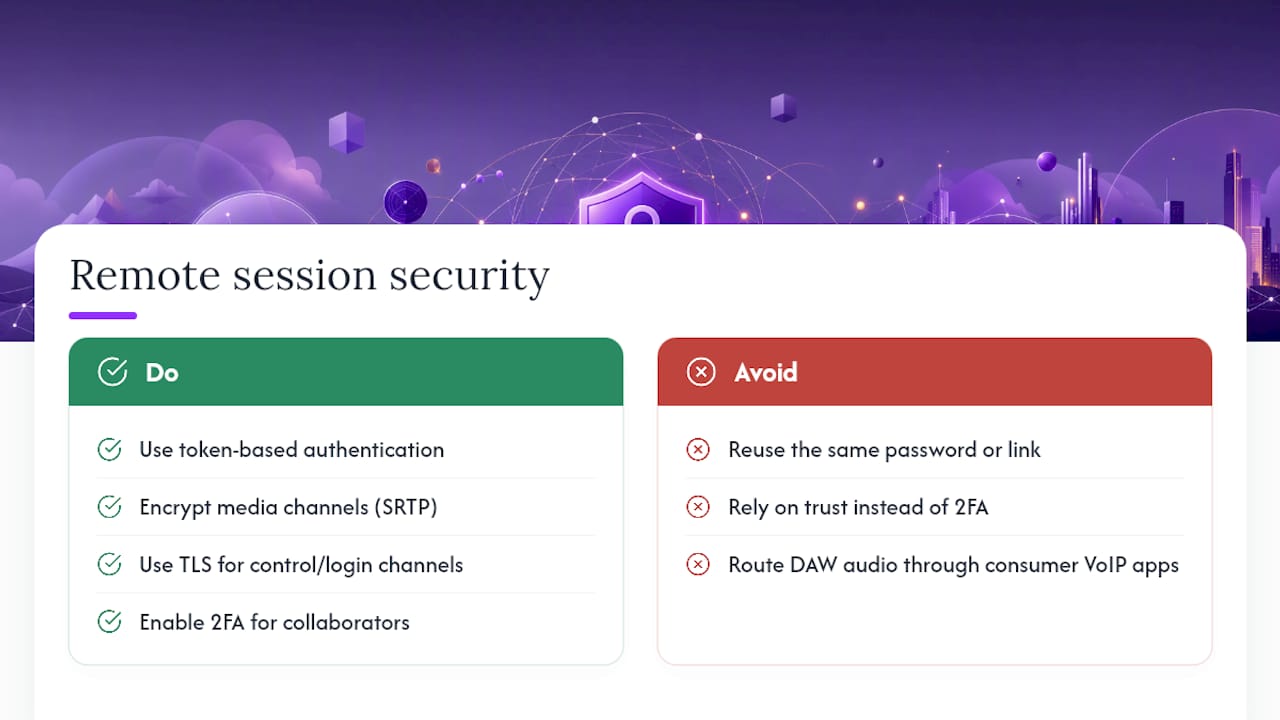
- Turn on end-to-end or media-channel encryption whenever your collaboration tool supports it.
- Send unique invite links per collaborator, require 2FA, and never reuse passwords across sessions.
- Keep the real-time performance stream separate from your asset transfers, and store stems in encrypted storage rather than on a shared drive.
- Use Ethernet, not Wi-Fi, and set your router's QoS to prioritize your audio traffic.
Pro Tip: Treat these four as a pre-session ritual, not a one-time setup. Run through them before every remote tracking date, the same way you check gain staging before hitting record.
Key Takeaways
Secure remote DAW collaboration depends on separating live streaming from file transfer, encrypting both channels appropriately, and enforcing per-recipient access controls with 2FA.
| Point | Details |
|---|---|
| Separate streaming from transfer | Keep real-time performance audio on its own channel, distinct from encrypted asset delivery. |
| Encrypt at rest and in transit | Use AES-256 or zero-knowledge storage for stems, and encrypted media channels for live streams. |
| Lock down access per person | Issue unique invite links, mandate 2FA, and revoke access the moment a session ends. |
| Harden the network layer | Run wired Ethernet, enable router QoS, and disable UPnP and default admin credentials. |
| Choose collaboration-built tools | SoundBridge pairs studio-accurate sync and token-based session authentication with talkback kept separate from your audio feed. |
What Actually Threatens a Remote Session
Most leaks don’t come from cracked encryption. They come from a shared link forwarded to the wrong person, a password sent in cleartext, or a router still running its factory settings. Human error and casual link-sharing account for the majority of exposure in remote production work, and no cipher fixes a link pasted into the wrong group chat.
Consumer VoIP apps make things worse for audio specifically. Zoom, FaceTime, and similar tools compress your signal to prioritize speech intelligibility over fidelity, and they were never built to handle a mix bus. Routing your DAW output through one of these apps also exposes your IP address to every participant unless the platform actively masks it.
- Unsecured home routers with UPnP enabled and default admin credentials remain a common entry point.
- Laptops without full-disk encryption turn a stolen or borrowed machine into an open project folder.
- Mixing live performance streaming and file transfer on one channel means a single point of failure exposes both.
Encrypting Live Audio Streams and Keeping Fidelity Intact
Live tracking sessions need two things that seem to conflict: real fidelity and real protection. You get both by choosing tools built for audio collaboration rather than borrowing a video conferencing app. Platforms like Sessionwire demonstrate the trade-off well by streaming uncompressed, high-quality stereo audio while handling file transfers via peer-to-peer encryption, rather than parking your stems on someone else’s cloud server.
A hybrid architecture works best for securely scaling collaboration. Media travels over UDP with SRTP for low-latency delivery, while session control data (mutes, plugin states, transport commands) rides on a separate, reliable channel. This DAW collaboration framework documented in the Journal of the Audio Engineering Society shows that splitting media and control data this way avoids the bandwidth bottlenecks that plague single-channel setups.
Session entry should use short-lived tokens rather than a link that can be forwarded indefinitely. Token- or JWT-based authentication lets you automatically expire access when a session ends, closing a door that a static password link leaves open forever.
Here’s the operational sequence that keeps a remote tracking date clean:
- Confirm sample rate and buffer size with every collaborator before pressing record.
- Agree on a dedicated talkback channel so direction doesn’t compete with the performance feed.
- Run a latency test with a clap or count-off before the first real take.
- Require every collaborator to record locally at full resolution as a fallback, syncing the high-quality file afterward rather than trusting the streamed take as final.
Pro Tip: Real-time streaming during a session is for direction and feel, not the master take. Treat it like a phone call you’re producing over, and let the local recording do the heavy lifting.
Securing Project Files, Stems, and Multitracks
Unreleased material requires more secure handling than a Google Drive link. Feedtracks frames the right approach as three layers working together: encryption to protect the content itself, access control to limit who can reach it, and watermarking to trace it if it leaks anyway.
For anything unreleased, use a zero-knowledge cloud service or pre-encrypt the archive yourself with AES-256 tools like 7-Zip or Keka before it ever touches generic storage. If you’re stuck using standard cloud storage, encrypt the file first and send the password through a separate channel entirely, never in the same email or message as the download link.
- Set per-recipient passwords and link expirations so access doesn’t outlive the session.
- Use view-only or download-limited sharing for mixes still under review.
- For high-risk recipients (labels, sync licensors, unfamiliar collaborators), issue uniquely watermarked files. Forensic watermarking survives format conversion and lets you trace exactly which copy leaked.
- Send passwords out of band, never bundled with the share link itself.
This layered approach matters more as a project moves closer to release, when the cost of a leak climbs fastest. A rough demo leaking is embarrassing. A mastered single leaking two weeks before drop day is a lost campaign.
Access Control and Account Habits That Stop Most Breaches
Encryption protects data in transit. It does nothing if you hand out one shared password to six collaborators and never revoke it. Access discipline is where most studios actually fail, and it’s the cheapest fix on this entire list.
- Issue a unique invite to each collaborator for every session, and revoke it the moment the session wraps up.
- Make two-factor authentication mandatory for every account with project access, favoring an app-based authenticator over SMS codes, which are more exposed to interception.
- Set role-based permissions so only the session host can push changes to the project or grant plugin control to a guest.
- Keep a simple log of who was invited, when they were invited, and when access was revoked. It takes two minutes and turns “who had access when this leaked” from a guessing game into a question with an answer.
Per-recipient links and unique tokens give you something a shared password never can: a clean audit trail. If one collaborator’s link shows up somewhere it shouldn’t, you know exactly which access point to shut down, rather than rotating credentials for the whole session.
Pro Tip: Build revocation into your workflow the same way you build in a save routine. The session isn’t over until access is closed.
Network and Workstation Hardening for Stable, Safe Sessions
Your studio’s network is the weakest link in a chain that otherwise looks solid on paper. Fix it once, and most of your session headaches disappear along with the security gaps.
- Run wired Ethernet on every machine involved in the session; fall back to 5GHz Wi-Fi only if there’s no alternative, since it carries less congestion than 2.4GHz.
- Enable QoS on your router to prioritize audio traffic, and disable UPnP and remote administration, both of which are common entry points for opportunistic attacks.
- Change default router admin credentials on day one. It sounds obvious, and it’s still how a shocking number of home networks get compromised.
- Turn on full-disk encryption, FileVault on Mac or BitLocker on Windows, keep your OS and plugins up to date, and run a reputable antivirus.
- Keep a tested backup connection, a 4G or 5G hotspot, ready to go if your primary line drops mid-session.
The team at Audome makes a similar case for treating network hygiene as part of the creative setup, not an afterthought bolted on after something breaks. Run through this list before every session the way you’d check your headphone mix.
How SoundBridge Applies These Protections in Practice
SoundBridge builds several of these safeguards directly into its remote collaboration workflow. Studio-accurate synchronization keeps every collaborator’s clock locked together, session entry runs on token-based authentication rather than open links, and integrated talkback keeps direction on its own channel, away from your performance audio. High sample-rate support up to 192kHz means you’re not trading fidelity for security either.
A practical session looks like this: pre-encrypt and share your reference stems, send a per-session invite to each collaborator, confirm sample rate and buffer settings, then start the synced session and verify talkback before rolling.
- Require 2FA on every collaborator account before granting access.
- Confirm each collaborator is recording locally as a fallback.
- Verify that full-disk encryption is active on any machine that touches the project.
For a more detailed walkthrough of the setup steps, SoundBridge’s remote collaboration guide covers the pre-session checklist in more detail.
The habit that actually prevents leaks
The leaks that hurt most rarely involve a broken cipher. A shared studio password, reused across three collaborators and one intern, is a more common cause of an early leak than anything happening at the protocol level. One password change after that intern left would have closed the gap; instead, the fallout took weeks to trace.
Start with a one-week plan: enable 2FA on every account today, switch to per-recipient links this week, and turn on disk encryption before your next session. Run a test session with a trusted collaborator first, then build a habit of revoking and rotating access the moment a project wraps. Discipline beats cleverness here, every time.
Try SoundBridge for Your Next Secure Remote Session
SoundBridge already handles a good share of this checklist for you. Studio-accurate sync keeps timing tight across all collaborators, token-based session authentication replaces open invite links, and integrated talkback keeps your direction channel separate from the performance feed, exactly as this guide recommends.

If you’ve been tracking remote sessions through a patchwork of consumer apps and shared cloud folders, this is a more direct route to the same result: secure by default, without you having to bolt on a dozen separate tools. Start with the free tier and set your account up right from day one: enable 2FA immediately, configure your first session tokens, and invite a collaborator to run a test session before your next real tracking date. If you’re still comparing DAWs, the guide to what a modern DAW should offer covers the fundamentals side by side.
Frequently Asked Questions
Does virtual session security and encryption slow down my remote tracking workflow? Not when it’s set up correctly. Token-based authentication and encrypted media channels add negligible latency compared to the delay you’d get from routing audio through a consumer VoIP app in the first place.
Is SRTP enough encryption for a live DAW streaming session? SRTP protects your media stream in transit, but pair it with TLS on your control and login channels for full coverage. The combination is what platforms mean by saying a session is end-to-end protected.
Do I need 2FA if my collaborators are people I trust? Yes. Trust doesn’t protect against a phished password or a reused credential from a data breach elsewhere. 2FA is the cheapest control on this entire list relative to what it prevents.
Can I encrypt files without paying for specialized software? Yes. Free tools like 7-Zip support AES-256 encryption for archives, which covers most home studio needs for pre-release stems and multitracks.
What’s the single biggest mistake home studios make with virtual meeting security for tracking sessions? Reusing the same password or link across multiple collaborators and sessions. It prevents you from tracing a leak back to its source, which defeats the entire purpose of access control.
Sources
For technical grounding, the JAES paper on DAW collaboration architecture details the media and control-data separation referenced throughout this guide. Feedtracks and Sessionwire offer practical notes on high-fidelity streaming and encrypted transfer. For implementation specifics, see SoundBridge’s remote collaboration overview.
- Sessionwire product page
Recommended
MASTER MUSIC PRODUCTION
Expert-led courses designed to take you from fundamentals to finished tracks.

HOUSEFrom bouncy bass and solid kicks, this course teaches you the most modern House music production techniques needed to succeed and stand out.

TRAPQuit sounding like generic Trap and produce something World with hints of the Far East. Create ethnic soundscapes to put your Trap ahead of the curve.

AMBIENTProduce relaxing, sophisticated psy-influenced ambient. Psychedelic and relaxing to listen to, create meditative soundscapes to put your listeners in Zen.