

Virtual Studio Networking for Musicians & Audio Engineers
Last Edited: Aug 3, 2026
Virtual studio networking is the practice of streaming DAW-to-DAW audio in real time over broadband, allowing musicians and engineers to record directly into each other's sessions with low latency and full-fidelity sound. The single best first move: run a 10-minute loopback test with your collaborator before any paid session. If your round-trip latency stays under 30ms and you hear no dropouts, you're ready to track.
Three features you need before anything else:
- Zero-latency tracking with hardware-monitored input so performers hear themselves without delay
- Integrated talkback and video so you can communicate cues without switching apps
- Sample-rate alignment across both DAWs (44.1kHz, 48kHz, or 96kHz — both ends must match)
What Does Virtual Studio Networking Mean for DAW-Based Collaboration?
Virtual studio networking means two or more DAWs share a synchronized transport and exchange audio streams in real time over the internet. It's not a video call with a shared screen. It's a live session where a vocalist in Austin records directly into a producer's session in Brooklyn, with both parties hearing the same playback, plugins, and mix.
Three practical shapes this takes:
- Live tracking. A performer plays or sings while the engineer arms a track and captures the stream. Latency compensation happens inside the DAW, not in the performer's headphones.
Overdub session. The remote performer receives a rough mix, records a pass, and the DAW captures it as a new stem. No file transfer needed mid-session.
Remote mix review. The mixer shares stems in real time while the artist listens and gives notes via integrated talkback. HD audio streams, not a bounced MP3, are the baseline expectation here.
What Core Technologies Make Low-Latency Remote Recording Possible?
The protocol layer is where most remote sessions succeed or fail. Audio-over-IP transport (RTP/RTCP variants) handles packetized audio with timestamps, enabling jitter buffers to reconstruct timing. Proprietary DAW streaming protocols go further by embedding session metadata like timecode, markers, and tempo maps alongside the audio.
Key components:
- Clock sync: Word Clock over hardware (AES3 or BNC) is the gold standard for multi-room setups. For internet sessions, the DAW's software sample-rate matching handles drift, but both ends must lock to the same nominal rate.
- Codec choice: Uncompressed PCM at 24-bit/96kHz is ideal when bandwidth allows. Lossless compression (FLAC-based transport) works well on constrained connections without audible quality loss. Avoid lossy codecs for tracking; reserve them for monitoring-only streams.
- Talkback and video: Integrated talkback over the same session connection keeps communication in sync with playback. A separate video call (Zoom or Microsoft Teams) serves as a fallback but introduces latency in visual cues.
- Timecode and markers: Embedding SMPTE timecode in the stream lets both DAWs stay frame-accurate, which matters for film scoring and any session with picture lock.
A cloud-based DAW approach that handles these layers natively removes the need to wire together separate tools.
What Are the Minimum Network and Hardware Requirements?
| Session type | Min. bandwidth (up/down) | Latency target | Packet loss tolerance | Buffer size |
|---|---|---|---|---|
| Live tracking | 10 Mbps / 10 Mbps | Under 30ms RTT | — | 64–128 samples |
| Overdub | 5 Mbps / 5 Mbps | Under 30ms round-trip latency | Under 0.5% | 128–256 samples |
| Mix review | 3 Mbps / 3 Mbps | — | Under 1% | 256–512 samples |
Your audio interface needs stable ASIO (Windows) or CoreAudio (Mac) drivers. Round-trip latency at 64 samples / 48kHz should stay under 5ms locally. Anything higher points to a driver or USB bandwidth issue before the internet is even involved.
Audio interfaces with dedicated DSP for monitoring (rather than relying on the CPU) give you the most headroom during a live remote session.
Testing checklist before every session:
- Run a sample-rate match check: confirm both DAWs report the same rate in their audio preferences.
- Run a buffer round-trip test: record a click, play it back, measure the offset.
- Run a traceroute to your collaborator's IP to spot high-latency hops.
- Simulate load by streaming audio for 5 minutes while running your usual plugin count, and check for dropouts.
Pro Tip: Set your interface clock source to "Internal" on the sending end and "External" or "Word Clock" on the receiving end when using hardware sync. Mismatched clock sources are the most common cause of mysterious crackles that appear only during remote sessions.
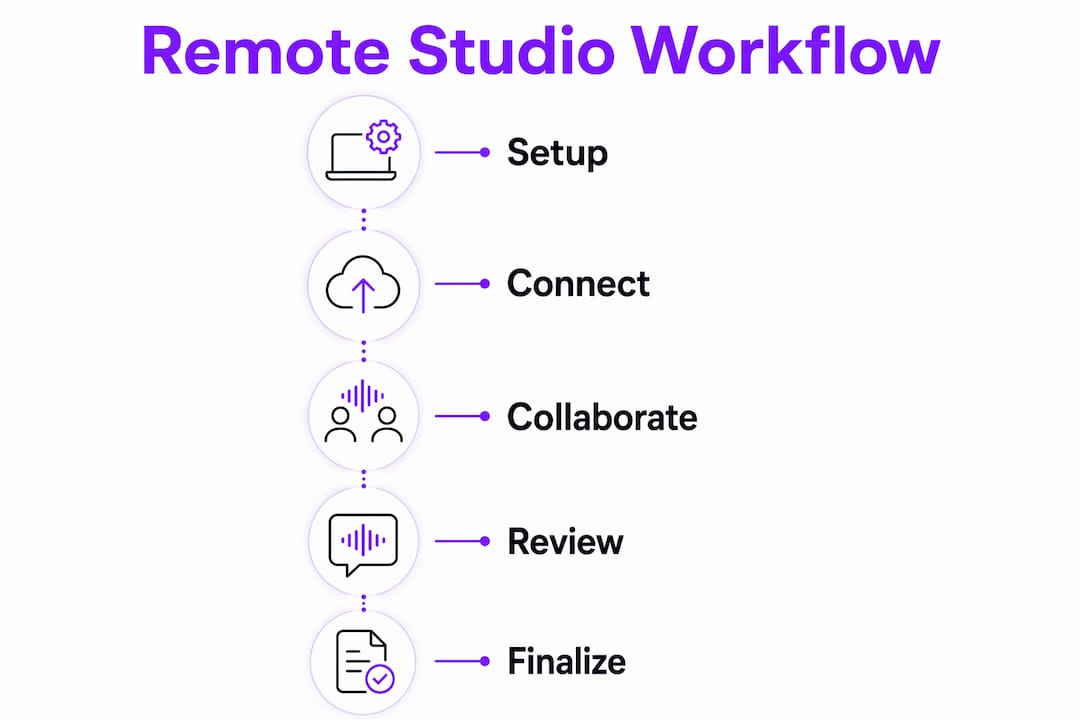
How Do Standardized Workflows Keep Remote Productions on Track?
The admin layer is where remote sessions quietly fall apart. Pre-signing a master contractor agreement and an NDA once per contributor, rather than per project, speeds up invoicing and casting across all subsequent productions. You collect time entries in a centralized hub, auto-generate invoices, and skip the back-and-forth entirely.
Structure your communications by production, not by person. A private channel per project, with sub-channels for tracking, mixing, and editing, keeps information from bleeding between sessions when freelancers jump between productions. Consolidated ops platforms that surface docs, Kanban boards, and installers in one place can cut onboarding time from hours to minutes for new contributors.
Automating routine tasks, like compiling hours and generating review links, frees your team to stay in creative mode. Tools like Spire Studio add automatic transcripts and pinned feedback so nothing gets lost between sessions. For musicians managing video alongside audio, music video automation tools can handle the repetitive delivery tasks that eat into production time.
How Do You Set Up a Remote DAW Session for Live Tracking?
- Pre-session check: Confirm sample rate, buffer size, and driver version on both ends. Set file paths and enable a local backup recording on the performer's machine.
- Network prep: Run the four-point test above. Enable talkback in your DAW and confirm that the performer can hear your voice before any music plays.
- DAW routing: Create a dedicated input track for the remote performer's stream. Arm it for recording. Route monitoring to a cue mix, not the main mix, so latency compensation doesn't affect what the performer hears.
- Session start: Roll the transport, call out the take number over talkback, and capture. Label every take immediately with performer name, date, and take number.
- Backup plan: The performer simultaneously records a local direct take. After the session, an automated file transfer (via Dropbox, Google Drive, or a DAW-native cloud sync) serves as a safety net for the local file.
Pro Tip: Always record a "scratch" reference take at the start of every remote session. It confirms sync, gives you a latency-compensation reference point, and catches interface issues before the real takes begin.
For a deeper look at remote audio editing after the session, SoundBridge's practical guide covers file-exchange patterns and stem organization.
How Do You Fix Dropouts, Sync Drift, and CPU Overload Fast?
Dropouts: Check local CPU load first. If it's above 70%, freeze or flatten tracks before the next take. Then check the buffer size — increase it by one step (e.g., from 128 to 256 samples). If dropouts persist, run a packet-loss test; anything above 0.5% during tracking requires a network fix, not a DAW fix.
Sync drift: Restart the transport and re-sync sample rates on both ends. If drift returns within minutes, one interface is running at a slightly different actual rate than its nominal setting. Freeze/flatten all tracks, bounce a reference click, and compare timestamps to measure the drift rate.
CPU overload: Switch to a lower-fidelity monitoring stream (stereo mix instead of multi-stem) for the session, then re-record locally and upload the high-quality file afterward. Log every error with a timestamp and share it with your collaborator so both sides can cross-reference what happened.
What Security and IP Practices Protect Your Remote Sessions?
A solid legal foundation for remote work covers five areas:
- NDA + master agreement: Signed once per contributor, covering all projects under that relationship. Specify ownership of raw stems, final mixes, and any AI-generated elements.
- Usage and split provisions: Define who owns what percentage of the master and publishing before the session, not after.
- Secure file transfer: Use encrypted links (SFTP, end-to-end encrypted cloud storage) for raw stems. Never send unmastered audio over unencrypted email.
- Access controls: Shared hubs should use role-based permissions. Engineers get read/write access; clients get review-only access.
- Sync-license considerations: If the session produces music for picture, the master agreement should explicitly address sync rights, including territory and term.
Jurisdiction matters more than most producers realize. A master agreement that specifies governing law (e.g., "disputes resolved under the laws of New York") removes ambiguity when collaborators are in different states or countries.
Why Does an Integrated DAW Simplify Virtual Studio Networking?
Stitching together a separate streaming tool, a video call app, a plugin controller, and a DAW creates four potential failure points per session. An integrated DAW collapses those into a single unit. SoundBridge handles zero-latency remote tracking, integrated talkback and video, and bidirectional plugin and hardware control within a single-session environment. Both ends share session state, so there's no "my session vs. your session" sync problem.
SoundBridge supports sample rates up to 192kHz, runs on both Mac and Windows, and offers free and paid tiers. For engineers evaluating DAW-native approaches versus browser-based tools, the DAW-native vs. browser comparison on the SoundBridge site clearly lays out the technical trade-offs.
What Legal Issues Are Specific to Virtual Studio Collaboration?
Jurisdiction is the sleeper issue in remote sessions. When a producer in California and a vocalist in Tennessee co-write a song, two state contract laws potentially apply. A master agreement that designates a single governing state eliminates that ambiguity. For international collaborations, specifying U.S. federal copyright law as the governing framework for ownership is standard practice.
Work-for-hire status is another common trap. A session musician hired remotely is not automatically a work-for-hire contributor under U.S. copyright law unless the agreement explicitly states that it is and the work falls within one of the nine statutory categories. Get it in writing before the session, not after.
What Do Real Remote Studio Projects Look Like in Practice?
Remote production workflows have matured well beyond simple file-sharing, and distributed animation studios like AgoraStudio have built fully remote creative teams using pre-signed agreements, centralized Slack workspaces with per-client channels, and automated invoicing, demonstrating that the admin architecture matters as much as the technical one.
In audio specifically, the Virtual Production Studio Network (VPSN) has documented how production literacy — the ability to work fluently across tools and roles — determines remote session success more than any single piece of software. Engineers who understand routing, sync, and file management at a conceptual level adapt to new tools in minutes. Those who only know one DAW's menu structure struggle when anything changes.
How Should You Configure Your Audio Interface for Virtual Sessions?
The interface is your session's weakest link if it's misconfigured. Use a dedicated USB or Thunderbolt interface rather than a built-in sound card. Set the sample rate in the interface's control panel first, then match it in the DAW — not the other way around. Mismatched settings at the driver level cause a subtle pitch drift that takes 20 minutes to diagnose.
For tracking sessions, set your buffer to 64 or 128 samples and monitor via the interface's direct monitoring path rather than through the DAW. This gives the performer a latency-free headphone mix while the DAW captures the stream with full latency compensation applied. For mix review sessions, you can open the buffer to 256 or 512 samples and route monitoring through the DAW for more accurate plugin processing.
Advanced Sync Techniques for Multi-User Sessions
Two-person sessions are manageable. Three or more get complicated fast. The cleanest approach for multi-user setups is a hub-and-spoke model: one DAW acts as the session master and distributes the transport clock. All other DAWs sync to it via MIDI Clock or MTC (MIDI Time Code), with the master also sending a reference audio click on a dedicated channel.
For sessions with picture, SMPTE LTC (Linear Timecode) distributed over an audio channel keeps every DAW frame-accurate regardless of network jitter. If your DAW supports ReWire-style sub-session routing, use it to keep instrument stems isolated from the master mix bus, which makes stem handoff at the end of the session much cleaner.
How Do You Maintain Audio Quality Across Different Connection Types?
Fiber and cable connections handle uncompressed 24-bit/96kHz streams without issue. On a shared Wi-Fi connection, prioritize your machine with quality of service settings on your router, or better yet, plug in via Ethernet. Wi-Fi introduces variable jitter that a buffer can compensate for, but it also adds latency you can't fully recover from.
On a mobile hotspot or a slower DSL connection, switch to a lossless compressed stream and increase your buffer to 256 samples. The difference in quality is inaudible; the difference in reliability is significant. Always have the performer record a local dry take as a backup regardless of connection type. That file is your insurance policy.
What Software Options Exist for Virtual Studio Networking?
The market breaks into three broad categories, each with real trade-offs.
DAW-native platforms (like SoundBridge) integrate streaming, session state, talkback, and plugin control into a single environment. Setup is faster, sync is tighter, and there's no third-party dependency. The trade-off is that both collaborators need to use the same DAW.
Dedicated audio-over-IP tools (standalone streaming apps that route into any DAW via virtual audio drivers) offer DAW flexibility but require careful driver configuration and introduce a potential failure point. They work well for engineers who need to collaborate across different DAWs.
Browser-based collaboration platforms lower the barrier to entry but sacrifice sample rate, buffer control, and plugin integration. They're fine for songwriting demos and reference listening, but not for professional tracking or mixing.
For anyone serious about remote music collaboration, the DAW-native route delivers the most reliable results with the least configuration overhead.
Key Takeaways
Virtual studio networking works best when your DAW, network, and admin workflows are all configured before the session starts, not during it.
| Point | Details |
|---|---|
| Run a pre-session loopback test | Confirm round-trip latency under 30ms and zero dropouts before any paid session begins. |
| Match sample rates on both ends | Both DAWs must report the same nominal rate; mismatches cause pitch drift and crackles. |
| Sign one master agreement per contributor. | A pre-signed NDA and master agreement that cover all projects eliminate per-session contract friction. |
| Use a hub-and-spoke clock model for multi-user sessions | Designate one DAW as transport master and sync all others via MTC or a reference click. |
| SoundBridge as a DAW-native option | SoundBridge combines zero-latency tracking, integrated talkback/video, and 192kHz support on a single platform. |
The Shift Remote Networking Actually Demands
Most conversations about remote studio work focus on tools. The harder shift is operational and cultural. When you move a session out of a physical room, you lose the ambient communication that keeps everyone synchronized: the nod, the hand signal, the shared sense of where the energy is going. You have to replace all of that deliberately, with structure.
What the VPSN's emphasis on production literacy gets right is that tool fluency is not the bottleneck. Engineers who understand why a session works, not just how to click through a specific DAW's menus, adapt to any platform in an afternoon. The producers who struggle with remote work are usually the ones who've never had to articulate their workflow out loud. Remote work forces that articulation. That's uncomfortable at first, and genuinely useful afterward.
The admin layer is the same story. Pre-signed agreements and centralized task hubs aren't bureaucracy. They're the scaffolding that lets creative work happen without friction. Build the structure once, and every session after that runs faster.
SoundBridge: Start Your First Remote Session Today
SoundBridge gives you zero-latency remote tracking, integrated talkback and video, and bidirectional plugin control in a single DAW on both Mac and Windows. You don't need to wire together four separate tools to run a professional remote session. You need a single platform that handles the entire signal chain.

Download SoundBridge for free, run your first loopback test in under 10 minutes, and hear the difference a DAW-native approach makes. The quick-start guide walks you through session setup from scratch. If you're still deciding whether a DAW-native workflow fits your setup, the 2026 DAW guide covers everything you need to make that call with confidence.
Useful Sources and Further Reading
- Virtual Studio Networks (VSN) — Practitioner resource on DAW-to-DAW streaming, real-time recording, and session testing protocols.
- Agora.Studio via Animation World Network — Concrete admin templates for remote creative teams: pre-signed NDAs, centralized hubs, and automated invoicing.
- VPSN — About — The case for production literacy over tool lock-in; essential reading for engineers building adaptable remote workflows.
- Spire Studio — AI-powered media management with automatic transcripts and pinned feedback; useful for distributed audio review.
- StudiOps — Consolidated ops platform (docs, Kanban, installers) that cuts onboarding time for new session contributors.
- SoundBridge: remote collaboration guide — Practical leadership and organization tips for distributed music production teams.
- SoundBridge: remote audio editing — File-exchange patterns and stem organization for post-session editing workflows.
Recommended
MASTER MUSIC PRODUCTION
Expert-led courses designed to take you from fundamentals to finished tracks.
HOUSEFrom bouncy bass and solid kicks, this course teaches you the most modern House music production techniques needed to succeed and stand out.
TRAPQuit sounding like generic Trap and produce something World with hints of the Far East. Create ethnic soundscapes to put your Trap ahead of the curve.
AMBIENTProduce relaxing, sophisticated psy-influenced ambient. Psychedelic and relaxing to listen to, create meditative soundscapes to put your listeners in Zen.