

Program Change Automation: Switch Patches on Cue
Last Edited: Oct 26, 2026
Program change automation means placing MIDI Program Change events on a timeline so a synth, sampler, or plugin jumps to a new patch at exactly the bar you choose. You draw or record the event, point it at the right MIDI channel, and the instrument answers. Simple in theory. In practice, the details (Bank Select order, timing, how your instrument counts from zero or one) decide whether it works on the first try or leaves you staring at a silent track.
This guide walks you through the whole thing: what a Program Change really is, how to place one, how to fix the usual failures, and when to skip raw events for something smarter.
TL;DR
- A Program Change is a single MIDI message that selects a patch. Many instruments also need Bank Select (CC0 and CC32) sent first, in order.
- Place the events a little before the musical moment you want, on the same MIDI channel as the instrument, and leave a gap after them.
- If a patch doesn't change, check these three things in order: channel, bank messages, and zero-based versus one-based numbering.
- For big orchestral or film templates, articulation-switching tools are often easier to read and maintain than hand-placed Program Change events.
- MIDI 2.0 folds Bank and Program into one message, while staying backward compatible with MIDI 1.0.
What a Program Change Actually Does
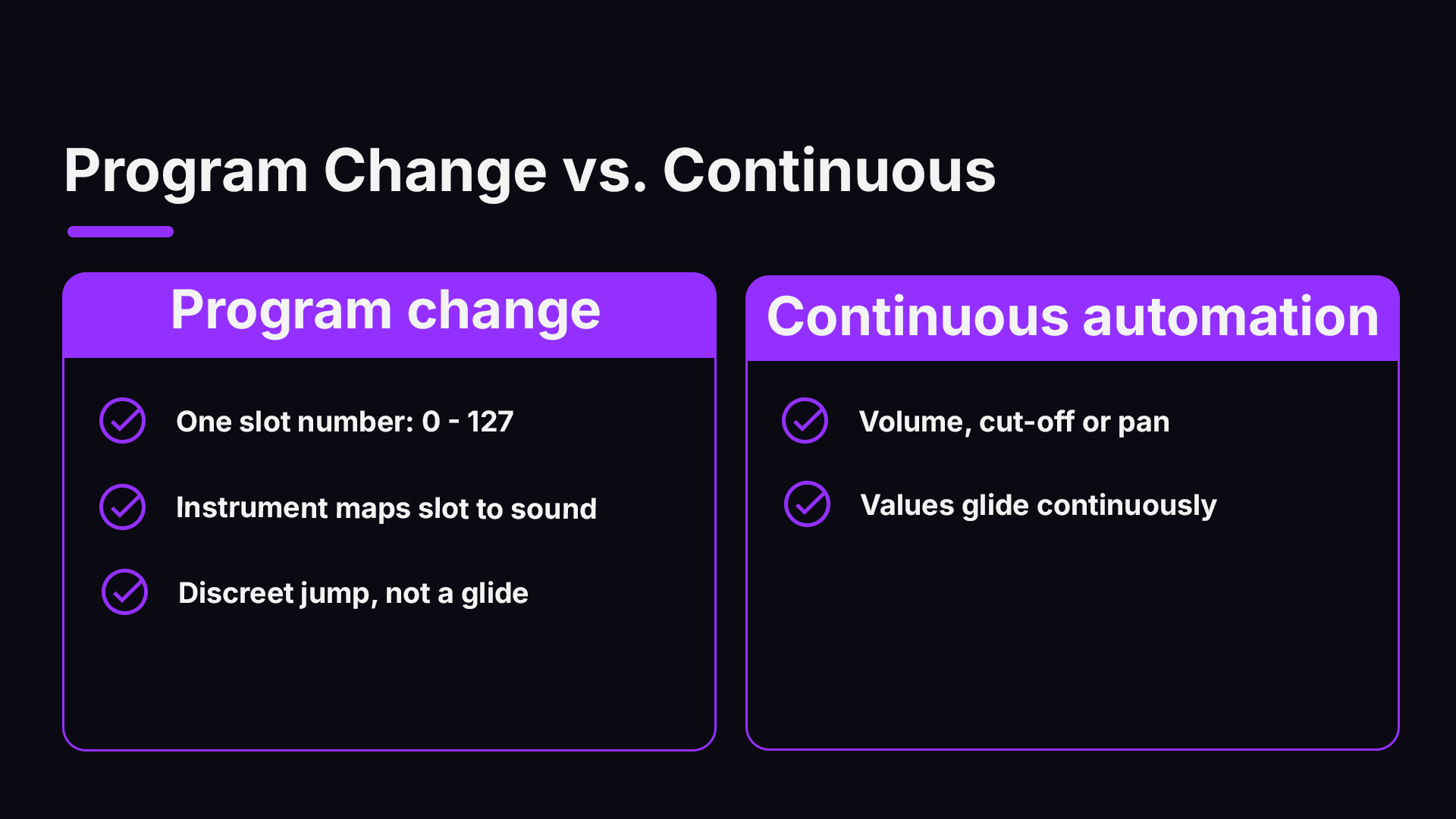
A MIDI Program Change message carries one number from 0 to 127. The receiving instrument maps that number to a stored sound: a patch, preset, or program. That is all. The message does not know what the sound is. It only says “go to slot 12.”
That is why the same event can call up a warm pad on one synth and a snare on another. You are not automating sound. You are automating a pointer, and the instrument decides what the pointer means.
Program Change is different from the automation you may draw for volume, filter cutoff, or pan. Those are continuous values that glide. A Program Change is a discrete jump. Nothing is smooth about it, which is exactly why it is useful for switching and exactly why it can sound abrupt if you place it carelessly.
Why Bank Select Comes Into It
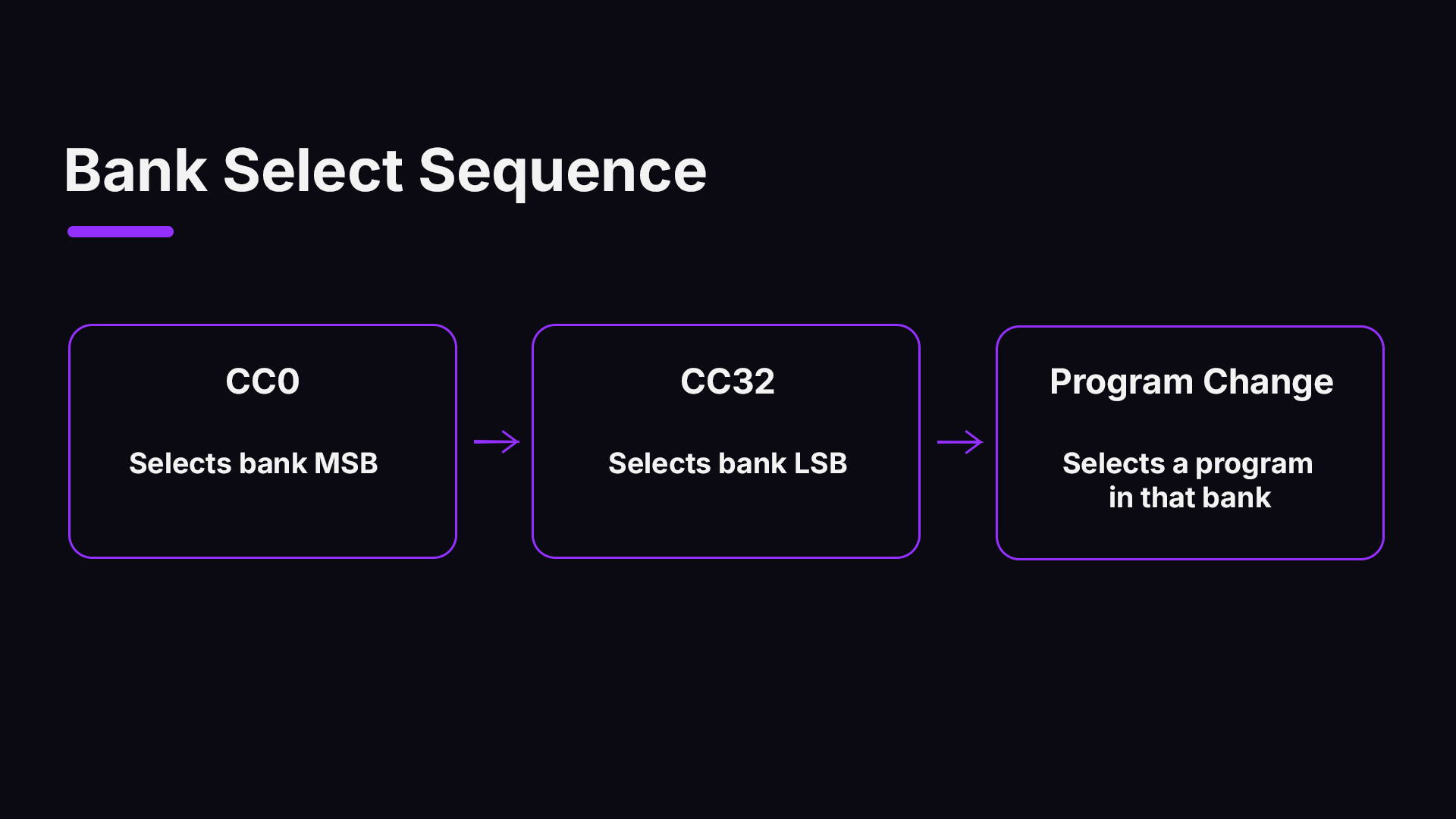
The original MIDI spec could reach 128 programs. Modern instruments hold far more, so they added Bank Select. A true program change that also selects a bank is made up of three MIDI messages: CC0 for the bank MSB, CC32 for the bank LSB, then the Program Change itself.
Order matters. Many devices expect the bank messages immediately before the Program Change, and a Program Change sent alone will only pick a slot inside whichever bank is currently active. Testing on a hardware controller showed the two CCs arriving serially, CC0 then CC32, so build your event list the same way: CC0, CC32, Program Change, top to bottom.
The manual is your referee. An instrument's interpretation of bank values is left to its maker, so look for a MIDI implementation chart or bank map in the documentation before you guess.
Where Program Change Automation Earns Its Keep
You do not need it every day. When you do need it, nothing else does the job as cleanly.
- Hardware synths in a hybrid setup. You want a hardware lead to switch from a pluck to a pad at the chorus, with no hands on the panel.
- Multi-timbral plugins. One instance, several parts, and the channel 3 part changes sound in the bridge.
- Guitar and amp-modeling plugins. Clean tone for the verse, high-gain for the solo, switched by a preset event.
- Live rigs and backing tracks. Your sequence changes the patches on stage so you can focus on playing.
- Session recall. A track carries its own patch instructions, so the instrument is ready when the project opens.
How to Place a Program Change Event, Step by Step
Menus differ between DAWs, but the logic is the same everywhere. Here is a workflow that holds up on any MIDI-capable host.
- Route the track to the instrument. Make sure the MIDI track outputs to the right device or plugin, and note the MIDI channel. A Program Change on channel 1 does nothing to a part listening on channel 2.
- Find the right patch number. Check the instrument’s patch list or MIDI chart. Write down bank MSB, bank LSB, and program number.
- Open the MIDI event list or a controller lane. Raw events live in an event list. Some hosts also show Program Change as a lane or marker in the piano roll.
- Insert the three events in order. CC0, then CC32, then Program Change, each with its value. If your device ignores banks, the Program Change alone is enough.
- Position them early. Put the events a bit before the note that needs the new sound. Instruments take a moment to load or recall a patch, and some need a few more milliseconds than you might expect.
- Leave the gap clear. Do not put a note on the exact tick of the Program Change. Notes that land during a patch switch can be dropped, cut, or played with the old sound.
- Test from before the change. Start playback a few bars ahead and listen. Then start from the middle of the song and check that the right patch is still active.
That last test matters more than it looks. If you jump straight to the chorus and the patch never changed, your project depends on the Program Change having played earlier. Many people fix this by adding a patch-set event at the very start of the track as well, so the sound is correct wherever playback begins.
A Worked Example
Say your hardware synth has a bank map where bank 1 holds pads, and bank 2 holds leads, and you want a lead at bar 17.
| Position | Event | Value |
|---|---|---|
| Bar 16, beat 4 | CC0 (Bank MSB) | 0 |
| Bar 16, beat 4, a few ticks later | CC32 (Bank LSB) | 2 |
| Bar 16, beat 4, a few ticks later | Program Change | 5 |
| Bar 17, beat 1 | First lead note | any |
The event times here are only an illustration. What matters is the pattern: bank messages first, program last, all a hair before the first note. If your synth lists programs starting at 1, the number you type may need to be one less than the front-panel number. More on that below.
When the Patch Will Not Change
This is the number one reason people search this topic. Work down the list.
1. Check the channel
Program Change is channel-specific. If the instrument is set to receive on channel 4 and your event is on channel 1, nothing happens. Many multi-timbral instruments also have an “omni” mode that changes this behavior, so check which one you are in.
2. Re-check the order of the three events
If the bank is wrong or the order is flipped, the device may switch to a different patch or ignore the message. If your patch doesn't change, recheck the order of these events in the event list and compare it against the device’s bank map mode.
3. Watch the numbering
Some manufacturers label programs 1 to 128 on screen, while the wire value runs 0 to 127. If you land one patch off, that is your culprit. Fix it by subtracting one from the displayed number.
4. Confirm the device is listening
Some synths have a switch that turns off Program Change reception, or a mode where the front panel overrides incoming messages. If it is hardware, look in the MIDI menu. If it is a plugin, check whether it needs to be set to respond to host MIDI.
5. Give it time
A plugin that loads large samples on a patch change can take a moment. If notes land too soon, you will hear the old sound, silence, or a glitch. Move the event earlier, or add a short rest.
6. Look at your host’s limits
Not every DAW exposes Program Change as a normal automation lane. Some show bank controllers as lanes but expect you to enter Program Change as a MIDI event or marker instead. That is why so many forum threads ask the same question: where did the lane go? If you don't see one, check the event list for a patch-change insert or a dedicated external-instrument device.
Do It by Feel, Not Just by Grid
Automating patch changes is powerful, and it is also a quick path to music that sounds like a machine wrote it. Practitioners caution that blind programmatic switching can make performances feel mechanical, and they suggest recording expressive controller data such as mod wheel or breath control in real time to add nuance.
So use Program Change for what it does well, switching sounds at structural points, and use continuous controllers for the feel inside the phrase. A pad that changes at a section boundary sounds intentional. A sustained string line that changes patch halfway through a phrase usually does not.
Program Change Versus Articulation Tools
Once you build a large template with dozens of orchestral instruments, raw events get hard to read. You open a track and see a pile of CCs and program numbers with no idea which means “staccato” and which means “tremolo.”
That is why many film composers lean on articulation-management tools. Composer Sean Kim describes an approach where you define articulation slots that can trigger key switches, program changes, or CC values, all hidden behind a clean visual interface. The Program Change still happens under the hood. You never have to manage it by hand.
There is a reliability argument too. For complex orchestral templates, relying only on simple Program Change automation can lead to timing artifacts or stuck notes, and many practitioners prefer articulation maps or dedicated articulation tracks for readability and control over legato transitions.
| Situation | Best fit |
|---|---|
| Hardware synth switching sounds between sections | Raw Program Change (with Bank Select if needed) |
| Amp or effect plugin preset changes in a song | Program Change or preset automation |
| Orchestral template with many articulations | Articulation maps or keyswitches |
| Live backing track controlling a rig | Program Change at the start of each song section |
| Sound that must evolve smoothly | Continuous controllers, not Program Change |
If you write for picture, our guides on film score orchestration and composing film music show how these choices fit a full scoring workflow. For strings specifically, see realistic orchestral strings.
Film Work Adds a Twist
When picture edits move a cue, your patch changes have to move with it. Moving MIDI events is rarely enough: practitioners often adjust tempo maps by hand and sometimes re-track CC data for timbre and volume when a new tempo changes the feel. A Program Change sitting in the wrong place after a conform can switch a patch in the middle of a held note. After any conform, audit your events.
What MIDI 2.0 Changes
The old three-message routine is a relic of the 1980s. As of February 2026, MIDI 2.0 unifies Program Change and Bank Select into a single message and remains backward compatible with MIDI 1.0 through translation. Your older gear will keep working.
The same MIDI Association update describes Profiles as a kind of behavioral contract: devices can negotiate requirements automatically, so you spend less time hunting for bank and program values. Until all your gear speaks MIDI 2.0, though, you will still be thinking in CC0, CC32 and Program Change. Learn the classic method once, and it will serve you for years.
Our Perspective
We see Program Change automation as a bridge between two worlds: the precise, numbered world of MIDI hardware and the fluid, creative world of making music. Most frustration comes from treating it as a puzzle of numbers. We think it is better treated as a habit.
Here is the habit. Name your patches in the track name. Put your bank and program events in one consistent spot, just ahead of the section they serve. Test from the middle of the song, every time. Do those three things and you will rarely lose an hour to a patch that refuses to change.
We built SoundBridge around the idea that your tools should get out of the way. Bi-directional control of plugins and hardware, robust MIDI and audio routing, and a customizable workflow all aim at the same goal: you spend your time on the music, not on the plumbing. When you work with a collaborator in another city, you want routing and patch calls to behave the same way on both ends, which is why we care about remote sessions that stay in sync.
The best setup is the one you stop thinking about. Get the events right once, save the template, and go write something great.
— Wake
Build the Habit in a DAW Made for Hands-on Routing
If you want a place to practice this workflow, SoundBridge is a DAW for Mac and Windows with MIDI and audio routing and built-in effects. Download SoundBridge and try it on your next project.
Working with a partner who is not in the room? Our guide to remote collaboration in SoundBridge covers how sessions stay in sync. Optional STUN/TURN access for collaboration is $4.99 per month.
Related Skills That Make Your Automation Better
Program Change is one piece of a bigger timing picture. A few neighbors worth learning:
- Sync. If a hardware sequencer or drum machine shares your session, patch changes only land correctly when everything runs on the same clock. Read MIDI clock sync: the complete guide to perfect timing.
- Expressive controllers. To shape what a patch does after it loads, add pitch-bend automation to your melodies.
- Pattern tools. An arpeggiator pairs nicely with patch switches: change the sound at the chorus, and the pattern follows.
- Instrument families. Browse keyboard instruments and string instruments to decide which patches you will want to switch between.
- The basics. New to all this? Start with what a digital audio workstation is.
A Quick Pre-Flight Checklist
Before you hit record on a patch-switching session, run through this list:
- Is the track routed to the right device or plugin, on the right channel?
- Do you have the bank MSB, LSB, and program number written down from the manual?
- Are the events in order: CC0, CC32, Program Change?
- Are they placed ahead of the first note that needs the new sound?
- Did you add a starting patch-set at the top of the track so any start point sounds right?
- Have you tested from mid-song and from the top?
- If the tempo or picture changed, did you re-check the events?
FAQ
Is Program Change the same as preset automation?
Not quite. Program Change is a MIDI message that selects a patch by number, and it works across hardware and plugins that listen for it. Preset automation is a host-side feature that may use a plugin’s own parameters instead. The result looks similar, but the method differs.
Why do I need Bank Select at all?
Program Change alone reaches only 128 slots. Instruments with larger libraries use CC0 and CC32 to choose the bank first. The bank messages and the program message together make three events, sent in that order.
Why does my patch change by one number too high or low?
Many devices display programs from 1 to 128 while the MIDI value runs from 0 to 127. If you are off by one, subtract or add one to the value you enter. Check the manual’s chart to confirm which way your instrument counts.
Should I use Program Change for orchestral articulations?
You can, but it gets hard to manage in a large template. Many composers prefer articulation maps or keyswitches, which can still send program changes behind a clean interface. Use raw events when you want direct, transparent control over a single device.
Sources
- The State of MIDI 2.0: High-Resolution Performance and the Rise of Profiles (MIDI Association, Feb 2026)
- MIDI Bank Select and Program Change Guide
- Bank select: two CCs at once? (Electra One forum)
- Orchestral Mockups That Sound Real: The Complete Template Building Tutorial (Sean Kim)
- Exploring the Virtual Orchestra through Blood, Sweat, and Tears (Zenodo)
- Cue Conforming: What does it involve? (VI-Control)
Recommended
MASTER MUSIC PRODUCTION
Expert-led courses designed to take you from fundamentals to finished tracks.

HOUSEFrom bouncy bass and solid kicks, this course teaches you the most modern House music production techniques needed to succeed and stand out.

TRAPQuit sounding like generic Trap and produce something World with hints of the Far East. Create ethnic soundscapes to put your Trap ahead of the curve.

AMBIENTProduce relaxing, sophisticated psy-influenced ambient. Psychedelic and relaxing to listen to, create meditative soundscapes to put your listeners in Zen.